Monkey Battle: Swing Shot
Actualizada
Versión actual
1.0.16
Ofrecida por

Con toda tu pasión para jugar Monkey Battle: Swing Shot, no se supone que tus manos estén limitadas en una pequeña pantalla de tu teléfono. Juega como un profesional y obtén el control total de tu juego con el teclado y el mouse. MEmu le ofrece todas las cosas que espera. Descargar y jugar Monkey Battle: Swing Shot en PC. Juega todo el tiempo que quieras, sin más limitaciones de batería, datos móviles y llamadas molestas. El nuevo MEmu 9 es la mejor opción para jugar Monkey Battle: Swing Shot en PC. Preparado con nuestra experiencia, el exquisito sistema de keymapping preestablecido convierte a Monkey Battle: Swing Shot en un verdadero juego de PC. Codificado con nuestra absorción, el administrador de instancias múltiples hace posible jugar 2 o más cuentas en el mismo dispositivo. Y lo más importante, nuestro exclusivo motor de emulación puede liberar todo el potencial de su PC, hacer que todo sea más fluido. Nos importa no solo cómo juegas, sino también todo el proceso de disfrutar de la felicidad de los juegos.
Más detalles
Descargar Monkey Battle: Swing Shot en PC con MEmu Android Emulador. Disfruta jugando en la pentalla grande. ¡Una guerra de supervivencia desesperada pero divertidísima entre animales colgados de los árboles!
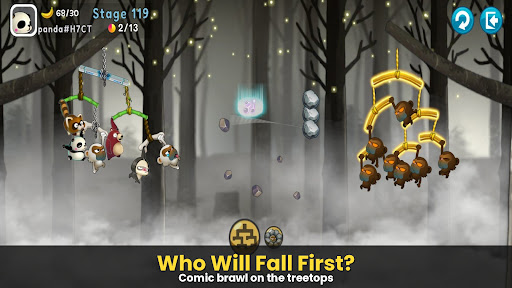
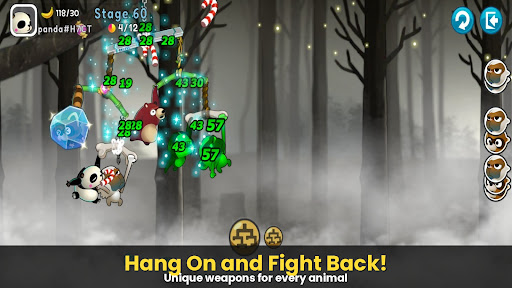
¡Una guerra de supervivencia desesperada pero divertidísima entre animales colgados de los árboles!
[Monkey Battle: Swing Shot], el juego de acción con tirachinas que arrasó en todo el mundo, está de vuelta.
¡Súbete a las ramas y lanza el tiro perfecto usando el poder de la gravedad!
▣ Características del juego
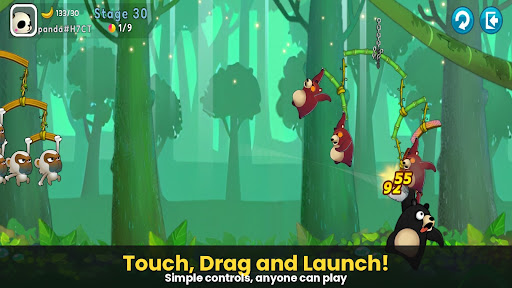
■ ¡Toca, tira y dispara! Acción con físicas realistas
Domina el sofisticado motor de físicas con controles sencillos de tocar y arrastrar.
Calcula el balanceo de las ramas, tanto las tuyas como las del enemigo, para golpear el punto débil.
¡Disfruta de las reacciones realistas y cómicas de los animales al recibir el impacto!
■ Escuadrón estratégico: Crea tu propio ejército animal
Colecciona personajes con habilidades únicas, como monos, mapaches, osos pardos, perezosos y pandas.
¡La victoria depende de tu estrategia! La posición y composición de tu escuadrón son clave.
Mejora tus ramas para construir una defensa impenetrable que resista cualquier ataque.
■ Acción sin parar en varios modos
Modo Arcade: Supera diversos terrenos y desafíos para poner a prueba tus límites en este campo de entrenamiento.
Modo Objetos: Batallas clásicas con tirachinas donde el uso estratégico de objetos puede cambiar el rumbo de la partida.
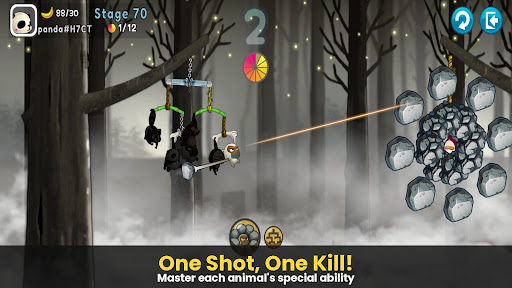
Modo Francotirador: La precisión es clave: ¡no falles ni un solo disparo!
Modo Loco: Experimenta velocidad extrema y una potencia de fuego abrumadora.
***
Aviso de permisos de acceso a la aplicación
Solicitamos permisos de acceso para poder ofrecerte el siguiente servicio al usar la aplicación.
[Obligatorio]
Ninguno
[Opcional]
· NOTIFICACIONES: Este permiso es necesario para recibir información de la aplicación del juego y notificaciones push publicitarias.
[Cómo eliminar permisos]
Puedes restablecer o eliminar los permisos después de otorgarlos, como se muestra a continuación.
1. Android 6.0 o superior: Ajustes > Aplicaciones > Seleccionar aplicación > Permisos > Permitir o eliminar permisos
2. Android 6.0 o inferior: Actualiza el sistema operativo para eliminar permisos o desinstala la aplicación
※ Si usas Android 6.0 o inferior, te recomendamos actualizar a la versión 6.0 o superior, ya que no puedes modificar los permisos opcionales individualmente.
***
• Idiomas compatibles: coreano, inglés, chino simplificado, chino tradicional, francés, alemán
• Dispositivos no compatibles: iPhone 3GS, iPod Touch de 3.ª/4.ª generación, iPad 1
• Esta aplicación es gratuita y ofrece compras dentro de la aplicación. La compra de artículos de pago puede generar cargos adicionales y la cancelación del pago podría no estar disponible según el tipo de artículo. • Las condiciones de uso de este juego (rescisión del contrato, cancelación del pago, etc.) pueden consultarse en el juego o en los Términos de Servicio del juego móvil de Com2uS (disponibles en el sitio web: https://terms.withhive.com/terms/policy/view/M121/T1).
• Para consultas relacionadas con el juego, póngase en contacto con el Servicio de Atención al Cliente de Com2uS (https://customer.withhive.com/com2us).
Más detalles

1. Descargar el instalador de MEmu y finalice la instalación

2. Iniciar MEmu y abrir Google Play en la página de inicio

3. Buscar Monkey Battle: Swing Shot en Google Play
Install
4. Descargar y instalar Monkey Battle: Swing Shot
5. Hacer click al icono para iniciar

6. Disfruta jugando Monkey Battle: Swing Shot en PC con MEmu
MEmu App Player es el mejor emulador de Android gratuito y 50 millones de personas ya están disfrutando su magnífica experiencia jugando en Android. La tecnología de virtualización de MEmu te permite jugar a miles de juegos Android suavemente en tu PC, incluso los más intensivos gráficamente.
Pantalla más grande con mejores gráficos; Larga duración, sin limitación de batería o datos móviles.
Soporte completo de keymapping para un control preciso del teclado y el mouse o gamepad.
Múltiples cuentas de juegos o tareas en una sola PC a la vez con el administrador de instancias múltiples.
Play Monkey Battle: Swing Shot on PC by following steps: