Monkey Battle: Swing Shot
อัปเดตเมื่อ
เวอร์ชันปัจจุบัน
ให้บริการโดย

เวลาคุณเล่น Monkey Battle: Swing Shot, คุณอาจรู้สึกว่ามือคุณอาจบังจอแล้วทำให้ไม่ได้เล่นแบบเต็มที่. เล่นแบบไร้ขีดจำกัดด้วยเม้าส์และคีย์บอร์ด. MEmu มีตัวเลือกหลายอย่างให้คุณใช้งานเกมที่คุณเล่นแบบที่คุณต้องการ. ดาวน์โหลดและเล่น Monkey Battle: Swing Shot บน PC. เล่นนานแค่ไหนก็ได้, ไม่ต้องชาร์จแบตเตอรี่, หรือเจอคนโทรเข้ามาระหว่างเล่น. MEmu 9 เป็นตัวเลือกสำหรับการเล่น Monkey Battle: Swing Shot บน PC. ทางทีมงานเราได้ปรับแต่งเกม, ปรับให้เล่นเกมบางเกมได้เหมือนเล่น Monkey Battle: Swing Shot เป็นเกม PC เช่นเล็งด้วยเม้าส์หรือใช้คีย์บอร์ด. ระบบของเรายังทำให้คุณสามารถเปิดเล่นได้มากกว่า 2 เกมพร้อมๆกันในคอมของคุณ. และที่สำคัญที่สุด, ระบบโปรแกรมของเราสามารถทำให้คุณใช้ระบบของ PC ทำให้เกมลื่นเหมือนกับใช้โทรศัพท์รุ่นล่าสุด. เราไม่ได้ดูแลเรื่องการเล่นเกม, แต่เราดูแลถึงความสนุกสนานที่คุณได้จากการเล่นด้วย.
แสดงเพิ่มเติม
ดาวน์โหลด Monkey Battle: Swing Shot บน PC ด้วย MEmu Android Emulator สนุกกับการเล่นบนหน้าจอขนาดใหญ่ A desperate yet hilarious survival war of animals hanging from trees!
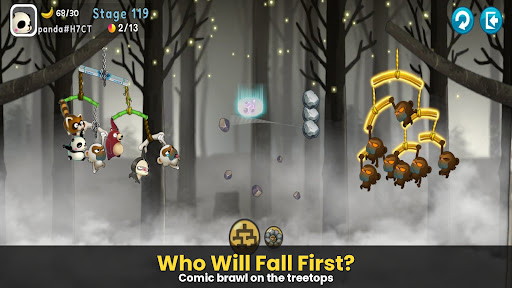
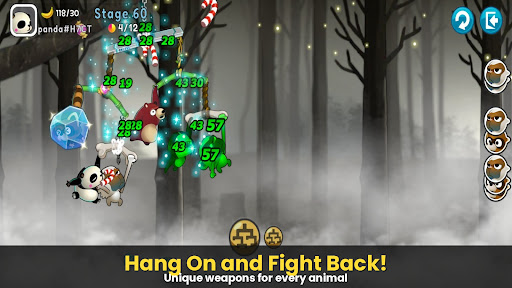
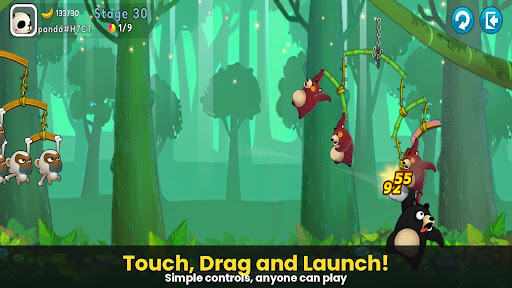
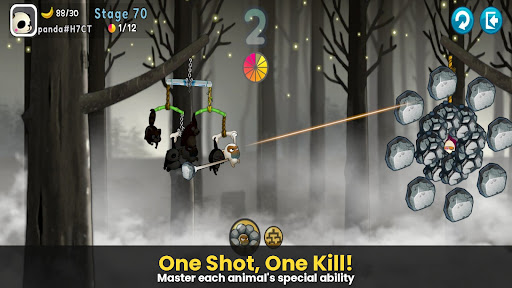
A desperate yet hilarious survival war of animals hanging from trees!
The pinnacle of slingshot action that took the world by storm, [Monkey Battle: Swing Shot] is back.
Hop onto the branches and launch the perfect shot using the power of gravity!
▣ Game Features
■ Tap, Pull, and Pop! Ultimate Physics-Based Action
Master the sophisticated physics engine with simple touch-and-drag controls.
Calculate the sway of branches—both yours and the enemy's—to strike the weak spot.
Enjoy the realistic and comical reactions of animals the moment they get hit!
■ Strategic Squad: Build Your Own Animal Army
Collect characters with unique abilities, including Monkeys, Raccoons, Brown Bears, Sloths, and Pandas.
Victory depends on your strategy! The placement and composition of your squad are key.
Upgrade to sturdy branches to build an ironclad defense that withstands any attack.
■ Non-Stop Action Across Various Modes
Arcade Mode: Overcome diverse terrains and gimmicks to test your limits in this training ground.
Item Mode: Traditional slingshot battles where strategic item use turns the tide.
Sniper Mode: Precision is everything—don't miss a single shot.
Crazy Mode: Experience extreme speed and overwhelming firepower.
***
Device App Access Permission Notice
Access permissions are requested in order for us to provide you with the following service when you use the app.
[Required]
None
[Optional]
· NOTIFICATION: The permission is required to receive info sent from the game app and advertisement push notifications.
[How to Remove Permissions]
You can reset or remove permissions after allowing them as shown below.
1. Android 6.0 or above: Settings > Apps > Select App > Permissions > Allow or Remove Permissions
2. Android 6.0 or below: Upgrade the operating system to remove permissions or delete the app
※ If you are using Android 6.0 or below, we recommend that you upgrade to 6.0 or above as you can't change the optional permissions individually.
***
• Supported Languages: 한국어, English, 简体中文, 繁體中文, Français, Deutsch
• Unsupported devices: iPhone 3GS, 3rd/4th Gen iPod Touch, iPad 1
• This app is free-to-play and offers in-app purchases. Purchasing paid items may incur additional fees, and payment cancelation may not be available depending on the type of the item.
• Conditions regarding the usage of this game (contract termination/payment cancelation, etc.) can be viewed in the game or the Com2uS mobile game Terms of Service (available on the website, https://terms.withhive.com/terms/policy/view/M121/T1 ).
• For game-related inquiries, please contact the Com2uS Customer Support (https://customer.withhive.com/com2us).
แสดงเพิ่มเติม

1. ดาวน์โหลดตัวติดตั้ง MEmu และสิ้นสุดการติดตั้ง

2. เริ่ม MEmu จากนั้นเปิด Google Play บนหน้าแรก

3. ค้นหา Monkey Battle: Swing Shot ใน Google Play
Install
4. ดาวน์โหลดและติดตั้ง Monkey Battle: Swing Shot
5. เมื่อติดตั้งเสร็จให้คลิกที่ไอคอนเพื่อเริ่มใช้งาน

6. สนุกกับการเล่น Monkey Battle: Swing Shot บนพีซีด้วย MEmu
MEmu App Player เป็นอีมูเลเตอร์ Android ที่ดีที่สุดและผู้คนกว่า 50 ล้านคนเพลิดเพลินไปกับประสบการณ์การเล่นเกม Android ที่ยอดเยี่ยม เทคโนโลยีการจำลองเสมือนของ MEmu ช่วยให้คุณเล่นเกม Android หลายพันเกมได้อย่างราบรื่นบนพีซีของคุณแม้แต่เกมที่ต้องใช้กราฟิกมากที่สุด
จอใหญ่และกราฟฟิกสวยกว่า; เล่นได้นาน, ไม่ต้องใช้แบตเตอรี่โทรศัพท์หรือเน็ตโทรศัพท์.
ระบบปรับแต่งปุ่มคีย์บอร์ดและเม้าส์ตามที่คุณเลือก
เล่นมากกว่าหนึ่งเกมบน PC ในเวลาเดียวกันด้วยระบบหลายจอหรือ Multi-Instance manager.
Play Monkey Battle: Swing Shot on PC by following steps:




























![[ไกด์เกม] CookieRun Classic แนะนำ 5 คุกกี้น่าปั้น น่าลงทุน ที่มือใหม่ห้ามพลาด! (เล่นบน PC ผ่าน MEmu ให้ลื่นสุด ๆ) PC](https://www.memuplay.com/blog/wp-content/uploads/2026/08/579c01ab-a953-45b3-8115-9b6279b7d6f9.png)