BanG Dream! Our Notes
更新日
現在のバージョン
1.0.1
提供元

スマホ不要!プロ選手のようにキーボードとマウスで操作しよう。MEmuエミュはあなたにすべての期待を与える。電池が切れてしまうとか画面が小さいとかの問題を心配する必要がなくて、存分BanG Dream! Our Notesを楽しんでください。新しいMEmuエミュ7はPCでBanG Dream! Our Notesをプレイするのに最適!完璧なキーマッピングシステムにより、まるでパソコンゲームみたい。マルチインスタンスで複数のゲームやアプリを同時に実行!唯一無二な仮想化エンジンがパソコンの可能性を最大限になる。遊べるだけでなく、より楽しめる!
もっと見る
BanG Dream! Our NotesをPCでダウンロード!大画面でより楽しむ。電源が落ちてしまうとか通信料が足りないとかの問題を心配する必要がなく、PCの大画面でより快適にゲームを楽しましょう! BanG Dream!
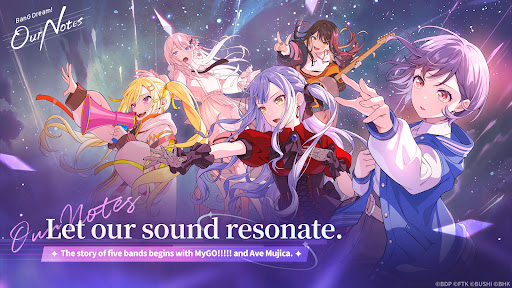
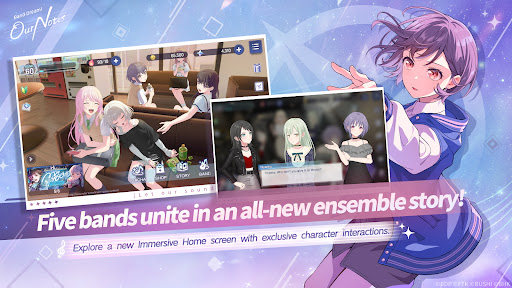
BanG Dream! Project がお届けする、全く新しいリズムゲームアドベンチャー『BanG Dream! Our Notes』!
5 つのバンドによる多彩な楽曲を楽しみながら、新たな物語の展開を体験しよう。
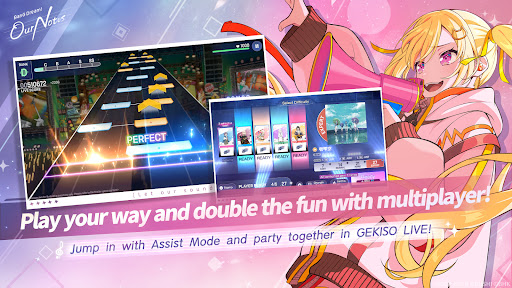
◆新リズムゲームシステム:「激励ライブ」◆
リズムゲームプレイ中に、特別な激励セクションが登場!
コンボ、正確なタイミング、そして運までもが鍵となる、刺激的な新ゲームプレイで、あなたのリズムゲームスキルを極限まで試そう!
BanG Dream!のライブパフォーマンスさながらの臨場感と没入感を体感し、最大 5 人まで参加できるパーティースタイルのリズムゲームプレイを楽しもう!
さらに、Our Notes には独自のシステム「アシストモード」も搭載!
リズムゲーム初心者の方も、もっと気軽に楽しみたい方も、アシストモードを使えば、誰もがパフォーマンスを楽しみながら、自分のペースで上達できる。
◆オリジナル楽曲から最新ヒットカバーまで◆
アニメ『BanG Dream!』でお馴染みのオリジナル楽曲はもちろん、MyGO!!!!!の楽曲も収録!そして Ave Mujica をはじめ、幅広い人気カバー曲を収録したラインナップは、聴き応え満点!
最新ヒット曲から名曲まで、お気に入りの曲をプレイしよう。
アニメ『BanG Dream!』の様々なパフォーマンスシーンやミュージックビデオも視聴可能。
さらに、ファンに人気のバンド MyGO!!!!!と Ave Mujica の最新曲が、Our Notes で先行配信!
【BanG Dream!収録曲】
・まよいうた / MyGO!!!!!
・KiLLKiSS / Ave Mujica
・春日影 (MyGO!!!!! ver.) / MyGO!!!!!
・MUGEN MY WORLD / 無限大ミュウタイプ
・騎士海戦 / millsage
・ホーミーのタイ!! / 一花ダムロック!
…その他多数
今後もカバー曲を追加予定!
◆5 つのバンドが紡ぐ新たな物語◆
MyGO!!!!!、Ave Mujica、Mugendai MewType に加え、millsage と Ikka Dumb Rock!も参戦!
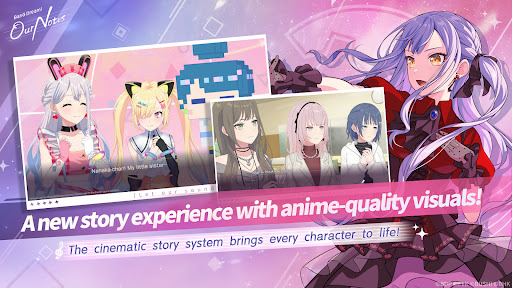
シネマティックストーリーシステムにより、まるで映画やアニメのように、キャラクターたちが豊かな表情で生き生きと動き回ります。
スペシャルシーンでは、完全新規カットを含むアニメーションシーケンスも収録。
多彩なビジュアルエフェクトとイラストシーンが融合し、壮大に生まれ変わったストーリー体験をお届けします。
MyGO!!!!!、Ave Mujica、Mugendai MewType の馴染み深いアニメストーリーを、ゲームならではの視点で追体験。アニメストーリーの続きを描いたスペシャルエピソードは、Our Notes で独占配信。一方、millsage と Ikka Dumb Rock!は、完全オリジナルストーリーを最初から展開します。
個性豊かな 5 つのバンドと、総勢 25 名の個性的なメンバーが紡ぐ、躍動感あふれる物語を体験しよう。
◆公式サイト◆
https://bdon.biligames.com/?lang=en-us
©BanG Dream!プロジェクト ©FROMTOKYO ©ブシロード。発行元:BILIBILI HK LIMITED
もっと見る

1. MEmuインストーラーをダウンロードしてセットアップを完了する

2. MEmuを起動し、デスクトップでのPlayストアを開く

3. PlayストアでBanG Dream! Our Notesを検索する
Install
4. BanG Dream! Our Notesをダウンロードしてインストールする
5. インストールが完了したら、アイコンをクリックしてスタート

6. MEmuを使用してPCでBanG Dream! Our Notesを楽しむ
MEmu App Playerは最高の無料で提供されるAndroidエミュレータで、5,000万人がすでに優れたAndroidゲーム体験を楽しんでいます。 MEmuの仮想化技術は、あなたのPCで何千ものAndroidゲームを快適にプレイすることを可能にします。
大画面でより精細;無限の待機、電池とドラフィックの極限を超え
キーボード・マウス・コントローラーを全力でサポート、より快適
マルチインスタンスで複数のゲームを同時に実行
Play BanG Dream! Our Notes on PC by following steps: