BanG Dream! Our Notes
Atualizada
Versão atual
1.0.1
Oferecido por

Com toda a sua paixão por jogar BanG Dream! Our Notes, não deixe os polegares te atrapalharem em uma pequena tela do seu celular. Jogue como um profissional e tenha controle total do seu jogo com teclado e mouse. O MEmu oferece todas as coisas que você está esperando. Baixe e jogue BanG Dream! Our Notes no PC. Jogue o tempo que quiser, sem mais limitações de bateria, dados móveis e aquelas ligações enquanto estiver jogando. O novíssimo MEmu 9 é a melhor escolha de jogar BanG Dream! Our Notes no PC. Com grandes novidades no sistema de mapeamento que faz BanG Dream! Our Notes um jogo de PC real. Nossa equipe melhorou o gerenciamento de várias instâncias do Android, reduzindo tempo de reprodução de 2 ou mais contas no mesmo dispositivo. O mais importante, nosso mecanimos de emulação exclusivo pode liberar todo o potencial do seu PC sem travamentos, rodando tudo liso. Nós nos preocupamos não apenas com você joga, mas com todo o processo de desfrutar de 100% do seu jogo favorito.
Mostre mais
Download do BanG Dream! Our Notes no PC com MEmu Android Emulador: Divirta-se jogando na tela grande. Apresentando BanG Dream!
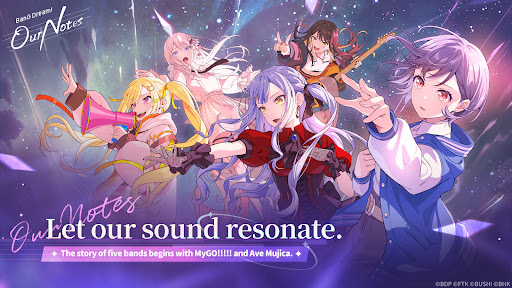
Apresentando BanG Dream! Our Notes, uma nova aventura de jogo de ritmo do BanG Dream! Project!
Desfrute de uma grande variedade de músicas de cinco bandas e descubra uma nova e rica história que está prestes a se desenrolar.
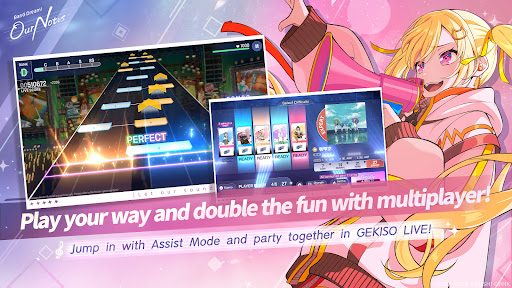
◆Novo Sistema de Jogo de Ritmo: “GEKISO LIVE”◆
Seções especiais de GEKISO agora aparecerão durante o jogo de ritmo!
Combos, precisão de tempo e até mesmo sorte — coloque suas habilidades de jogo de ritmo à prova em uma nova e emocionante experiência de jogo!
Sinta a emoção e a imersão de uma apresentação ao vivo de BanG Dream! e aproveite o jogo de ritmo no estilo festa com até cinco jogadores!
Our Notes também apresenta um novo sistema exclusivo: Modo Assistência!
Seja você um novato em jogos de ritmo ou esteja apenas procurando por uma experiência mais relaxante, o Modo Assistência permite que todos aproveitem a apresentação e melhorem no seu próprio ritmo.
◆De Músicas Originais aos Mais Recentes Covers de Sucesso◆
De músicas originais icônicas apresentadas no anime BanG Dream! — incluindo faixas de MyGO!!!!! De MyGO!!!!! e Ave Mujica a uma ampla variedade de covers populares, a seleção musical está repleta de opções para você curtir!
Toque suas músicas favoritas, dos hits mais recentes aos clássicos adorados.
Você também pode assistir a diversas cenas de performance e videoclipes da série de anime BanG Dream!
Além disso, as faixas mais recentes das bandas favoritas dos fãs, MyGO!!!!! e Ave Mujica, estarão disponíveis primeiro em Our Notes!
【Músicas de BanG Dream!】
・Mayoiuta / MyGO!!!!!
・KiLLKiSS / Ave Mujica
・Haruhikage (MyGO!!!!! ver.) / MyGO!!!!!
・MUGEN MY WORLD / Mugendai MewType
・Kishi Kaisen / millsage
・Homie’s Tie!! / Ikka Dumb Rock!
...e muito mais
Mais covers serão adicionados em breve!
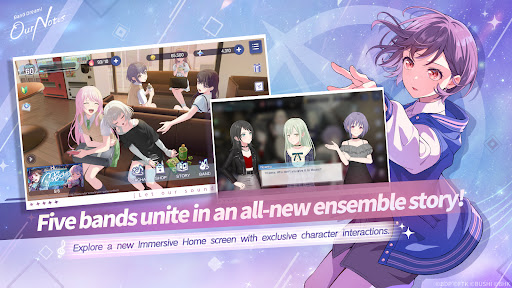
◆Novas Histórias Entrelaçadas por Cinco Bandas◆
Além de MyGO!!!!!, Ave Mujica e Mugendai MewType, millsage e Ikka Dumb Rock! também chegam ao palco!
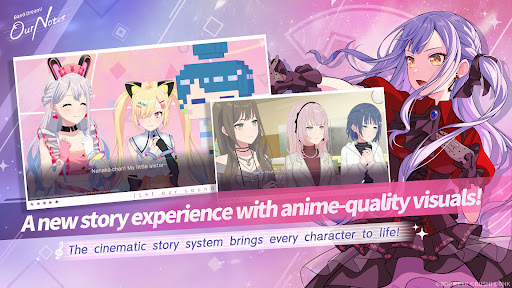
Com o Sistema de História Cinematográfica, os personagens se movem de forma vívida e com expressões ricas, como em um filme ou anime.
Cenas especiais também apresentam sequências animadas, incluindo cortes inéditos.
Uma ampla gama de efeitos visuais e cenas ilustradas se unem para oferecer uma experiência de história espetacularmente renovada.
Reviva as histórias de anime já conhecidas de MyGO!!!!!, Ave Mujica e Mugendai MewType a partir da perspectiva exclusiva do jogo. Você também pode curtir episódios especiais que dão continuidade às histórias do anime, disponíveis exclusivamente em Our Notes. Enquanto isso, millsage e Ikka Dumb Rock! apresentarão histórias completamente originais desde o início.
Vivencie histórias vibrantes entrelçadas por cinco bandas distintas e um total de 25 membros únicos.
◆Site Oficial◆
https://bdon.biligames.com/?lang=en-us
©BanG Dream! Project ©FROMTOKYO ©Bushiroad. Publicado por BILIBILI HK LIMITED
Mostre mais

1. Faça o download do instalador do MEmu e conclua a instalação

2. Inicie o MEmu e depois abra o Google Play na página inicial

3. Pesquise BanG Dream! Our Notes no Google Play
Install
4. Baixe e Instale BanG Dream! Our Notes
5. Na conclusão da instalação, clique no ícone para iniciar

6. Divirta-se jogando BanG Dream! Our Notes no PC com MEmu
O MEmu App Player é o melhor emulador de Android grátis e 50 milhões de pessoas já desfrutam de sua excelente experiência de jogos no Android. A tecnologia de virtualização do MEmu permite que você jogue milhares de jogos do Android sem problemas no seu PC, mesmo os com gráficos mais intensivos.
Tela maior com gráficos melhores; Longa duração e sem limitação de bateria ou dados móveis.
Suporte completo ao Mapaeamento de Teclas para controle preciso do teclado e mouse ou gamepad.
Várias contas de jogos ou tarefas em um único PC de uma só vez com o Gerenciador de várias instâncias.
Play BanG Dream! Our Notes on PC by following steps: