BanG Dream! Our Notes
อัปเดตเมื่อ
เวอร์ชันปัจจุบัน
1.0.1
ให้บริการโดย

เวลาคุณเล่น BanG Dream! Our Notes, คุณอาจรู้สึกว่ามือคุณอาจบังจอแล้วทำให้ไม่ได้เล่นแบบเต็มที่. เล่นแบบไร้ขีดจำกัดด้วยเม้าส์และคีย์บอร์ด. MEmu มีตัวเลือกหลายอย่างให้คุณใช้งานเกมที่คุณเล่นแบบที่คุณต้องการ. ดาวน์โหลดและเล่น BanG Dream! Our Notes บน PC. เล่นนานแค่ไหนก็ได้, ไม่ต้องชาร์จแบตเตอรี่, หรือเจอคนโทรเข้ามาระหว่างเล่น. MEmu 9 เป็นตัวเลือกสำหรับการเล่น BanG Dream! Our Notes บน PC. ทางทีมงานเราได้ปรับแต่งเกม, ปรับให้เล่นเกมบางเกมได้เหมือนเล่น BanG Dream! Our Notes เป็นเกม PC เช่นเล็งด้วยเม้าส์หรือใช้คีย์บอร์ด. ระบบของเรายังทำให้คุณสามารถเปิดเล่นได้มากกว่า 2 เกมพร้อมๆกันในคอมของคุณ. และที่สำคัญที่สุด, ระบบโปรแกรมของเราสามารถทำให้คุณใช้ระบบของ PC ทำให้เกมลื่นเหมือนกับใช้โทรศัพท์รุ่นล่าสุด. เราไม่ได้ดูแลเรื่องการเล่นเกม, แต่เราดูแลถึงความสนุกสนานที่คุณได้จากการเล่นด้วย.
แสดงเพิ่มเติม
ดาวน์โหลด BanG Dream! Our Notes บน PC ด้วย MEmu Android Emulator สนุกกับการเล่นบนหน้าจอขนาดใหญ่ ขอแนะนำ BanG Dream!
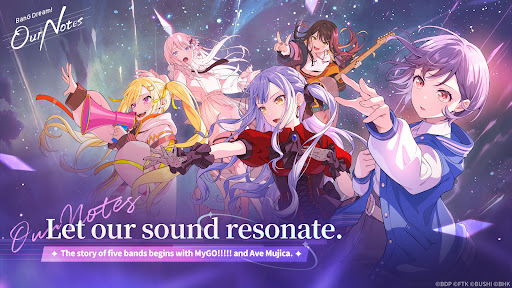


ขอแนะนำ BanG Dream! Our Notes เกมผจญภัยจังหวะดนตรีใหม่ล่าสุดจาก BanG Dream! Project!
สนุกไปกับบทเพลงมากมายจากห้าวงดนตรี และค้นพบเรื่องราวใหม่สุดเข้มข้นที่รอให้คุณค้นพบ
◆ระบบเกมจังหวะดนตรีใหม่: “GEKISO LIVE”◆
ส่วน GEKISO พิเศษจะปรากฏขึ้นระหว่างการเล่นเกมจังหวะดนตรี!
คอมโบ ความแม่นยำของจังหวะ และแม้แต่โชค—ทดสอบทักษะเกมจังหวะดนตรีของคุณในประสบการณ์การเล่นเกมใหม่ที่น่าตื่นเต้น!
สัมผัสความตื่นเต้นและความสมจริงของการแสดงสด BanG Dream! และสนุกไปกับเกมจังหวะดนตรีสไตล์ปาร์ตี้กับผู้เล่นสูงสุดห้าคน!
Our Notes ยังมีระบบใหม่สุดพิเศษ: โหมดช่วยเหลือ!
ไม่ว่าคุณจะเป็นมือใหม่ในเกมจังหวะดนตรีหรือกำลังมองหาประสบการณ์ที่ผ่อนคลายมากขึ้น โหมดช่วยเหลือจะช่วยให้ทุกคนสนุกกับการแสดงและพัฒนาฝีมือได้ตามจังหวะของตนเอง
◆จากเพลงต้นฉบับไปจนถึงเพลงคัฟเวอร์ฮิตล่าสุด◆
จากเพลงต้นฉบับอันเป็นเอกลักษณ์ที่ปรากฏในอนิเมะ BanG Dream!—รวมถึงเพลงจาก MyGO!!!!! และ Ave Mujica—ไปจนถึงเพลงคัฟเวอร์ยอดนิยมมากมาย รายชื่อเพลงเต็มไปด้วยความเพลิดเพลิน!
เล่นเพลงโปรดของคุณ ตั้งแต่เพลงฮิตล่าสุดไปจนถึงเพลงคลาสสิกที่ทุกคนชื่นชอบ
คุณยังสามารถรับชมฉากการแสดงและมิวสิกวิดีโอต่างๆ จากอนิเมะ BanG Dream! ได้อีกด้วย
นอกจากนี้ เพลงใหม่ล่าสุดจากวงดนตรีขวัญใจแฟนๆ อย่าง MyGO!!!!! และ Ave Mujica จะพร้อมให้ฟังก่อนใครใน Our Notes!
【เพลง BanG Dream!】
・Mayoiuta / MyGO!!!!!
・KiLLKiSS / Ave Mujica
・Haruhikage (MyGO!!!!! ver.) / MyGO!!!!!
・MUGEN MY WORLD / Mugendai MewType
・Kishi Kaisen / millsage
・Homie’s Tie!! / Ikka Dumb Rock!
...และอีกมากมาย
เพลงคัฟเวอร์อื่นๆ จะตามมาเร็วๆ นี้!
◆เรื่องราวใหม่จากห้าวงดนตรี◆
นอกจาก MyGO!!!!!, Ave Mujica และ Mugendai MewType แล้ว millsage และ Ikka Dumb Rock! ก็มาร่วมเวทีด้วย!
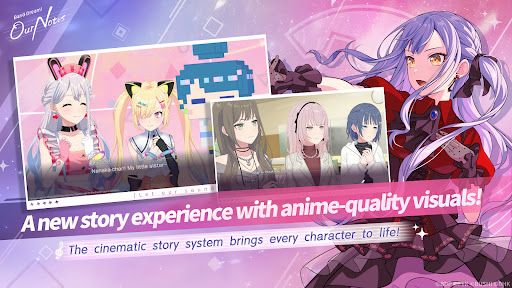
ด้วยระบบ Cinematic Story System ตัวละครจะเคลื่อนไหวอย่างมีชีวิตชีวาด้วยสีหน้าท่าทางที่หลากหลาย เหมือนในภาพยนตร์หรืออนิเมะ
ฉากพิเศษยังมีภาพเคลื่อนไหวประกอบ รวมถึงฉากใหม่ทั้งหมด
เอฟเฟกต์ภาพและฉากภาพประกอบมากมายมารวมกันเพื่อมอบประสบการณ์เรื่องราวที่ได้รับการปรับปรุงใหม่ให้น่าตื่นตาตื่นใจ
หวนระลึกถึงเรื่องราวอนิเมะที่คุ้นเคยของ MyGO!!!!!, Ave Mujica และ Mugendai MewType จากมุมมองพิเศษเฉพาะในเกม คุณยังสามารถเพลิดเพลินกับตอนพิเศษที่สานต่อเรื่องราวอนิเมะได้เฉพาะใน Our Notes เท่านั้น ในขณะเดียวกัน millsage และ Ikka Dumb Rock! จะเปิดเผยเรื่องราวใหม่ทั้งหมดตั้งแต่ต้น
สัมผัสประสบการณ์เรื่องราวที่สดใสซึ่งรังสรรค์โดยห้าวงดนตรีที่โดดเด่นและสมาชิกทั้งหมด 25 คน
◆เว็บไซต์อย่างเป็นทางการ◆
https://bdon.biligames.com/?lang=en-us
©BanG Dream! Project ©FROMTOKYO ©Bushiroad. จัดพิมพ์โดย BILIBILI HK LIMITED
แสดงเพิ่มเติม

1. ดาวน์โหลดตัวติดตั้ง MEmu และสิ้นสุดการติดตั้ง

2. เริ่ม MEmu จากนั้นเปิด Google Play บนหน้าแรก

3. ค้นหา BanG Dream! Our Notes ใน Google Play
Install
4. ดาวน์โหลดและติดตั้ง BanG Dream! Our Notes
5. เมื่อติดตั้งเสร็จให้คลิกที่ไอคอนเพื่อเริ่มใช้งาน

6. สนุกกับการเล่น BanG Dream! Our Notes บนพีซีด้วย MEmu
MEmu App Player เป็นอีมูเลเตอร์ Android ที่ดีที่สุดและผู้คนกว่า 50 ล้านคนเพลิดเพลินไปกับประสบการณ์การเล่นเกม Android ที่ยอดเยี่ยม เทคโนโลยีการจำลองเสมือนของ MEmu ช่วยให้คุณเล่นเกม Android หลายพันเกมได้อย่างราบรื่นบนพีซีของคุณแม้แต่เกมที่ต้องใช้กราฟิกมากที่สุด
จอใหญ่และกราฟฟิกสวยกว่า; เล่นได้นาน, ไม่ต้องใช้แบตเตอรี่โทรศัพท์หรือเน็ตโทรศัพท์.
ระบบปรับแต่งปุ่มคีย์บอร์ดและเม้าส์ตามที่คุณเลือก
เล่นมากกว่าหนึ่งเกมบน PC ในเวลาเดียวกันด้วยระบบหลายจอหรือ Multi-Instance manager.
Play BanG Dream! Our Notes on PC by following steps: