GigaBash Mobile
Atualizada
Versão atual
Oferecido por

Com toda a sua paixão por jogar GigaBash Mobile, não deixe os polegares te atrapalharem em uma pequena tela do seu celular. Jogue como um profissional e tenha controle total do seu jogo com teclado e mouse. O MEmu oferece todas as coisas que você está esperando. Baixe e jogue GigaBash Mobile no PC. Jogue o tempo que quiser, sem mais limitações de bateria, dados móveis e aquelas ligações enquanto estiver jogando. O novíssimo MEmu 9 é a melhor escolha de jogar GigaBash Mobile no PC. Com grandes novidades no sistema de mapeamento que faz GigaBash Mobile um jogo de PC real. Nossa equipe melhorou o gerenciamento de várias instâncias do Android, reduzindo tempo de reprodução de 2 ou mais contas no mesmo dispositivo. O mais importante, nosso mecanimos de emulação exclusivo pode liberar todo o potencial do seu PC sem travamentos, rodando tudo liso. Nós nos preocupamos não apenas com você joga, mas com todo o processo de desfrutar de 100% do seu jogo favorito.
Mostre mais
Download do GigaBash Mobile no PC com MEmu Android Emulador: Divirta-se jogando na tela grande. Claim your place as king among Titans!
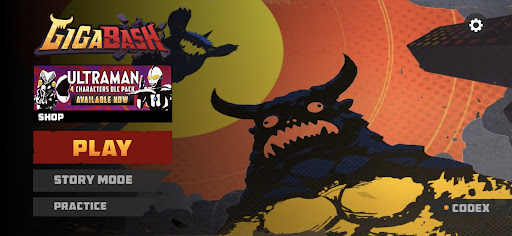
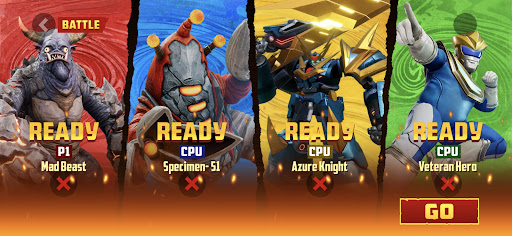
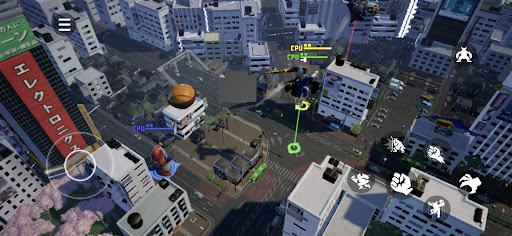
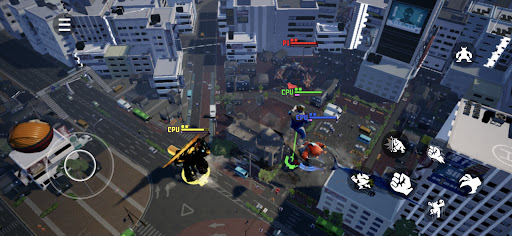
Claim your place as king among Titans! GigaBash is the ultimate Kaiju Fighting Game for 1-4 players, where you battle as film-inspired kaijus and giant heroes in fully destructible cityscapes.
Key Features:
● ORIGINAL CHARACTERS
Play as a rampaging Titan and send skyscrapers flying with a single punch; or pilot a Titan-hunting Mech and strike your foes with lightning from the heavens. Wreak havoc or chain thrilling combos to gain Giga Energy to transform into your final form, the terrifying titanic S-Class. More crossover characters from legendary IPs available as DLCs.
● ONSLAUGHT MODE
Challenge against endless waves of enemies and collect perks to help your journey. Some enemies have mutations too. The further you go, the more exclusive character skins you’ll unlock.
● ARCADE MODE
Face off alone against a lineup of 8 random opponents and one Final Boss to get a higher score. Do you dare to crank up the difficulty for a merciless yet satisfying challenge?
● STORY MODE
Discover the origins (and misadventures) of the Titans in four unique single-player campaigns, each with their own oversized protagonist.
● BATTLE MODE
It’s simple, 1-4 players battle each other in a variety of fully destructible maps to be the last Titan standing. Did you suffer an early defeat? Exact revenge on your foes by firing Orbital Lasers or dropping meteors from the convenience of your grave. Available as offline or online mode where you can cross-play with friends across mobile platforms.
● MAYHEM MODE
A casual party mode filled with wacky minigames for new and veteran players to enjoy together in online private matches.
Mostre mais

1. Faça o download do instalador do MEmu e conclua a instalação

2. Inicie o MEmu e depois abra o Google Play na página inicial

3. Pesquise GigaBash Mobile no Google Play
Install
4. Baixe e Instale GigaBash Mobile
5. Na conclusão da instalação, clique no ícone para iniciar

6. Divirta-se jogando GigaBash Mobile no PC com MEmu
O MEmu App Player é o melhor emulador de Android grátis e 50 milhões de pessoas já desfrutam de sua excelente experiência de jogos no Android. A tecnologia de virtualização do MEmu permite que você jogue milhares de jogos do Android sem problemas no seu PC, mesmo os com gráficos mais intensivos.
Tela maior com gráficos melhores; Longa duração e sem limitação de bateria ou dados móveis.
Suporte completo ao Mapaeamento de Teclas para controle preciso do teclado e mouse ou gamepad.
Várias contas de jogos ou tarefas em um único PC de uma só vez com o Gerenciador de várias instâncias.
Play GigaBash Mobile on PC by following steps: