GigaBash Mobile
อัปเดตเมื่อ
เวอร์ชันปัจจุบัน
ให้บริการโดย

เวลาคุณเล่น GigaBash Mobile, คุณอาจรู้สึกว่ามือคุณอาจบังจอแล้วทำให้ไม่ได้เล่นแบบเต็มที่. เล่นแบบไร้ขีดจำกัดด้วยเม้าส์และคีย์บอร์ด. MEmu มีตัวเลือกหลายอย่างให้คุณใช้งานเกมที่คุณเล่นแบบที่คุณต้องการ. ดาวน์โหลดและเล่น GigaBash Mobile บน PC. เล่นนานแค่ไหนก็ได้, ไม่ต้องชาร์จแบตเตอรี่, หรือเจอคนโทรเข้ามาระหว่างเล่น. MEmu 9 เป็นตัวเลือกสำหรับการเล่น GigaBash Mobile บน PC. ทางทีมงานเราได้ปรับแต่งเกม, ปรับให้เล่นเกมบางเกมได้เหมือนเล่น GigaBash Mobile เป็นเกม PC เช่นเล็งด้วยเม้าส์หรือใช้คีย์บอร์ด. ระบบของเรายังทำให้คุณสามารถเปิดเล่นได้มากกว่า 2 เกมพร้อมๆกันในคอมของคุณ. และที่สำคัญที่สุด, ระบบโปรแกรมของเราสามารถทำให้คุณใช้ระบบของ PC ทำให้เกมลื่นเหมือนกับใช้โทรศัพท์รุ่นล่าสุด. เราไม่ได้ดูแลเรื่องการเล่นเกม, แต่เราดูแลถึงความสนุกสนานที่คุณได้จากการเล่นด้วย.
แสดงเพิ่มเติม
ดาวน์โหลด GigaBash Mobile บน PC ด้วย MEmu Android Emulator สนุกกับการเล่นบนหน้าจอขนาดใหญ่ Claim your place as king among Titans!
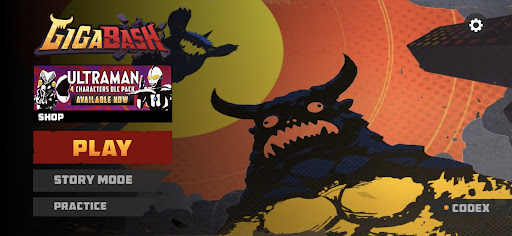
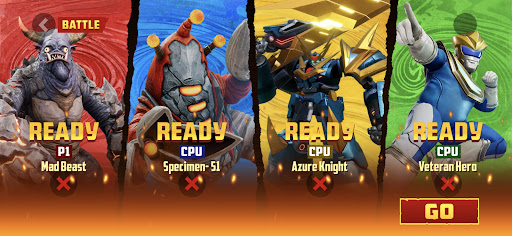
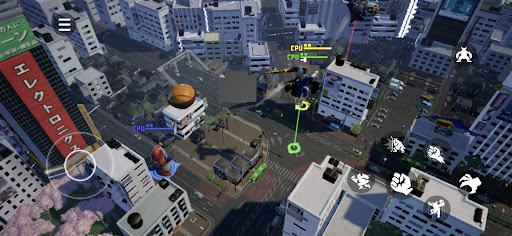
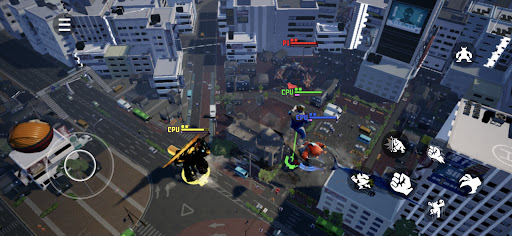
Claim your place as king among Titans! GigaBash is the ultimate Kaiju Fighting Game for 1-4 players, where you battle as film-inspired kaijus and giant heroes in fully destructible cityscapes.
Key Features:
● ORIGINAL CHARACTERS
Play as a rampaging Titan and send skyscrapers flying with a single punch; or pilot a Titan-hunting Mech and strike your foes with lightning from the heavens. Wreak havoc or chain thrilling combos to gain Giga Energy to transform into your final form, the terrifying titanic S-Class. More crossover characters from legendary IPs available as DLCs.
● ONSLAUGHT MODE
Challenge against endless waves of enemies and collect perks to help your journey. Some enemies have mutations too. The further you go, the more exclusive character skins you’ll unlock.
● ARCADE MODE
Face off alone against a lineup of 8 random opponents and one Final Boss to get a higher score. Do you dare to crank up the difficulty for a merciless yet satisfying challenge?
● STORY MODE
Discover the origins (and misadventures) of the Titans in four unique single-player campaigns, each with their own oversized protagonist.
● BATTLE MODE
It’s simple, 1-4 players battle each other in a variety of fully destructible maps to be the last Titan standing. Did you suffer an early defeat? Exact revenge on your foes by firing Orbital Lasers or dropping meteors from the convenience of your grave. Available as offline or online mode where you can cross-play with friends across mobile platforms.
● MAYHEM MODE
A casual party mode filled with wacky minigames for new and veteran players to enjoy together in online private matches.
แสดงเพิ่มเติม

1. ดาวน์โหลดตัวติดตั้ง MEmu และสิ้นสุดการติดตั้ง

2. เริ่ม MEmu จากนั้นเปิด Google Play บนหน้าแรก

3. ค้นหา GigaBash Mobile ใน Google Play
Install
4. ดาวน์โหลดและติดตั้ง GigaBash Mobile
5. เมื่อติดตั้งเสร็จให้คลิกที่ไอคอนเพื่อเริ่มใช้งาน

6. สนุกกับการเล่น GigaBash Mobile บนพีซีด้วย MEmu
MEmu App Player เป็นอีมูเลเตอร์ Android ที่ดีที่สุดและผู้คนกว่า 50 ล้านคนเพลิดเพลินไปกับประสบการณ์การเล่นเกม Android ที่ยอดเยี่ยม เทคโนโลยีการจำลองเสมือนของ MEmu ช่วยให้คุณเล่นเกม Android หลายพันเกมได้อย่างราบรื่นบนพีซีของคุณแม้แต่เกมที่ต้องใช้กราฟิกมากที่สุด
จอใหญ่และกราฟฟิกสวยกว่า; เล่นได้นาน, ไม่ต้องใช้แบตเตอรี่โทรศัพท์หรือเน็ตโทรศัพท์.
ระบบปรับแต่งปุ่มคีย์บอร์ดและเม้าส์ตามที่คุณเลือก
เล่นมากกว่าหนึ่งเกมบน PC ในเวลาเดียวกันด้วยระบบหลายจอหรือ Multi-Instance manager.
Play GigaBash Mobile on PC by following steps: