
ANANTA
อัปเดตเมื่อ
เวอร์ชันปัจจุบัน
ให้บริการโดย

เวลาคุณเล่น ANANTA, คุณอาจรู้สึกว่ามือคุณอาจบังจอแล้วทำให้ไม่ได้เล่นแบบเต็มที่. เล่นแบบไร้ขีดจำกัดด้วยเม้าส์และคีย์บอร์ด. MEmu มีตัวเลือกหลายอย่างให้คุณใช้งานเกมที่คุณเล่นแบบที่คุณต้องการ. ดาวน์โหลดและเล่น ANANTA บน PC. เล่นนานแค่ไหนก็ได้, ไม่ต้องชาร์จแบตเตอรี่, หรือเจอคนโทรเข้ามาระหว่างเล่น. MEmu 9 เป็นตัวเลือกสำหรับการเล่น ANANTA บน PC. ทางทีมงานเราได้ปรับแต่งเกม, ปรับให้เล่นเกมบางเกมได้เหมือนเล่น ANANTA เป็นเกม PC เช่นเล็งด้วยเม้าส์หรือใช้คีย์บอร์ด. ระบบของเรายังทำให้คุณสามารถเปิดเล่นได้มากกว่า 2 เกมพร้อมๆกันในคอมของคุณ. และที่สำคัญที่สุด, ระบบโปรแกรมของเราสามารถทำให้คุณใช้ระบบของ PC ทำให้เกมลื่นเหมือนกับใช้โทรศัพท์รุ่นล่าสุด. เราไม่ได้ดูแลเรื่องการเล่นเกม, แต่เราดูแลถึงความสนุกสนานที่คุณได้จากการเล่นด้วย.
แสดงเพิ่มเติม
ดาวน์โหลด ANANTA บน PC ด้วย MEmu Android Emulator สนุกกับการเล่นบนหน้าจอขนาดใหญ่ Step into the shoes of a diverse cast of characters and forge connections as you build a team all your own.

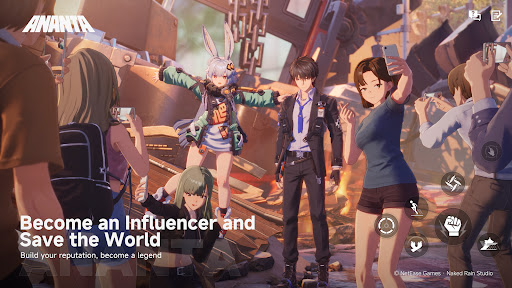
Step into the shoes of a diverse cast of characters and forge connections as you build a team all your own.
Join forces against the threats lurking in the shadows, or live it up and take in the nightlife under the neon glow. The choice is yours.
In ANANTA, a whole new world awaits you. Ready to take the plunge?
Become an Influencer and Save the World
You're a stranger in a strange land, but that's alright.
The moment you set foot in Nova City,
you start making a name for yourself.
It's time to build your reputation, and save the world while you're at it.
Two Cities, Two Adventures
Don't forget to head back home once in a while.
One plane ticket and you're back to your old stomping grounds of Chongxiao.
But even a place you know like the back of your hand
is bound to have a hidden secret or two.
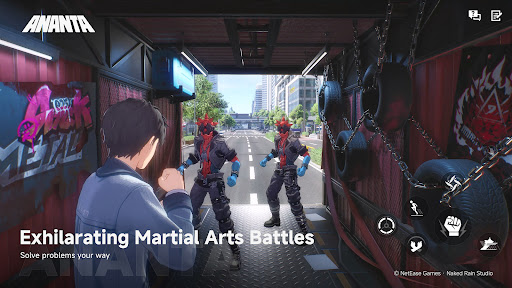
Exhilarating Martial Arts Battles
From the second you raise your fist,
the street becomes your stage,
and each strike deserves to go viral.
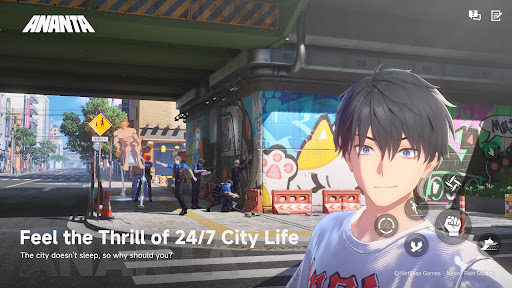
Experience the Thrill of 24/7 City Life
Boredom? Never heard of it.
Drama that would make soap operas blush one day, 3AM street racing the next.
No two days are the same.
Every hour has something new on offer, and it can all be streamed anytime.
Discover Different Walks of Life
NCCA officer, genius hacker, or gang leader?
Inhabit all manner of different characters.
Experience this world from top to bottom and everywhere in-between.
Who knows, you may befriend some oddballs along the way.
Unlimited Exploration
Turn in any direction and set your destination.
Rev the car engine, hop on a bike, sail the ocean blue,
or take to the skies, swinging freely between buildings.
If you can see it, you can go there. So, where to next?
แสดงเพิ่มเติม

1. ดาวน์โหลดตัวติดตั้ง MEmu และสิ้นสุดการติดตั้ง

2. เริ่ม MEmu จากนั้นเปิด Google Play บนหน้าแรก

3. ค้นหา ANANTA ใน Google Play
Install
4. ดาวน์โหลดและติดตั้ง ANANTA
5. เมื่อติดตั้งเสร็จให้คลิกที่ไอคอนเพื่อเริ่มใช้งาน

6. สนุกกับการเล่น ANANTA บนพีซีด้วย MEmu
MEmu App Player เป็นอีมูเลเตอร์ Android ที่ดีที่สุดและผู้คนกว่า 50 ล้านคนเพลิดเพลินไปกับประสบการณ์การเล่นเกม Android ที่ยอดเยี่ยม เทคโนโลยีการจำลองเสมือนของ MEmu ช่วยให้คุณเล่นเกม Android หลายพันเกมได้อย่างราบรื่นบนพีซีของคุณแม้แต่เกมที่ต้องใช้กราฟิกมากที่สุด
จอใหญ่และกราฟฟิกสวยกว่า; เล่นได้นาน, ไม่ต้องใช้แบตเตอรี่โทรศัพท์หรือเน็ตโทรศัพท์.
ระบบปรับแต่งปุ่มคีย์บอร์ดและเม้าส์ตามที่คุณเลือก
เล่นมากกว่าหนึ่งเกมบน PC ในเวลาเดียวกันด้วยระบบหลายจอหรือ Multi-Instance manager.
Play ANANTA on PC by following steps:




























![[ไกด์เกม] CookieRun Classic แนะนำ 5 คุกกี้น่าปั้น น่าลงทุน ที่มือใหม่ห้ามพลาด! (เล่นบน PC ผ่าน MEmu ให้ลื่นสุด ๆ) PC](https://www.memuplay.com/blog/wp-content/uploads/2026/08/579c01ab-a953-45b3-8115-9b6279b7d6f9.png)