Dream Tycoon: Build & Decide
อัปเดตเมื่อ
เวอร์ชันปัจจุบัน
1.0.0.21
ให้บริการโดย

เวลาคุณเล่น Dream Tycoon: Build & Decide, คุณอาจรู้สึกว่ามือคุณอาจบังจอแล้วทำให้ไม่ได้เล่นแบบเต็มที่. เล่นแบบไร้ขีดจำกัดด้วยเม้าส์และคีย์บอร์ด. MEmu มีตัวเลือกหลายอย่างให้คุณใช้งานเกมที่คุณเล่นแบบที่คุณต้องการ. ดาวน์โหลดและเล่น Dream Tycoon: Build & Decide บน PC. เล่นนานแค่ไหนก็ได้, ไม่ต้องชาร์จแบตเตอรี่, หรือเจอคนโทรเข้ามาระหว่างเล่น. MEmu 9 เป็นตัวเลือกสำหรับการเล่น Dream Tycoon: Build & Decide บน PC. ทางทีมงานเราได้ปรับแต่งเกม, ปรับให้เล่นเกมบางเกมได้เหมือนเล่น Dream Tycoon: Build & Decide เป็นเกม PC เช่นเล็งด้วยเม้าส์หรือใช้คีย์บอร์ด. ระบบของเรายังทำให้คุณสามารถเปิดเล่นได้มากกว่า 2 เกมพร้อมๆกันในคอมของคุณ. และที่สำคัญที่สุด, ระบบโปรแกรมของเราสามารถทำให้คุณใช้ระบบของ PC ทำให้เกมลื่นเหมือนกับใช้โทรศัพท์รุ่นล่าสุด. เราไม่ได้ดูแลเรื่องการเล่นเกม, แต่เราดูแลถึงความสนุกสนานที่คุณได้จากการเล่นด้วย.
แสดงเพิ่มเติม
ดาวน์โหลด Dream Tycoon: Build & Decide บน PC ด้วย MEmu Android Emulator สนุกกับการเล่นบนหน้าจอขนาดใหญ่ [Notice Regarding Purchase Issues & Compensation].

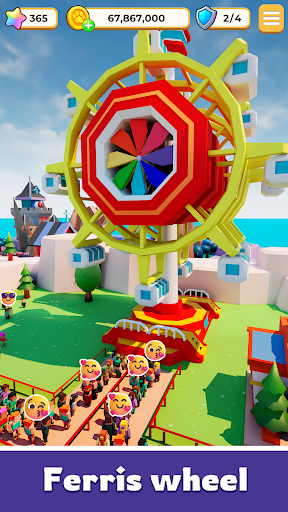
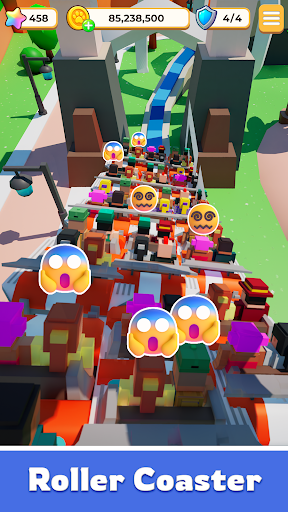
[Notice Regarding Purchase Issues & Compensation]
We highly value every player's gaming experience. If you have completed an in-game purchase but did not receive your items immediately (potentially due to network fluctuations), please do not worry.
Please email your [Character ID] and a [Screenshot of your Google Purchase Receipt (showing the GPA order number)] to our official support email: pt@all9fun.com. Our team will verify your information and manually issue your items as a top priority.
—— — — — — — — — — — — — — — — — — — — — — — — —
Build Your Park. Outsmart Fate. Rule the World.
Step into a world where every decision sets your story in motion.
Dream Tycoon isn’t just another simulation game—it’s where high-stakes strategy meets the thrill of the unexpected.
Design your layout, expand your empire, and watch as the world responds to your every move.
Your Strategy. Your Rules. Your Management.
Will you play it safe for steady growth, or go all-in for a legendary breakthrough?
Fate doesn’t decide for you—it reacts to you. Sometimes things go perfectly to plan; other times, a sudden twist changes everything.
Embrace the thrill. In this journey, the only constant is excitement.
Create a Landmark Worth Remembering
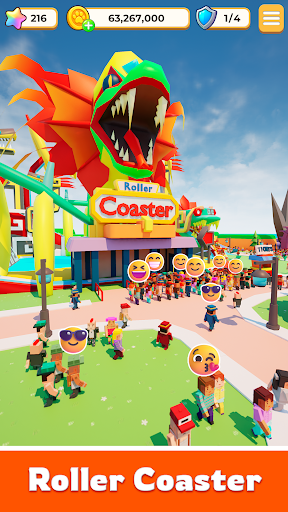
Build breathtaking attractions and iconic landmarks that draw massive crowds.
As you unlock hidden secrets and expand your reach, your park evolves from a simple project into a living, breathing empire with a soul. Every choice you make leaves a permanent mark.
High-Stakes Social Action & Strategy
● Friends or Rivals?
Meet a cast of colorful characters on your journey. Some are here to help you grow—others are just targets waiting for you to strike first and claim rewards.
● Play Your Way, Any Time.
Whether you have five minutes to make a power move or an hour to perfect your empire, the game fits your pace.
Fate Doesn’t Choose the Path. It Responds to You.
The opportunity is right in front of you. The gates are open.
Start your Dream Tycoon legacy today!
แสดงเพิ่มเติม

1. ดาวน์โหลดตัวติดตั้ง MEmu และสิ้นสุดการติดตั้ง

2. เริ่ม MEmu จากนั้นเปิด Google Play บนหน้าแรก

3. ค้นหา Dream Tycoon: Build & Decide ใน Google Play
Install
4. ดาวน์โหลดและติดตั้ง Dream Tycoon: Build & Decide
5. เมื่อติดตั้งเสร็จให้คลิกที่ไอคอนเพื่อเริ่มใช้งาน

6. สนุกกับการเล่น Dream Tycoon: Build & Decide บนพีซีด้วย MEmu
MEmu App Player เป็นอีมูเลเตอร์ Android ที่ดีที่สุดและผู้คนกว่า 50 ล้านคนเพลิดเพลินไปกับประสบการณ์การเล่นเกม Android ที่ยอดเยี่ยม เทคโนโลยีการจำลองเสมือนของ MEmu ช่วยให้คุณเล่นเกม Android หลายพันเกมได้อย่างราบรื่นบนพีซีของคุณแม้แต่เกมที่ต้องใช้กราฟิกมากที่สุด
จอใหญ่และกราฟฟิกสวยกว่า; เล่นได้นาน, ไม่ต้องใช้แบตเตอรี่โทรศัพท์หรือเน็ตโทรศัพท์.
ระบบปรับแต่งปุ่มคีย์บอร์ดและเม้าส์ตามที่คุณเลือก
เล่นมากกว่าหนึ่งเกมบน PC ในเวลาเดียวกันด้วยระบบหลายจอหรือ Multi-Instance manager.
Play Dream Tycoon: Build & Decide on PC by following steps: