Fall Up
อัปเดตเมื่อ
เวอร์ชันปัจจุบัน
ให้บริการโดย

เวลาคุณเล่น Fall Up, คุณอาจรู้สึกว่ามือคุณอาจบังจอแล้วทำให้ไม่ได้เล่นแบบเต็มที่. เล่นแบบไร้ขีดจำกัดด้วยเม้าส์และคีย์บอร์ด. MEmu มีตัวเลือกหลายอย่างให้คุณใช้งานเกมที่คุณเล่นแบบที่คุณต้องการ. ดาวน์โหลดและเล่น Fall Up บน PC. เล่นนานแค่ไหนก็ได้, ไม่ต้องชาร์จแบตเตอรี่, หรือเจอคนโทรเข้ามาระหว่างเล่น. MEmu 9 เป็นตัวเลือกสำหรับการเล่น Fall Up บน PC. ทางทีมงานเราได้ปรับแต่งเกม, ปรับให้เล่นเกมบางเกมได้เหมือนเล่น Fall Up เป็นเกม PC เช่นเล็งด้วยเม้าส์หรือใช้คีย์บอร์ด. ระบบของเรายังทำให้คุณสามารถเปิดเล่นได้มากกว่า 2 เกมพร้อมๆกันในคอมของคุณ. และที่สำคัญที่สุด, ระบบโปรแกรมของเราสามารถทำให้คุณใช้ระบบของ PC ทำให้เกมลื่นเหมือนกับใช้โทรศัพท์รุ่นล่าสุด. เราไม่ได้ดูแลเรื่องการเล่นเกม, แต่เราดูแลถึงความสนุกสนานที่คุณได้จากการเล่นด้วย.
แสดงเพิ่มเติม
ดาวน์โหลด Fall Up บน PC ด้วย MEmu Android Emulator สนุกกับการเล่นบนหน้าจอขนาดใหญ่ Labi always aims for powerful and precise jumps!

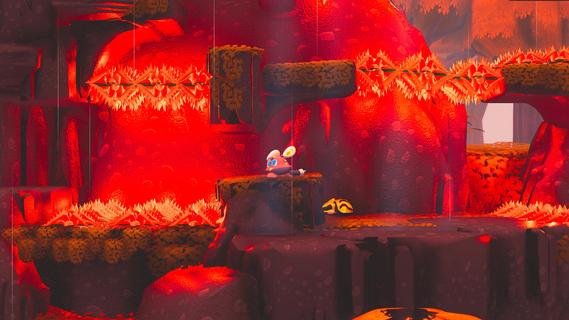
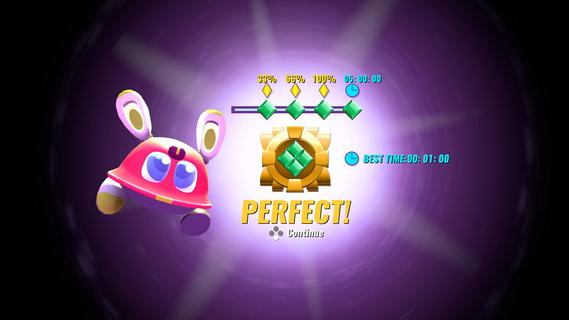
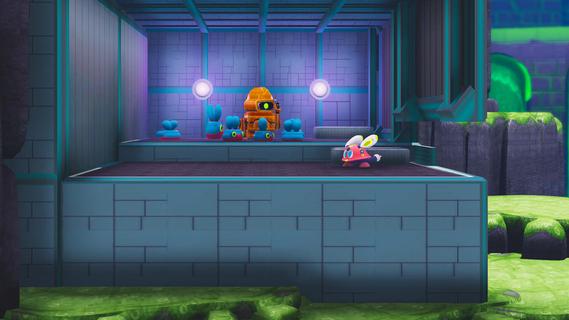
Labi always aims for powerful and precise jumps!A mistake in installing a thruster module instead of a mobility module gave Labi a pair of shortest yet most powerful legs among all robots. It has mastered the skill to Leg Launch itself like a cannonball with its powerful legs. With this advantage, Labi can Stomp with great force on enemies or bounce over walls.You know whatâs better? After Labi has found the Warp Ball, you may immediately teleport to any place where the ball lands. To beat the levels and solve the puzzles, you must plan ahead, Run, Stomp, Dash and Double Jump your way to succeed the best route. You may also Dash like a ninja, using your quick reflex to dodge all incoming dangers as they show up.GOALSThe core function of Labiâs program: seek FREEDOM!During the game, you need to collect âBatteriesâ scattered around the level. Some are lying in plain sight along the path, while others may require a little bit of exploration spirit. At the end of every level, your will get Gems based on the number of Batteries youâve found. You will need certain gems to unlock the new areas.Whatâs more, when you have found all the batteries in a level, a Time Trial will be unlocked. Complete the challenge, and you will be rewarded with the final Gem of the level. A trophy for serious challengers!FEATURESEvery being, organic or synthetic, has its own value, even robots (only the cute one counts!)What were your enemies one second ago may become your friends the next. Despite the mean look, the enemies wonât mind you stepping on their heads. You may manipulate, provoke or even guard your enemies, and use them to complete the level in ways one could never imagine.STORYAn imaginary yet realistic post-apocalyptic world.Do you wonder where do so many robots come from? Who created them? And why do those pointless assembly lines keep running indefinitely?Dive into the fantasy world made of giant fruits and adorable robots and unwrap the authentic story about humanity and identity. Traverse and explore colorful and vibrant scenes, interact with all sorts of intriguing characters, and piece by piece learn the worldâs history. Help our little hero find out what really matters, reveal everything that has been lost, and make friends with a bunch of totally huggable characters!
แสดงเพิ่มเติม

1. ดาวน์โหลดตัวติดตั้ง MEmu และสิ้นสุดการติดตั้ง

2. เริ่ม MEmu จากนั้นเปิด Google Play บนหน้าแรก

3. ค้นหา Fall Up ใน Google Play
Install
4. ดาวน์โหลดและติดตั้ง Fall Up
5. เมื่อติดตั้งเสร็จให้คลิกที่ไอคอนเพื่อเริ่มใช้งาน

6. สนุกกับการเล่น Fall Up บนพีซีด้วย MEmu
MEmu App Player เป็นอีมูเลเตอร์ Android ที่ดีที่สุดและผู้คนกว่า 50 ล้านคนเพลิดเพลินไปกับประสบการณ์การเล่นเกม Android ที่ยอดเยี่ยม เทคโนโลยีการจำลองเสมือนของ MEmu ช่วยให้คุณเล่นเกม Android หลายพันเกมได้อย่างราบรื่นบนพีซีของคุณแม้แต่เกมที่ต้องใช้กราฟิกมากที่สุด
จอใหญ่และกราฟฟิกสวยกว่า; เล่นได้นาน, ไม่ต้องใช้แบตเตอรี่โทรศัพท์หรือเน็ตโทรศัพท์.
ระบบปรับแต่งปุ่มคีย์บอร์ดและเม้าส์ตามที่คุณเลือก
เล่นมากกว่าหนึ่งเกมบน PC ในเวลาเดียวกันด้วยระบบหลายจอหรือ Multi-Instance manager.
Play Fall Up on PC by following steps:






















![[ไกด์เกม] CookieRun Classic แนะนำ 5 คุกกี้น่าปั้น น่าลงทุน ที่มือใหม่ห้ามพลาด! (เล่นบน PC ผ่าน MEmu ให้ลื่นสุด ๆ) PC](https://www.memuplay.com/blog/wp-content/uploads/2026/08/579c01ab-a953-45b3-8115-9b6279b7d6f9.png)