Ragnarok: Twilight Global
อัปเดตเมื่อ
เวอร์ชันปัจจุบัน
1.0.3
ให้บริการโดย

เวลาคุณเล่น Ragnarok: Twilight Global, คุณอาจรู้สึกว่ามือคุณอาจบังจอแล้วทำให้ไม่ได้เล่นแบบเต็มที่. เล่นแบบไร้ขีดจำกัดด้วยเม้าส์และคีย์บอร์ด. MEmu มีตัวเลือกหลายอย่างให้คุณใช้งานเกมที่คุณเล่นแบบที่คุณต้องการ. ดาวน์โหลดและเล่น Ragnarok: Twilight Global บน PC. เล่นนานแค่ไหนก็ได้, ไม่ต้องชาร์จแบตเตอรี่, หรือเจอคนโทรเข้ามาระหว่างเล่น. MEmu 9 เป็นตัวเลือกสำหรับการเล่น Ragnarok: Twilight Global บน PC. ทางทีมงานเราได้ปรับแต่งเกม, ปรับให้เล่นเกมบางเกมได้เหมือนเล่น Ragnarok: Twilight Global เป็นเกม PC เช่นเล็งด้วยเม้าส์หรือใช้คีย์บอร์ด. ระบบของเรายังทำให้คุณสามารถเปิดเล่นได้มากกว่า 2 เกมพร้อมๆกันในคอมของคุณ. และที่สำคัญที่สุด, ระบบโปรแกรมของเราสามารถทำให้คุณใช้ระบบของ PC ทำให้เกมลื่นเหมือนกับใช้โทรศัพท์รุ่นล่าสุด. เราไม่ได้ดูแลเรื่องการเล่นเกม, แต่เราดูแลถึงความสนุกสนานที่คุณได้จากการเล่นด้วย.
แสดงเพิ่มเติม
ดาวน์โหลด Ragnarok: Twilight Global บน PC ด้วย MEmu Android Emulator สนุกกับการเล่นบนหน้าจอขนาดใหญ่ >>100% Drop Rate, Epic Gear and Cards Come Easy, Idle and Win Effortlessly.
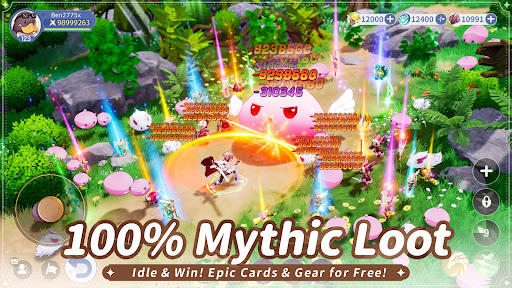
>>100% Drop Rate, Epic Gear and Cards Come Easy, Idle and Win Effortlessly
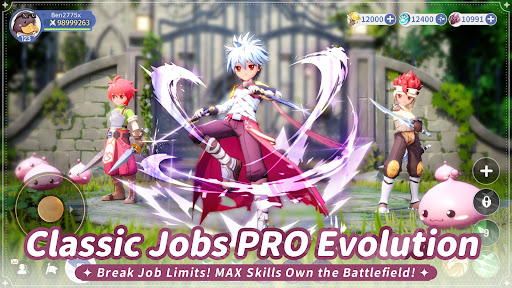
>>Hero Transformation, MVP Monsters Evolve, Awakened Heroes Surge with Power
>>Adventure Team, Fight Side by Side with Friends, Double the Fun in Team Battles
>>Classic Pets & Monsters Return, Join You on a Brand-New Adventure in Prontera
>>Unique Costumes, 1000+ OOTD Combos, Style Freely with Ultimate Fashion
>>Enter the Game NOW to Claim 100 Treasure Gacha, the Limited Mount Fire Drake, and the Rare Wings!
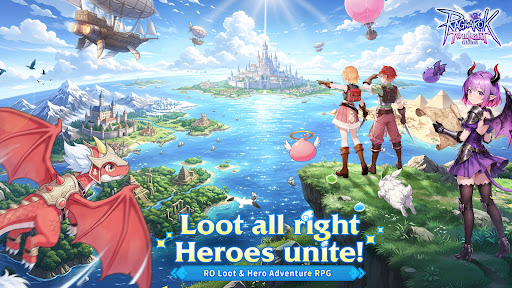
Ragnarok: Twilight Global is a brand-new MMORPG in the Ragnarok IP series. As the first RO mobile game featuring “100% Drop Rate” + “Hero Transformation”, it perfectly blends classic RO elements with innovative gameplay. The game not only brings back iconic elements such as nostalgic BGM, adorable pets like Poring and Raging Lunatic, classic MVP monsters like Baphomet and Phreeoni, and a versatile fashion system, but also faithfully recreates the complete job changing system from Novice to Swordsman, Acolyte, Mage, Thief, and Archer.
This time, in-game rewards have been greatly increased. Defeating MVPs guarantees a 100% gear drop, and players can grow stronger easily even through idle gameplay. The debut Hero Transformation System allows players to transform into legendary MVP/BOSS heroes such as Baphomet, while the Adventure Team Mode lets you experience the social fun of exploring dungeons and defeating bosses with friends.
【Classic IP, A Brand-New Journey】
A perfect fusion of RO classic elements and innovative gameplay! As the familiar BGM begins to play, memories instantly come flooding back. The adorable mount Poring mount and pet Raging Lunatic return to accompany your journey! Classic MVP monsters like Baphomet and Phreeoni are waiting for your challenge.
【100% Drop Rate, Grow Strong While You Relax】
The most generous RO is here! No need to purchase equipment. You can defeat MVPs for 100% epic gear drops! Strengthen effortlessly through idle gameplay, with 20 hours of offline auto-battling. Log back in to claim massive EXP, epic gear, and cards, and reach Level 150 in just one hour! There are also Exclusive MVP Dungeons with no monster competition. Solo players can freely farm bosses and grow rapidly without pressure.
【Hero Transformation, MVP Evolution】
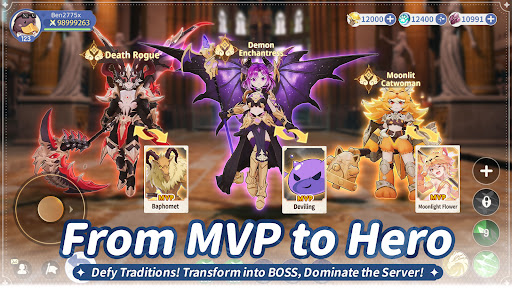
MVP monsters undergo ultimate evolution and appear as powerful heroes, allowing you to break through combat limits and transform into mighty bosses within the game!
When Angeling evolves into the Blazing Angel, and Deviling awakens its dark power to become the Demon Enchantress, the once-familiar MVP monsters transcend dimensions and evolve into heroes with mythic power.
【Adventure Team, Double the Fun】
Say goodbye to solo adventures and enjoy relaxed social gameplay! Team up with friends to form an Adventure Team, clear main story missions and dungeons together, and participate in guild wars to seize the throne of the royal castle. No need to worry about insufficient combat power --get carried anytime! The special Couple System even allows you to deepen bonds while adventuring together, fulfilling both friendship and romance.
【Unique Costumes, Style Your Way】
With 1000+ OOTD combos, express your style freely! Create your exclusive look with DIY outfits, switching effortlessly from cute styles to cool aesthetics. Dynamic wings, headgear costumes, chat expressions, and many other cosmetic options are available, allowing you to begin a brand-new adventure in style as a Novice.
For more updates and gameplay reveals, please stay tuned to the official Ragnarok: Twilight Global Facebook page.
Pre-registration: https://pse.is/8wq2k5
Official Community Channels: https://rotl.onelink.me/HtQJ/70mbpgxe
แสดงเพิ่มเติม

1. ดาวน์โหลดตัวติดตั้ง MEmu และสิ้นสุดการติดตั้ง

2. เริ่ม MEmu จากนั้นเปิด Google Play บนหน้าแรก

3. ค้นหา Ragnarok: Twilight Global ใน Google Play
Install
4. ดาวน์โหลดและติดตั้ง Ragnarok: Twilight Global
5. เมื่อติดตั้งเสร็จให้คลิกที่ไอคอนเพื่อเริ่มใช้งาน

6. สนุกกับการเล่น Ragnarok: Twilight Global บนพีซีด้วย MEmu
MEmu App Player เป็นอีมูเลเตอร์ Android ที่ดีที่สุดและผู้คนกว่า 50 ล้านคนเพลิดเพลินไปกับประสบการณ์การเล่นเกม Android ที่ยอดเยี่ยม เทคโนโลยีการจำลองเสมือนของ MEmu ช่วยให้คุณเล่นเกม Android หลายพันเกมได้อย่างราบรื่นบนพีซีของคุณแม้แต่เกมที่ต้องใช้กราฟิกมากที่สุด
จอใหญ่และกราฟฟิกสวยกว่า; เล่นได้นาน, ไม่ต้องใช้แบตเตอรี่โทรศัพท์หรือเน็ตโทรศัพท์.
ระบบปรับแต่งปุ่มคีย์บอร์ดและเม้าส์ตามที่คุณเลือก
เล่นมากกว่าหนึ่งเกมบน PC ในเวลาเดียวกันด้วยระบบหลายจอหรือ Multi-Instance manager.
Play Ragnarok: Twilight Global on PC by following steps: