Ragnarok: Yggdrasil
อัปเดตเมื่อ
เวอร์ชันปัจจุบัน
ให้บริการโดย

เวลาคุณเล่น Ragnarok: Yggdrasil, คุณอาจรู้สึกว่ามือคุณอาจบังจอแล้วทำให้ไม่ได้เล่นแบบเต็มที่. เล่นแบบไร้ขีดจำกัดด้วยเม้าส์และคีย์บอร์ด. MEmu มีตัวเลือกหลายอย่างให้คุณใช้งานเกมที่คุณเล่นแบบที่คุณต้องการ. ดาวน์โหลดและเล่น Ragnarok: Yggdrasil บน PC. เล่นนานแค่ไหนก็ได้, ไม่ต้องชาร์จแบตเตอรี่, หรือเจอคนโทรเข้ามาระหว่างเล่น. MEmu 9 เป็นตัวเลือกสำหรับการเล่น Ragnarok: Yggdrasil บน PC. ทางทีมงานเราได้ปรับแต่งเกม, ปรับให้เล่นเกมบางเกมได้เหมือนเล่น Ragnarok: Yggdrasil เป็นเกม PC เช่นเล็งด้วยเม้าส์หรือใช้คีย์บอร์ด. ระบบของเรายังทำให้คุณสามารถเปิดเล่นได้มากกว่า 2 เกมพร้อมๆกันในคอมของคุณ. และที่สำคัญที่สุด, ระบบโปรแกรมของเราสามารถทำให้คุณใช้ระบบของ PC ทำให้เกมลื่นเหมือนกับใช้โทรศัพท์รุ่นล่าสุด. เราไม่ได้ดูแลเรื่องการเล่นเกม, แต่เราดูแลถึงความสนุกสนานที่คุณได้จากการเล่นด้วย.
แสดงเพิ่มเติม
ดาวน์โหลด Ragnarok: Yggdrasil บน PC ด้วย MEmu Android Emulator สนุกกับการเล่นบนหน้าจอขนาดใหญ่ Facebook:https://www.
Facebook:https://www.facebook.com/profile.php?id=61593311410496#
INS:https://www.instagram.com/ragnarok_yggdrasil/
Youtube:https://www.youtube.com/@RagnarokYggdrasil
Discord:https://discord.gg/2qu8HzyuMP
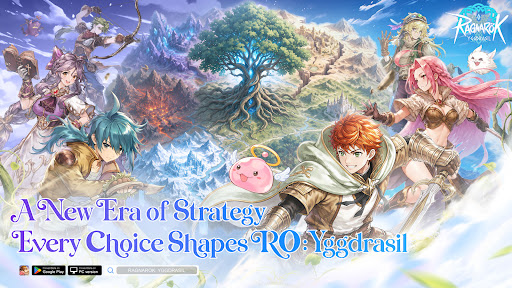
The World Tree is withering, its vitality fading. Six divine clans clash without end, and the fate of Midgard rests in your hands. Built on classic RO character and real-time combat, ROY deeply integrates SLG sandbox strategy to unleash an unprecedented divine realm war.
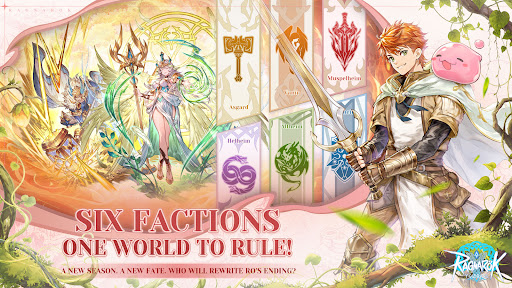
[Six Clans Rise · Hundred-City Warfare] Six divine factions hold their ground across a vast sandbox of 76 cities and 30 passes. Advance from starter zones to resource heartlands to the core — forge alliances, betray rivals, lay siege, ignite 300-player same-screen kingdom battles now!
[Seasonal Warfare · Ever-Changing Battlefields] 13-week seasons with fully refreshed maps and rules every cycle — new and veteran players compete on equal footing. Every campaign you wage reshapes the World Tree's destiny and writes your faction's legend.
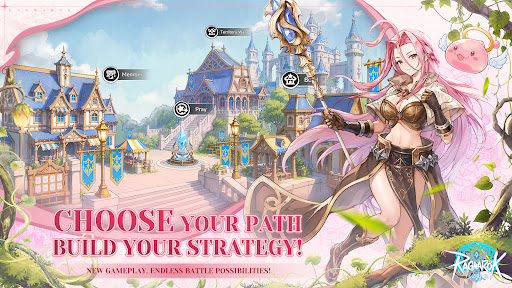
[War & Wisdom · Every Player Matters] Heavy hitters charge the frontline, builders run logistics and production, diplomats maneuver behind the scenes — no matter your skill level, everyone has a role to play and a stake in the outcome.
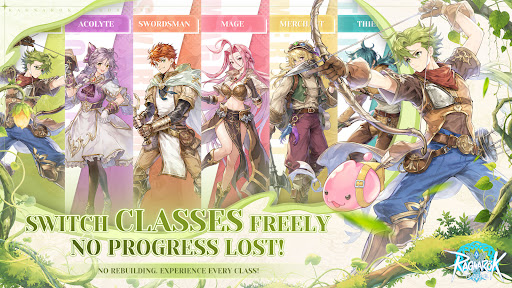
[Fair Progression · Free Job Switching] Class switching without any regression or loss, dual economy of Exchange + Merchant Guild, and power gaps strictly controlled from the ground up. Trade to Win — everyone can truly fight.
[Classic Reborn · Visual Upgrade] Hard cel-shading art style been fully upgraded, cuter and more refined characters, yet classic scenes reimagined. Familiar jobs and melodies, a brand-new divine realm adventure!
Rally your guild, choose your clan, and fight for your future beneath Yggdrasil.
แสดงเพิ่มเติม

1. ดาวน์โหลดตัวติดตั้ง MEmu และสิ้นสุดการติดตั้ง

2. เริ่ม MEmu จากนั้นเปิด Google Play บนหน้าแรก

3. ค้นหา Ragnarok: Yggdrasil ใน Google Play
Install
4. ดาวน์โหลดและติดตั้ง Ragnarok: Yggdrasil
5. เมื่อติดตั้งเสร็จให้คลิกที่ไอคอนเพื่อเริ่มใช้งาน

6. สนุกกับการเล่น Ragnarok: Yggdrasil บนพีซีด้วย MEmu
MEmu App Player เป็นอีมูเลเตอร์ Android ที่ดีที่สุดและผู้คนกว่า 50 ล้านคนเพลิดเพลินไปกับประสบการณ์การเล่นเกม Android ที่ยอดเยี่ยม เทคโนโลยีการจำลองเสมือนของ MEmu ช่วยให้คุณเล่นเกม Android หลายพันเกมได้อย่างราบรื่นบนพีซีของคุณแม้แต่เกมที่ต้องใช้กราฟิกมากที่สุด
จอใหญ่และกราฟฟิกสวยกว่า; เล่นได้นาน, ไม่ต้องใช้แบตเตอรี่โทรศัพท์หรือเน็ตโทรศัพท์.
ระบบปรับแต่งปุ่มคีย์บอร์ดและเม้าส์ตามที่คุณเลือก
เล่นมากกว่าหนึ่งเกมบน PC ในเวลาเดียวกันด้วยระบบหลายจอหรือ Multi-Instance manager.
Play Ragnarok: Yggdrasil on PC by following steps:






















![[ไกด์เกม] CookieRun Classic แนะนำ 5 คุกกี้น่าปั้น น่าลงทุน ที่มือใหม่ห้ามพลาด! (เล่นบน PC ผ่าน MEmu ให้ลื่นสุด ๆ) PC](https://www.memuplay.com/blog/wp-content/uploads/2026/08/579c01ab-a953-45b3-8115-9b6279b7d6f9.png)


















