Slime Rancher
อัปเดตเมื่อ
เวอร์ชันปัจจุบัน
1.1.1103
ให้บริการโดย

เวลาคุณเล่น Slime Rancher, คุณอาจรู้สึกว่ามือคุณอาจบังจอแล้วทำให้ไม่ได้เล่นแบบเต็มที่. เล่นแบบไร้ขีดจำกัดด้วยเม้าส์และคีย์บอร์ด. MEmu มีตัวเลือกหลายอย่างให้คุณใช้งานเกมที่คุณเล่นแบบที่คุณต้องการ. ดาวน์โหลดและเล่น Slime Rancher บน PC. เล่นนานแค่ไหนก็ได้, ไม่ต้องชาร์จแบตเตอรี่, หรือเจอคนโทรเข้ามาระหว่างเล่น. MEmu 9 เป็นตัวเลือกสำหรับการเล่น Slime Rancher บน PC. ทางทีมงานเราได้ปรับแต่งเกม, ปรับให้เล่นเกมบางเกมได้เหมือนเล่น Slime Rancher เป็นเกม PC เช่นเล็งด้วยเม้าส์หรือใช้คีย์บอร์ด. ระบบของเรายังทำให้คุณสามารถเปิดเล่นได้มากกว่า 2 เกมพร้อมๆกันในคอมของคุณ. และที่สำคัญที่สุด, ระบบโปรแกรมของเราสามารถทำให้คุณใช้ระบบของ PC ทำให้เกมลื่นเหมือนกับใช้โทรศัพท์รุ่นล่าสุด. เราไม่ได้ดูแลเรื่องการเล่นเกม, แต่เราดูแลถึงความสนุกสนานที่คุณได้จากการเล่นด้วย.
แสดงเพิ่มเติม
ดาวน์โหลด Slime Rancher บน PC ด้วย MEmu Android Emulator สนุกกับการเล่นบนหน้าจอขนาดใหญ่ เกม Slime Rancher เปิดให้เล่นแล้ว!

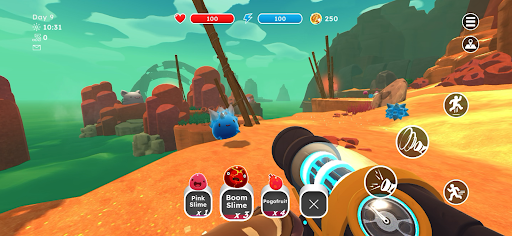
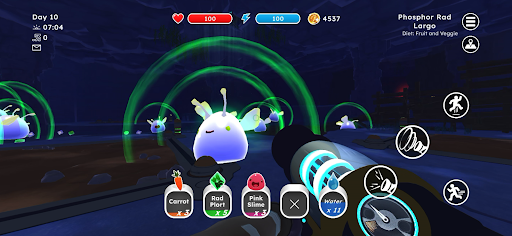
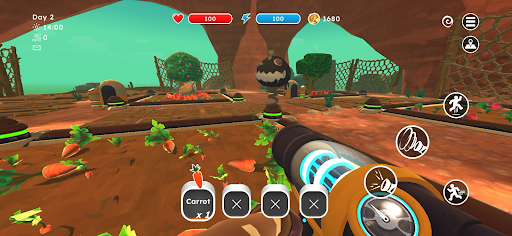
เกม Slime Rancher เปิดให้เล่นแล้ว!
Slime Rancher คือเรื่องราวของ Beatrix LeBeau สาวน้อยผู้กล้าหาญที่ออกเดินทางไปใช้ชีวิตไกลโพ้นโลกถึงพันปีแสงในดินแดนที่เรียกว่า ‘Far, Far Range’ ที่ซึ่งเธอพยายามหาเลี้ยงชีพด้วยการดูแลเหล่าสไลม์
[สำรวจโลกต่างดาวที่เต็มไปด้วยสีสัน จับและดูแลสไลม์แสนน่ารัก และฟื้นฟูฟาร์มที่เคยถูกทิ้งร้างให้กลับมามีชีวิตชีวาอีกครั้ง!]
*** คุณสมบัติ ***
- เล่นเป็นหญิงสาวผู้รักการผจญภัยและอยากรู้อยากเห็นที่พยายามฟื้นฟูฟาร์มสไลม์ที่เธอเพิ่งได้มา
- ใช้กระเป๋าดูดสไลม์คู่ใจของคุณเพื่อเก็บสไลม์แสนน่ารักในป่า สไลม์แต่ละชนิดมีสิ่งที่ชอบ ไม่ชอบ และบางครั้งก็มีความต้องการพิเศษที่ต้องตอบสนองเพื่อดูแลพวกมันอย่างเหมาะสม!
- ค้นพบสายพันธุ์ลูกผสมใหม่!
- สำรวจธรรมชาติอันกว้างใหญ่และสีสันสดใสของ Far, Far Range ค้นหาสไลม์และรวบรวมทรัพยากร!
- ท่องไปในผืนทรายของแนวปะการังแห้ง สำรวจพืชพรรณป่าบนผืนมอส และตื่นตาตื่นใจไปกับผลึกแวววาวของเหมืองคราม พร้อมค้นหาสมบัติที่ซ่อนอยู่!
- หารายได้จากการทำภารกิจประจำวันหรือการแลกเปลี่ยนในตลาดเพื่อขยายฟาร์มของคุณ: ตกแต่งบ้านไร่ กั้นคอกให้สไลม์ ปลูกพืช และสร้างเล้าไก่เพื่อเลี้ยงพวกมัน
- หารายได้จากการทำภารกิจประจำวันในตลาดแลกเปลี่ยน หรือขายพอร์ตในตลาดพอร์ต จากนั้นตกแต่งบ้านไร่ ขยายคอกสำหรับสไลม์ และเลี้ยงพวกมันด้วยการปลูกสวนและสร้างเล้าไก่!
- สร้างและอัปเกรดกระเป๋าดูดฝุ่นและเครื่องมือของคุณเพื่อการทำฟาร์มที่เร็วขึ้นและดีขึ้น!
- ติดตามการเดินทางของบีในแบบของคุณเองด้วย 3 โหมดเกมที่แตกต่างกัน! โหมดผจญภัยให้คุณได้สัมผัสกับความยากลำบากและความท้าทายของชีวิตการทำฟาร์มอย่างแท้จริง แต่คุณยังสามารถเล่นโหมดสบายๆ หรือท้าทายตัวเองให้ประสบความสำเร็จเร็วขึ้นด้วยโหมดเร่งด่วน!
ออกแบบใหม่หมดจดเพื่อมือถือ
- อินเทอร์เฟซที่ปรับปรุงใหม่ – UI มือถือสุดพิเศษพร้อมการควบคุมด้วยระบบสัมผัสอย่างสมบูรณ์
- ความสำเร็จของ Google Play Games
- ใช้งานได้เฉพาะกับคอนโทรลเลอร์ PS4, PS5 และ Xbox เท่านั้น
- บันทึกบนคลาวด์ – แชร์ความคืบหน้าของคุณระหว่างอุปกรณ์ Android
แสดงเพิ่มเติม

1. ดาวน์โหลดตัวติดตั้ง MEmu และสิ้นสุดการติดตั้ง

2. เริ่ม MEmu จากนั้นเปิด Google Play บนหน้าแรก

3. ค้นหา Slime Rancher ใน Google Play
Install
4. ดาวน์โหลดและติดตั้ง Slime Rancher
5. เมื่อติดตั้งเสร็จให้คลิกที่ไอคอนเพื่อเริ่มใช้งาน

6. สนุกกับการเล่น Slime Rancher บนพีซีด้วย MEmu
MEmu App Player เป็นอีมูเลเตอร์ Android ที่ดีที่สุดและผู้คนกว่า 50 ล้านคนเพลิดเพลินไปกับประสบการณ์การเล่นเกม Android ที่ยอดเยี่ยม เทคโนโลยีการจำลองเสมือนของ MEmu ช่วยให้คุณเล่นเกม Android หลายพันเกมได้อย่างราบรื่นบนพีซีของคุณแม้แต่เกมที่ต้องใช้กราฟิกมากที่สุด
จอใหญ่และกราฟฟิกสวยกว่า; เล่นได้นาน, ไม่ต้องใช้แบตเตอรี่โทรศัพท์หรือเน็ตโทรศัพท์.
ระบบปรับแต่งปุ่มคีย์บอร์ดและเม้าส์ตามที่คุณเลือก
เล่นมากกว่าหนึ่งเกมบน PC ในเวลาเดียวกันด้วยระบบหลายจอหรือ Multi-Instance manager.
Play Slime Rancher on PC by following steps: