Sweet Dance
อัปเดตเมื่อ
เวอร์ชันปัจจุบัน
23.3
ให้บริการโดย

เวลาคุณเล่น Sweet Dance, คุณอาจรู้สึกว่ามือคุณอาจบังจอแล้วทำให้ไม่ได้เล่นแบบเต็มที่. เล่นแบบไร้ขีดจำกัดด้วยเม้าส์และคีย์บอร์ด. MEmu มีตัวเลือกหลายอย่างให้คุณใช้งานเกมที่คุณเล่นแบบที่คุณต้องการ. ดาวน์โหลดและเล่น Sweet Dance บน PC. เล่นนานแค่ไหนก็ได้, ไม่ต้องชาร์จแบตเตอรี่, หรือเจอคนโทรเข้ามาระหว่างเล่น. MEmu 9 เป็นตัวเลือกสำหรับการเล่น Sweet Dance บน PC. ทางทีมงานเราได้ปรับแต่งเกม, ปรับให้เล่นเกมบางเกมได้เหมือนเล่น Sweet Dance เป็นเกม PC เช่นเล็งด้วยเม้าส์หรือใช้คีย์บอร์ด. ระบบของเรายังทำให้คุณสามารถเปิดเล่นได้มากกว่า 2 เกมพร้อมๆกันในคอมของคุณ. และที่สำคัญที่สุด, ระบบโปรแกรมของเราสามารถทำให้คุณใช้ระบบของ PC ทำให้เกมลื่นเหมือนกับใช้โทรศัพท์รุ่นล่าสุด. เราไม่ได้ดูแลเรื่องการเล่นเกม, แต่เราดูแลถึงความสนุกสนานที่คุณได้จากการเล่นด้วย.
แสดงเพิ่มเติม
ดาวน์โหลด Sweet Dance บน PC ด้วย MEmu Android Emulator สนุกกับการเล่นบนหน้าจอขนาดใหญ่ 【ยิงฉันด้วยความรักของคุณ】.

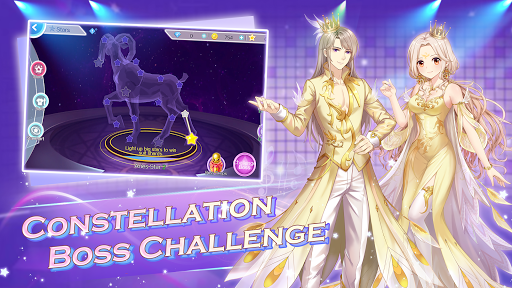
【ยิงฉันด้วยความรักของคุณ】
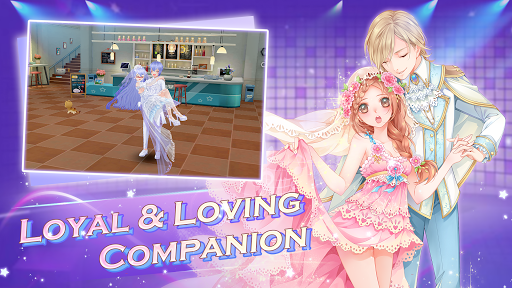
ประสบการณ์ทางสังคมที่เต็มอิ่มและแสนหวานจะเติมเต็มจินตนาการแห่งความรักของคุณทั้งหมด วิธีการโต้ตอบที่หลากหลายทำให้ความรักของคุณกับคู่รักลึกซึ้งยิ่งขึ้นในแต่ละวัน ขี่รถไปด้วยกันเพื่อแสดงความรักของคุณให้ไม่มีใครเห็น ไดอารี่คู่รักสุดน่ารักจะทำให้ทุกวันของคุณเต็มไปด้วยความประหลาดใจ!
“ฉันอยากเป็นคำทักทายและคำอำลาที่ไพเราะที่สุดของคุณ”
【จังหวะดนตรีคือจังหวะหัวใจของฉันสำหรับคุณ】
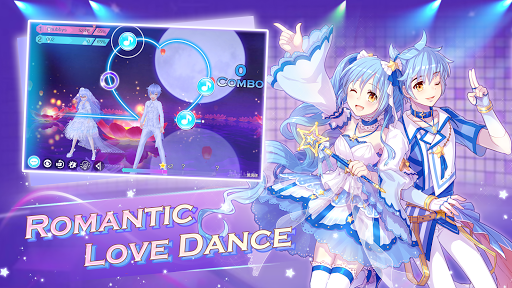
ออกสู่ฟลอร์เต้นรำพร้อมกับเพลงฮิตที่ได้รับอนุญาตมากมายและโหมดเกมที่หลากหลายพร้อมท่าเต้นล่าสุด! โหมดเทรลดั้งเดิมช่วยให้คุณแสดงความรักของคุณได้ด้วยทุกจังหวะและทุกเส้นทาง!
“ทุกเส้นทางและทุกเส้นคือเบาะแสที่ฉันต้องการทำให้คุณเป็นของฉัน”
【ด้วยเอลฟ์ คุณไม่ได้อยู่คนเดียว】
ประสบการณ์ที่ดื่มด่ำของการโต้ตอบกับเอลฟ์ทำให้มันเป็นมากกว่า "สัตว์เลี้ยง" สัมผัสความสนุกสนานโดยการรวมตัวกับเอลฟ์ของคุณและขึ้นขี่บนนั้นและเล่นด้วยกันบนฟลอร์เต้นรำ คุณและเอลฟ์ของคุณจะมีเวลาที่ยอดเยี่ยมและยอดเยี่ยมในการเล่นเกม “โปรดดูแลฉันตลอดชีวิต”
【คุณคือสุดยอดไอดอล】
ระบบใหม่ล่าสุด Idol Trainee มอบประสบการณ์การเล่นเกมที่น่าตื่นเต้นยิ่งขึ้นให้กับคุณ สร้างกลุ่มไอดอลกับผู้ฝึกหัดคนอื่นๆ ฝึกซ้อม รับงาน และต่อสู้เพื่อการแข่งขันไอดอลเพื่อเป็นดาราที่เจิดจรัสที่สุด!
“ฉันจะเป็นศูนย์กลางของโลกเพื่อตอบแทนเสียงเชียร์ของคุณตลอดเส้นทางของฉัน”
ตอนนี้ไฟฉายพร้อมแล้ว ดีเจพร้อมแล้ว และผู้ชมก็รออยู่
มาเลยไอดอลของฉัน มาร็อคแอนด์โรลกันเถอะ!
แฟนเพจ Facebook:https://www.facebook.com/SweetDanceGlobal/
แสดงเพิ่มเติม

1. ดาวน์โหลดตัวติดตั้ง MEmu และสิ้นสุดการติดตั้ง

2. เริ่ม MEmu จากนั้นเปิด Google Play บนหน้าแรก

3. ค้นหา Sweet Dance ใน Google Play
Install
4. ดาวน์โหลดและติดตั้ง Sweet Dance
5. เมื่อติดตั้งเสร็จให้คลิกที่ไอคอนเพื่อเริ่มใช้งาน

6. สนุกกับการเล่น Sweet Dance บนพีซีด้วย MEmu
MEmu App Player เป็นอีมูเลเตอร์ Android ที่ดีที่สุดและผู้คนกว่า 50 ล้านคนเพลิดเพลินไปกับประสบการณ์การเล่นเกม Android ที่ยอดเยี่ยม เทคโนโลยีการจำลองเสมือนของ MEmu ช่วยให้คุณเล่นเกม Android หลายพันเกมได้อย่างราบรื่นบนพีซีของคุณแม้แต่เกมที่ต้องใช้กราฟิกมากที่สุด
จอใหญ่และกราฟฟิกสวยกว่า; เล่นได้นาน, ไม่ต้องใช้แบตเตอรี่โทรศัพท์หรือเน็ตโทรศัพท์.
ระบบปรับแต่งปุ่มคีย์บอร์ดและเม้าส์ตามที่คุณเลือก
เล่นมากกว่าหนึ่งเกมบน PC ในเวลาเดียวกันด้วยระบบหลายจอหรือ Multi-Instance manager.
Play Sweet Dance on PC by following steps: