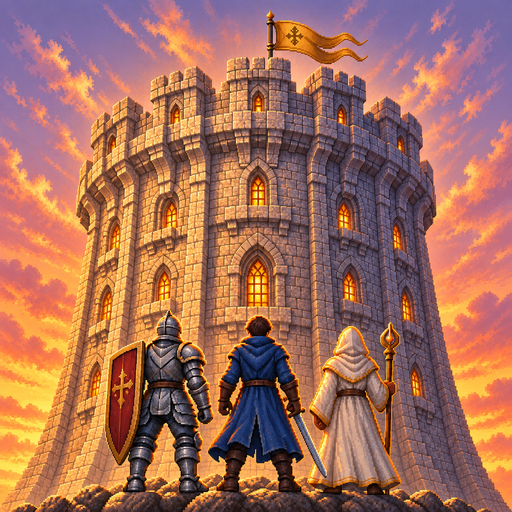
Tower & Mercenaries: Guild RPG
อัปเดตเมื่อ
เวอร์ชันปัจจุบัน
1.22.2
ให้บริการโดย

เวลาคุณเล่น Tower & Mercenaries: Guild RPG, คุณอาจรู้สึกว่ามือคุณอาจบังจอแล้วทำให้ไม่ได้เล่นแบบเต็มที่. เล่นแบบไร้ขีดจำกัดด้วยเม้าส์และคีย์บอร์ด. MEmu มีตัวเลือกหลายอย่างให้คุณใช้งานเกมที่คุณเล่นแบบที่คุณต้องการ. ดาวน์โหลดและเล่น Tower & Mercenaries: Guild RPG บน PC. เล่นนานแค่ไหนก็ได้, ไม่ต้องชาร์จแบตเตอรี่, หรือเจอคนโทรเข้ามาระหว่างเล่น. MEmu 9 เป็นตัวเลือกสำหรับการเล่น Tower & Mercenaries: Guild RPG บน PC. ทางทีมงานเราได้ปรับแต่งเกม, ปรับให้เล่นเกมบางเกมได้เหมือนเล่น Tower & Mercenaries: Guild RPG เป็นเกม PC เช่นเล็งด้วยเม้าส์หรือใช้คีย์บอร์ด. ระบบของเรายังทำให้คุณสามารถเปิดเล่นได้มากกว่า 2 เกมพร้อมๆกันในคอมของคุณ. และที่สำคัญที่สุด, ระบบโปรแกรมของเราสามารถทำให้คุณใช้ระบบของ PC ทำให้เกมลื่นเหมือนกับใช้โทรศัพท์รุ่นล่าสุด. เราไม่ได้ดูแลเรื่องการเล่นเกม, แต่เราดูแลถึงความสนุกสนานที่คุณได้จากการเล่นด้วย.
แสดงเพิ่มเติม
ดาวน์โหลด Tower & Mercenaries: Guild RPG บน PC ด้วย MEmu Android Emulator สนุกกับการเล่นบนหน้าจอขนาดใหญ่ You lead a mercenary company.
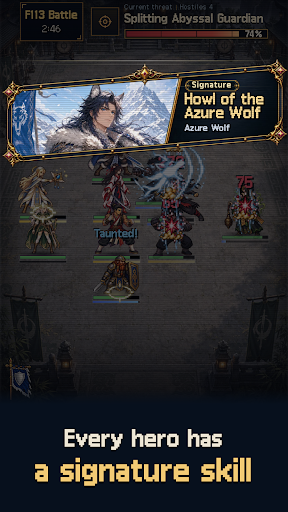
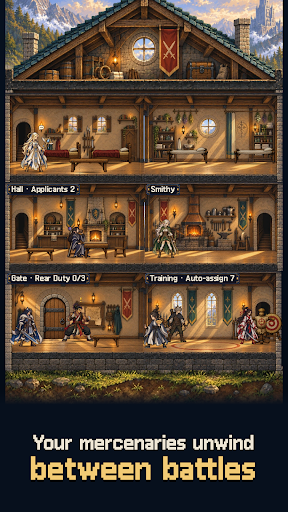
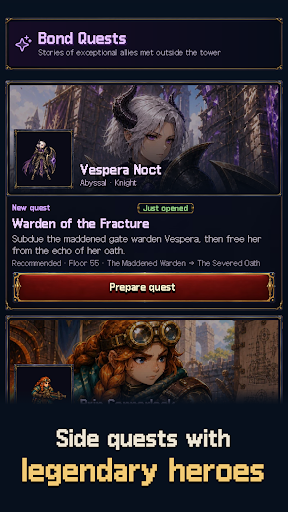

You lead a mercenary company.
A tower connects worlds. Climb through a ruined kingdom, misty bamboo forests and an empire of steel and gunpowder toward the dragon's nest. Defeat the ancient dragon on floor 50 to close the first chapter, then enter the Abyss from floor 51. The story runs all the way to an ending at the top, on floor 999.
Tower & Mercenaries is a mercenary management sim and auto-battle strategy RPG. Battles play out on their own. Who you bring and where you place them is up to you.
[Recruit and raise]
Mercenaries from six races and ten classes apply to join. Judge their potential, then assign training, rest and wages. Age, fatigue and morale shape your strength. Share out gear and upgrade facilities before each expedition. The higher you climb, the better the applicants who come knocking.
[Set the formation and watch]
Place five across a front and back row, or six once you earn the perk. Picking who holds the front, who heals and who hunts the enemy back row decides the fight. The battle forecast points out weak spots, and each floor's mutations call for a different party and relics.
[Named heroes and signature skills]
Fourteen named heroes join with skills and stories of their own. Ordinary mercenaries split into three skills per class, so two of the same class can play very differently.
[The Abyss and the end of growth]
Awaken members through the Abyss Rite to raise their potential, and purify them if you change your mind. Members who reach SS can pass personal trials to break through to SS+, recruits included.
[Your company's history]
Companions grow, age, retire and sometimes fall in the tower. The Corridor of Rebirth can call the departed back. Inside the tower you meet rival companies to trade with or fight. The chronicle and codex keep every story.
[A next goal in sight]
"Next unlock" on your base lists upcoming named heroes, story chapters and trials in floor order. Material dungeons, weekly raids, Abyss contracts and perks give you goals beyond the climb.
Hand-drawn pixel art, fully offline, no account needed.
No ads or subscriptions. One purchase takes you to the floor 999 ending.
한국어 · English · 日本語 · 繁體中文
แสดงเพิ่มเติม

1. ดาวน์โหลดตัวติดตั้ง MEmu และสิ้นสุดการติดตั้ง

2. เริ่ม MEmu จากนั้นเปิด Google Play บนหน้าแรก

3. ค้นหา Tower & Mercenaries: Guild RPG ใน Google Play
Install
4. ดาวน์โหลดและติดตั้ง Tower & Mercenaries: Guild RPG
5. เมื่อติดตั้งเสร็จให้คลิกที่ไอคอนเพื่อเริ่มใช้งาน

6. สนุกกับการเล่น Tower & Mercenaries: Guild RPG บนพีซีด้วย MEmu
MEmu App Player เป็นอีมูเลเตอร์ Android ที่ดีที่สุดและผู้คนกว่า 50 ล้านคนเพลิดเพลินไปกับประสบการณ์การเล่นเกม Android ที่ยอดเยี่ยม เทคโนโลยีการจำลองเสมือนของ MEmu ช่วยให้คุณเล่นเกม Android หลายพันเกมได้อย่างราบรื่นบนพีซีของคุณแม้แต่เกมที่ต้องใช้กราฟิกมากที่สุด
จอใหญ่และกราฟฟิกสวยกว่า; เล่นได้นาน, ไม่ต้องใช้แบตเตอรี่โทรศัพท์หรือเน็ตโทรศัพท์.
ระบบปรับแต่งปุ่มคีย์บอร์ดและเม้าส์ตามที่คุณเลือก
เล่นมากกว่าหนึ่งเกมบน PC ในเวลาเดียวกันด้วยระบบหลายจอหรือ Multi-Instance manager.
Play Tower & Mercenaries: Guild RPG on PC by following steps:























![[ไกด์เกม] CookieRun Classic แนะนำ 5 คุกกี้น่าปั้น น่าลงทุน ที่มือใหม่ห้ามพลาด! (เล่นบน PC ผ่าน MEmu ให้ลื่นสุด ๆ) PC](https://www.memuplay.com/blog/wp-content/uploads/2026/08/579c01ab-a953-45b3-8115-9b6279b7d6f9.png)