Warhammer 40,000: Dawn of War IV
อัปเดตเมื่อ
เวอร์ชันปัจจุบัน
ให้บริการโดย

เวลาคุณเล่น Warhammer 40,000: Dawn of War IV, คุณอาจรู้สึกว่ามือคุณอาจบังจอแล้วทำให้ไม่ได้เล่นแบบเต็มที่. เล่นแบบไร้ขีดจำกัดด้วยเม้าส์และคีย์บอร์ด. MEmu มีตัวเลือกหลายอย่างให้คุณใช้งานเกมที่คุณเล่นแบบที่คุณต้องการ. ดาวน์โหลดและเล่น Warhammer 40,000: Dawn of War IV บน PC. เล่นนานแค่ไหนก็ได้, ไม่ต้องชาร์จแบตเตอรี่, หรือเจอคนโทรเข้ามาระหว่างเล่น. MEmu 9 เป็นตัวเลือกสำหรับการเล่น Warhammer 40,000: Dawn of War IV บน PC. ทางทีมงานเราได้ปรับแต่งเกม, ปรับให้เล่นเกมบางเกมได้เหมือนเล่น Warhammer 40,000: Dawn of War IV เป็นเกม PC เช่นเล็งด้วยเม้าส์หรือใช้คีย์บอร์ด. ระบบของเรายังทำให้คุณสามารถเปิดเล่นได้มากกว่า 2 เกมพร้อมๆกันในคอมของคุณ. และที่สำคัญที่สุด, ระบบโปรแกรมของเราสามารถทำให้คุณใช้ระบบของ PC ทำให้เกมลื่นเหมือนกับใช้โทรศัพท์รุ่นล่าสุด. เราไม่ได้ดูแลเรื่องการเล่นเกม, แต่เราดูแลถึงความสนุกสนานที่คุณได้จากการเล่นด้วย.
แสดงเพิ่มเติม
ดาวน์โหลด Warhammer 40,000: Dawn of War IV บน PC ด้วย MEmu Android Emulator สนุกกับการเล่นบนหน้าจอขนาดใหญ่ Warhammer 40,000: Dawn of War IV marks a powerful return to the core elements that made the original real-time strategy titles in the series so captivating.
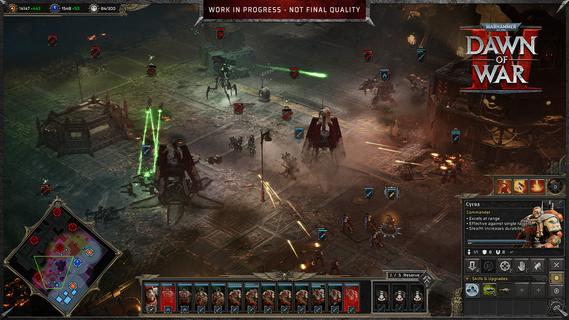
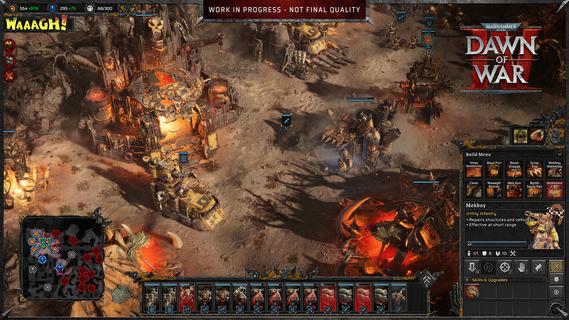
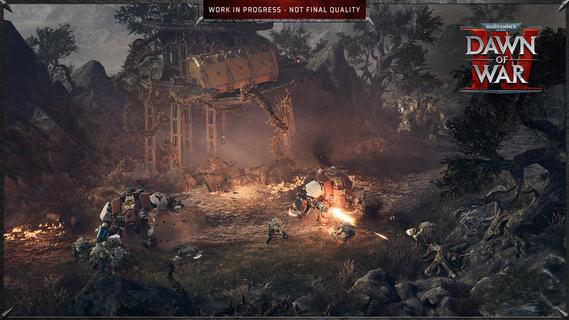
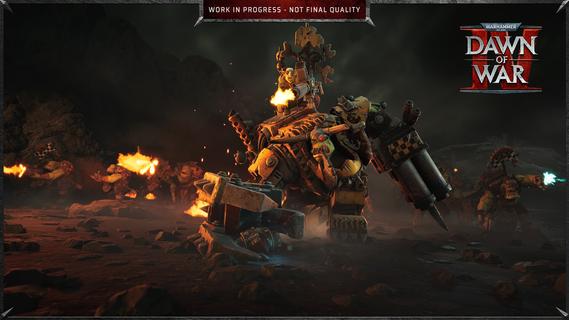
Warhammer 40,000: Dawn of War IV marks a powerful return to the core elements that made the original real-time strategy titles in the series so captivating. This installment blends the deep strategic gameplay fans crave with modern enhancements, delivering a rich and immersive experience that both newcomers and longtime players can enjoy. In Dawn of War IV, players take command of four distinct factions within the Warhammer 40,000 universe, each with its own unique style, strengths, and tactics. Notably, this is the first time the Adeptus Mechanicus, a faction known for its technological prowess and arcane machinery, appears in a Dawn of War game. Their inclusion brings fresh dynamics and strategic options to the battlefield, encouraging players to explore new ways of commanding forces and dominating their enemies. The campaign mode is a major highlight, featuring over seventy missions that span a gripping narrative full of epic battles, strategic challenges, and dramatic encounters. Every mission is meticulously designed to test your tactical creativity, resource management, and ability to adapt to changing battlefield conditions. The story-driven campaigns also help to deepen players’ connection to the factions, lore, and characters, creating an engaging backdrop for the intense warfare. In addition to the campaign, Dawn of War IV offers a rich variety of gameplay modes to keep players entertained and challenged. The Last Stand mode delivers intense, cooperative multiplayer action where players must defend against waves of increasingly tough enemies, perfect for testing team coordination and strategic endurance. Skirmish mode lets players pit their skills against AI opponents in customizable battles, ideal for practice or quick competitive fun. Of course, multiplayer remains a key component of Dawn of War IV’s appeal, with a competitive scene that emphasizes strategy, timing, and adapting to your opponent’s moves. Players can choose their preferred faction and mechanics, fine-tune their tactics, and compete against others from around the world. The multiplayer mode provides endless replayability and a constant challenge for those who enjoy mastering complex strategic gameplay. Visually, Dawn of War IV impresses with detailed unit models, atmospheric environments, and war-torn battlefields that capture the grimdark aesthetic of the Warhammer 40,000 universe. The sound design and score complement the intense action, immersing players in the chaos and grandeur of futuristic warfare. Overall, Warhammer 40,000: Dawn of War IV successfully captures the essence of what made the Dawn of War series a beloved staple in RTS gaming. Its blend of deep strategy, diverse factions, expansive campaign, and multiplayer variety ensures a memorable experience that honors the franchise’s roots while pushing it forward into exciting new territory. Whether commanding the enigmatic Adeptus Mechanicus or clashing with other iconic factions, players embark on an epic journey of tactical warfare that challenges the mind and thrills the senses.
แสดงเพิ่มเติม

1. ดาวน์โหลดตัวติดตั้ง MEmu และสิ้นสุดการติดตั้ง

2. เริ่ม MEmu จากนั้นเปิด Google Play บนหน้าแรก

3. ค้นหา Warhammer 40,000: Dawn of War IV ใน Google Play
Install
4. ดาวน์โหลดและติดตั้ง Warhammer 40,000: Dawn of War IV
5. เมื่อติดตั้งเสร็จให้คลิกที่ไอคอนเพื่อเริ่มใช้งาน

6. สนุกกับการเล่น Warhammer 40,000: Dawn of War IV บนพีซีด้วย MEmu
MEmu App Player เป็นอีมูเลเตอร์ Android ที่ดีที่สุดและผู้คนกว่า 50 ล้านคนเพลิดเพลินไปกับประสบการณ์การเล่นเกม Android ที่ยอดเยี่ยม เทคโนโลยีการจำลองเสมือนของ MEmu ช่วยให้คุณเล่นเกม Android หลายพันเกมได้อย่างราบรื่นบนพีซีของคุณแม้แต่เกมที่ต้องใช้กราฟิกมากที่สุด
จอใหญ่และกราฟฟิกสวยกว่า; เล่นได้นาน, ไม่ต้องใช้แบตเตอรี่โทรศัพท์หรือเน็ตโทรศัพท์.
ระบบปรับแต่งปุ่มคีย์บอร์ดและเม้าส์ตามที่คุณเลือก
เล่นมากกว่าหนึ่งเกมบน PC ในเวลาเดียวกันด้วยระบบหลายจอหรือ Multi-Instance manager.
Play Warhammer 40,000: Dawn of War IV on PC by following steps: