
WARRIORS: Abyss
อัปเดตเมื่อ
เวอร์ชันปัจจุบัน
ให้บริการโดย

เวลาคุณเล่น WARRIORS: Abyss, คุณอาจรู้สึกว่ามือคุณอาจบังจอแล้วทำให้ไม่ได้เล่นแบบเต็มที่. เล่นแบบไร้ขีดจำกัดด้วยเม้าส์และคีย์บอร์ด. MEmu มีตัวเลือกหลายอย่างให้คุณใช้งานเกมที่คุณเล่นแบบที่คุณต้องการ. ดาวน์โหลดและเล่น WARRIORS: Abyss บน PC. เล่นนานแค่ไหนก็ได้, ไม่ต้องชาร์จแบตเตอรี่, หรือเจอคนโทรเข้ามาระหว่างเล่น. MEmu 9 เป็นตัวเลือกสำหรับการเล่น WARRIORS: Abyss บน PC. ทางทีมงานเราได้ปรับแต่งเกม, ปรับให้เล่นเกมบางเกมได้เหมือนเล่น WARRIORS: Abyss เป็นเกม PC เช่นเล็งด้วยเม้าส์หรือใช้คีย์บอร์ด. ระบบของเรายังทำให้คุณสามารถเปิดเล่นได้มากกว่า 2 เกมพร้อมๆกันในคอมของคุณ. และที่สำคัญที่สุด, ระบบโปรแกรมของเราสามารถทำให้คุณใช้ระบบของ PC ทำให้เกมลื่นเหมือนกับใช้โทรศัพท์รุ่นล่าสุด. เราไม่ได้ดูแลเรื่องการเล่นเกม, แต่เราดูแลถึงความสนุกสนานที่คุณได้จากการเล่นด้วย.
แสดงเพิ่มเติม
ดาวน์โหลด WARRIORS: Abyss บน PC ด้วย MEmu Android Emulator สนุกกับการเล่นบนหน้าจอขนาดใหญ่ WARRIORS: Abyss is an exhilarating roguelite action game that combines the iconic gameplay of the Warriors series with innovative mechanics and a rich, chaotic environment.
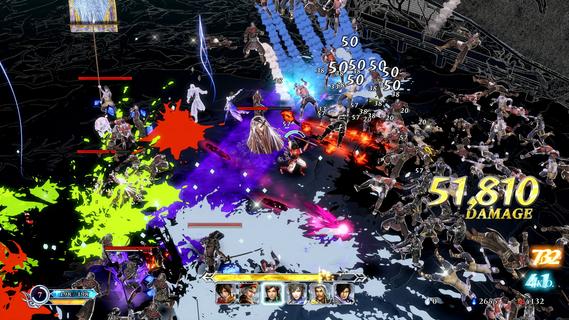

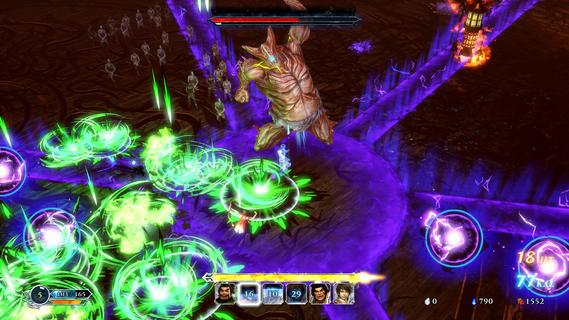
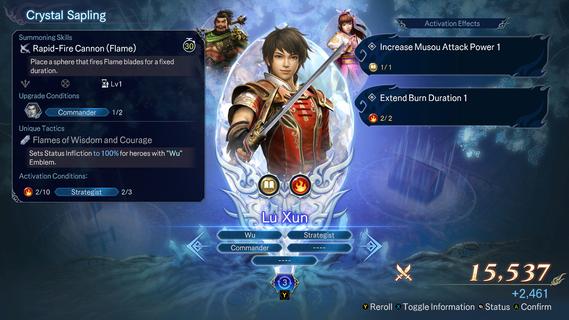
WARRIORS: Abyss is an exhilarating roguelite action game that combines the iconic gameplay of the Warriors series with innovative mechanics and a rich, chaotic environment. Set in the underworld, players embark on a journey to defeat the ancient evil known as Gouma, navigating through procedurally generated stages filled with hordes of enemies. With over 100 unique heroes to recruit, each possessing distinct abilities and traits, players have endless opportunities to create powerful combinations and strategies. The gameplay of WARRIORS: Abyss is reminiscent of classic hack-and-slash action, where players can engage in intense battles against thousands of foes. However, the game introduces a roguelite twist by incorporating randomly generated stages and elements, ensuring that no two playthroughs are ever the same. As players traverse the depths of hell, they will encounter various challenges and objectives that require quick thinking and adaptability. One of the standout features of WARRIORS: Abyss is its hero recruitment system. Players can summon heroes to join their cause during battles, allowing for dynamic team compositions. Each hero comes with unique abilities that can be synergized for devastating effects. The game encourages experimentation with different hero combinations, leading to countless strategic possibilities. Players can also enhance their heroes' abilities by collecting items and upgrading their stats throughout their runs. The progression system in WARRIORS: Abyss is designed to keep players engaged. After each run, players can spend resources to unlock new heroes or improve their base stats, making subsequent attempts more manageable. This loop of trial and error is central to the roguelite experience, as players learn from their defeats and refine their strategies over time. Visually, WARRIORS: Abyss boasts impressive graphics that bring the chaotic battles to life. The character models and animations are drawn from previous entries in the Warriors franchise, providing a familiar yet fresh aesthetic for fans of the series. The game’s environments are richly detailed, immersing players in the dark and treacherous world of the underworld. Boss battles in WARRIORS: Abyss present unique challenges that test players' skills and strategies. Each boss encounter requires players to deplete a protective barrier before dealing damage, adding an extra layer of complexity to these fights. While this mechanic can be frustrating at times, it also encourages players to develop effective tactics and work together with their summoned heroes. As players progress through the game, they will face increasingly difficult challenges that require careful planning and execution. The combination of fast-paced combat and strategic hero management creates a dynamic gameplay experience that keeps players on their toes. WARRIORS: Abyss embraces the essence of roguelite games by encouraging exploration and experimentation. Players are rewarded for taking risks and trying new strategies, making each run feel fresh and exciting. The thrill of discovering new heroes and unlocking powerful abilities adds depth to the gameplay. In conclusion, WARRIORS: Abyss is a captivating addition to the Warriors franchise that successfully blends action-packed combat with roguelite mechanics. With its diverse roster of heroes, engaging gameplay loop, and visually stunning environments, it offers an exhilarating experience for both new players and long-time fans alike. As players delve into the depths of hell to confront Gouma, they will find themselves immersed in a chaotic world filled with challenges and opportunities for glory.
แสดงเพิ่มเติม

1. ดาวน์โหลดตัวติดตั้ง MEmu และสิ้นสุดการติดตั้ง

2. เริ่ม MEmu จากนั้นเปิด Google Play บนหน้าแรก

3. ค้นหา WARRIORS: Abyss ใน Google Play
Install
4. ดาวน์โหลดและติดตั้ง WARRIORS: Abyss
5. เมื่อติดตั้งเสร็จให้คลิกที่ไอคอนเพื่อเริ่มใช้งาน

6. สนุกกับการเล่น WARRIORS: Abyss บนพีซีด้วย MEmu
MEmu App Player เป็นอีมูเลเตอร์ Android ที่ดีที่สุดและผู้คนกว่า 50 ล้านคนเพลิดเพลินไปกับประสบการณ์การเล่นเกม Android ที่ยอดเยี่ยม เทคโนโลยีการจำลองเสมือนของ MEmu ช่วยให้คุณเล่นเกม Android หลายพันเกมได้อย่างราบรื่นบนพีซีของคุณแม้แต่เกมที่ต้องใช้กราฟิกมากที่สุด
จอใหญ่และกราฟฟิกสวยกว่า; เล่นได้นาน, ไม่ต้องใช้แบตเตอรี่โทรศัพท์หรือเน็ตโทรศัพท์.
ระบบปรับแต่งปุ่มคีย์บอร์ดและเม้าส์ตามที่คุณเลือก
เล่นมากกว่าหนึ่งเกมบน PC ในเวลาเดียวกันด้วยระบบหลายจอหรือ Multi-Instance manager.
Play WARRIORS: Abyss on PC by following steps: