NCCN Guidelines®
อัปเดตเมื่อ
เวอร์ชันปัจจุบัน
4.5
ให้บริการโดย

เมื่อใช้ NCCN Guidelines® บนโทรศัพท์ของคุณไม่ต้องกังวลกับการชาร์จไฟมากเกินไปปลดปล่อยตัวคุณเองจากหน้าจอขนาดเล็กและสนุกกับการใช้แอพนี้บนหน้าจอขนาดใหญ่ จากนี้ไปรับประสบการณ์เต็มหน้าจอของแอปพลิเคชันของคุณด้วยคีย์บอร์ดและเมาส์ MEmu มีคุณสมบัติที่น่าแปลกใจที่คุณคาดหวัง: การติดตั้งที่รวดเร็วและการตั้งค่าที่ง่ายควบคุมได้ง่ายไม่ จำกัด แบตเตอรี่ข้อมูลมือถือและการโทรที่รบกวน MEmu 9 ใหม่ล่าสุดเป็นตัวเลือกที่ดีที่สุดสำหรับการใช้ Meitu – โปรแกรมแก้ไขภาพแนวธรรมชาติ บนคอมพิวเตอร์ของคุณ ด้วยรหัสการดูดซึมของเราผู้จัดการหลายอินสแตนซ์ทำให้สามารถเปิดบัญชี 2 บัญชีขึ้นไปในเวลาเดียวกันได้ และที่สำคัญที่สุดเอ็นจิ้นจำลองพิเศษของเราสามารถปลดปล่อยศักยภาพของPCของคุณและทำให้ทุกอย่างราบรื่นและสนุกสนาน
แสดงเพิ่มเติม
ดาวน์โหลด NCCN Guidelines® บน PC ด้วย MEmu Android Emulator สนุกกับการเล่นบนหน้าจอขนาดใหญ่ The National Comprehensive Cancer Network® (NCCN®), is pleased to present the Virtual Library of NCCN Guidelines® app formatted for Smart Phones & Tablet.
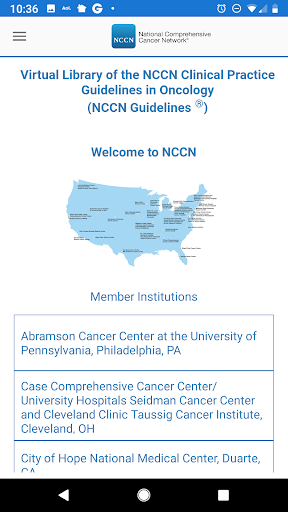
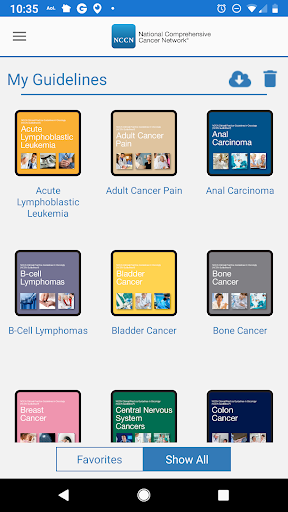
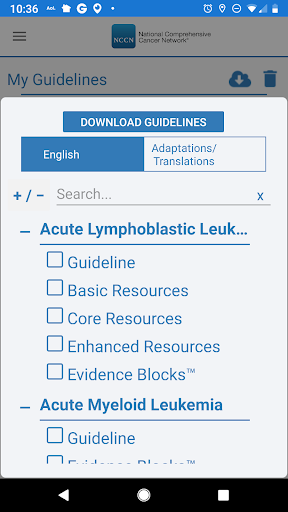
The National Comprehensive Cancer Network® (NCCN®), is pleased to present the Virtual Library of NCCN Guidelines® app formatted for Smart Phones & Tablet. This easy-to-use and convenient format will further assist health care professionals in their implementation of the NCCN Clinical Practice Guidelines in Oncology (NCCN Guidelines®), thus improving the quality and effectiveness of care provided to patients with cancer.
NCCN is a not-for-profit alliance of leading cancer centers devoted to patient care, research, and education. NCCN is dedicated to improving and facilitating quality, effective, equitable, and accessible cancer care so all patients can live better lives. Through the leadership and expertise of clinical professionals at NCCN Member Institutions, NCCN develops resources that present valuable information to the numerous stakeholders in the health care delivery system. By defining and advancing high-quality cancer care, NCCN promotes the importance of continuous quality improvement and recognizes the significance of creating clinical practice guidelines appropriate for use by patients, clinicians, and other health care decision-makers around the world.
Over the past 25 years, NCCN has developed an integrated suite of tools to improve the quality of cancer care. The NCCN Guidelines® document evidence-based, consensus-driven management to ensure that all patients receive preventive, diagnostic, treatment, and supportive services that are most likely to lead to optimal outcomes.
The NCCN Guidelines are a comprehensive set of guidelines detailing the sequential management decisions and interventions that apply to 97 percent of cancer cases in the United States. In addition, separate guidelines relate to major prevention and screening topics and another set of pathways focuses on the major supportive care areas.
The NCCN Guidelines provide recommendations based on the best evidence available at the time they are derived. Because new data are published continuously, it is essential that the NCCN Guidelines also be continuously updated and revised to reflect new data and new clinical information. The intent of the NCCN Guidelines is to assist in the decision-making process of individuals involved in cancer care—including physicians, nurses, pharmacists, payers, patients and their families—with the ultimate goal of improving patient care and outcomes. The NCCN Guidelines provide recommendations for appropriate care for most but not all patients; however, individual patient circumstances must be considered when applying these recommendations.
Visit NCCN.org to learn more about the NCCN Guidelines as well as other NCCN Content.
แสดงเพิ่มเติม

1. ดาวน์โหลดตัวติดตั้ง MEmu และสิ้นสุดการติดตั้ง

2. เริ่ม MEmu จากนั้นเปิด Google Play บนหน้าแรก

3. ค้นหา NCCN Guidelines® ใน Google Play
Install
4. ดาวน์โหลดและติดตั้ง NCCN Guidelines®
5. เมื่อติดตั้งเสร็จให้คลิกที่ไอคอนเพื่อเริ่มใช้งาน

6. ใช้ MEmu เพื่อสัมผัสประสบการณ์ NCCN Guidelines® บนคอมพิวเตอร์ของคุณ
MEmu Play คือโปรแกรมจำลอง Android ที่ดีที่สุด มีผู้ใช้มากกว่า 50 ล้านคน มอบประสบการณ์การใช้งานแอป Android ขั้นสุดยอดให้กับคุณ เทคโนโลยีจำลองเสมือนของ MEmu ช่วยให้คุณรันแอป Android หลายพันแอปบนคอมพิวเตอร์ได้อย่างราบรื่น แม้แอปที่กินทรัพยากรเครื่องสูงที่สุด
จอใหญ่และกราฟฟิกสวยกว่า; เล่นได้นาน, ไม่ต้องใช้แบตเตอรี่โทรศัพท์หรือเน็ตโทรศัพท์.
ระบบปรับแต่งปุ่มคีย์บอร์ดและเม้าส์ตามที่คุณเลือก
เล่นมากกว่าหนึ่งเกมบน PC ในเวลาเดียวกันด้วยระบบหลายจอหรือ Multi-Instance manager.
Use NCCN Guidelines® on PC by following steps: