Vivint
อัปเดตเมื่อ
เวอร์ชันปัจจุบัน
24.12.201
ให้บริการโดย

เมื่อใช้ Vivint บนโทรศัพท์ของคุณไม่ต้องกังวลกับการชาร์จไฟมากเกินไปปลดปล่อยตัวคุณเองจากหน้าจอขนาดเล็กและสนุกกับการใช้แอพนี้บนหน้าจอขนาดใหญ่ จากนี้ไปรับประสบการณ์เต็มหน้าจอของแอปพลิเคชันของคุณด้วยคีย์บอร์ดและเมาส์ MEmu มีคุณสมบัติที่น่าแปลกใจที่คุณคาดหวัง: การติดตั้งที่รวดเร็วและการตั้งค่าที่ง่ายควบคุมได้ง่ายไม่ จำกัด แบตเตอรี่ข้อมูลมือถือและการโทรที่รบกวน MEmu 9 ใหม่ล่าสุดเป็นตัวเลือกที่ดีที่สุดสำหรับการใช้ Meitu – โปรแกรมแก้ไขภาพแนวธรรมชาติ บนคอมพิวเตอร์ของคุณ ด้วยรหัสการดูดซึมของเราผู้จัดการหลายอินสแตนซ์ทำให้สามารถเปิดบัญชี 2 บัญชีขึ้นไปในเวลาเดียวกันได้ และที่สำคัญที่สุดเอ็นจิ้นจำลองพิเศษของเราสามารถปลดปล่อยศักยภาพของPCของคุณและทำให้ทุกอย่างราบรื่นและสนุกสนาน
แสดงเพิ่มเติม
ดาวน์โหลด Vivint บน PC ด้วย MEmu Android Emulator สนุกกับการเล่นบนหน้าจอขนาดใหญ่ The Vivint app brings home to the palm of your hand.
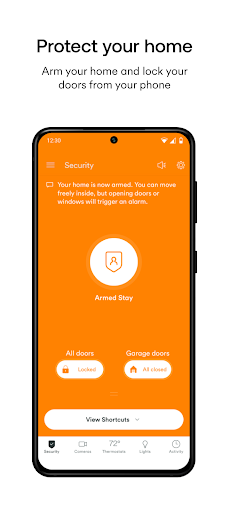
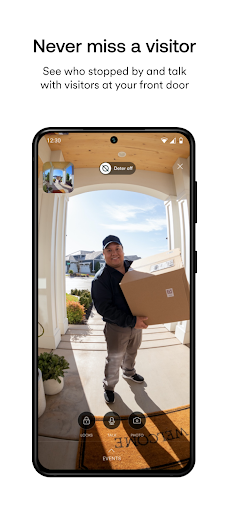
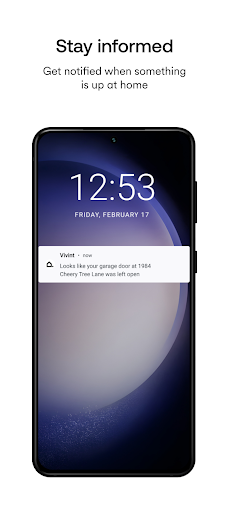
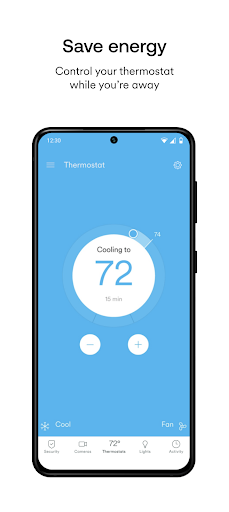
The Vivint app brings home to the palm of your hand. Whether you’re on the go or at home, controlling your smart security system has never felt so easy. The Vivint app allows you to:
Arm or disarm your security system
Control your whole system anytime, anywhere with the touch of a button. Including arming and disarming your system and setting up custom actions to automate your smart home.
View live camera feeds and recordings
Keep your home safer with cameras and security that work together. Check on what's happening around your home day and night, and rewatch important events with 30-day DVR recording and Smart Clips.
Receive alerts and notifications
Know if one of your cameras has deterred a lurker, your garage door was left open, a package has been delivered, and so much more.
Answer your doorbell
See and speak with visitors through your doorbell from anywhere with 2-way talk and clear 180x180 HD video.
Control lights
Create custom schedules for your lights and easily turn them on and off from anywhere.
Lock and unlock doors
Know your home is secure by checking the status of your smart locks and easily lock or unlock your doors with a swipe.
Open and Close your garage door
Check to see if the garage door is open through the status indicator on the app and be alerted right away if you happen to leave it open.
Note: Vivint Smart Home System and service subscription required. Call 877.788.2697 for information on a new System.
Note: If you’re looking for the app that supports the Vivint Go!Control Panel, search and download the “Vivint Classic” app.
แสดงเพิ่มเติม

1. ดาวน์โหลดตัวติดตั้ง MEmu และสิ้นสุดการติดตั้ง

2. เริ่ม MEmu จากนั้นเปิด Google Play บนหน้าแรก

3. ค้นหา Vivint ใน Google Play
Install
4. ดาวน์โหลดและติดตั้ง Vivint
5. เมื่อติดตั้งเสร็จให้คลิกที่ไอคอนเพื่อเริ่มใช้งาน

6. ใช้ MEmu เพื่อสัมผัสประสบการณ์ Vivint บนคอมพิวเตอร์ของคุณ
MEmu Play คือโปรแกรมจำลอง Android ที่ดีที่สุด มีผู้ใช้มากกว่า 50 ล้านคน มอบประสบการณ์การใช้งานแอป Android ขั้นสุดยอดให้กับคุณ เทคโนโลยีจำลองเสมือนของ MEmu ช่วยให้คุณรันแอป Android หลายพันแอปบนคอมพิวเตอร์ได้อย่างราบรื่น แม้แอปที่กินทรัพยากรเครื่องสูงที่สุด
จอใหญ่และกราฟฟิกสวยกว่า; เล่นได้นาน, ไม่ต้องใช้แบตเตอรี่โทรศัพท์หรือเน็ตโทรศัพท์.
ระบบปรับแต่งปุ่มคีย์บอร์ดและเม้าส์ตามที่คุณเลือก
เล่นมากกว่าหนึ่งเกมบน PC ในเวลาเดียวกันด้วยระบบหลายจอหรือ Multi-Instance manager.
Use Vivint on PC by following steps: