
Lily's Diary
Güncellendi
Mevcut Sürüm
1.0.14
Sunan

Lily's Diary oynamak için bu kadar tutkuluyken, ellerin telefonunun küçük ekranıyla sınırlı kalmamalı.Bir profesyonel gibi oyna ve klavye ve fare ile oyununun tüm kontrolü sende olsun.MEmu sana beklediğin her şeyi sunuyor.PC'de Lily's Diary indir ve oyna. İstediğin kadar oyna, artık pil sınırlamaları, mobil veri ve rahatsız edici çağrılar yok.Yepyeni MEmu 9, PC'de Lily's Diary oynamak için en iyi seçim. Uzmanlığımızla hazırlanan zarif ön ayar tuş eşleme sistemi Lily's Diary oyununu gerçek bir PC oyununa dönüştürüyor.MEmu çoklu örnek yöneticisi, aynı cihazda 2 veya daha fazla hesap oynamayı mümkün kılıyor.Ve en önemlisi, özel emülasyon motorumuz PC'nizin tüm potansiyelini ortaya çıkarıyor, her şeyi sorunsuz hale getiriyor.
Daha fazla göster
Lily's Diary’i MEmu Android Emülatör ile PC’ye indirin. Büyük ekranda oynamanın keyfini çıkarın. Bu oyunu reklamlarla ÜCRETSİZ oynayın – veya Gamehouse+ uygulamasıyla daha da fazla oyuna erişin!
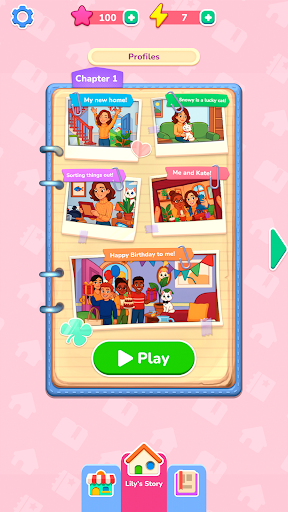

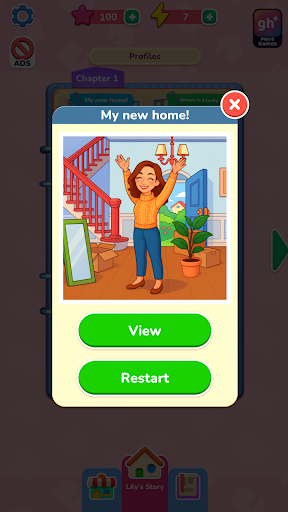
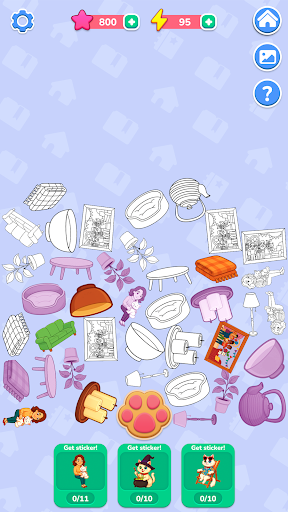
Bu oyunu reklamlarla ÜCRETSİZ oynayın – veya Gamehouse+ uygulamasıyla daha da fazla oyuna erişin! GH+ Ücretsiz üyesi olarak 100'den fazla oyunu reklamlarla açın veya GH+ VIP üyesi olarak tüm oyunların reklamsız keyfini çıkarın, çevrimdışı oynayın, özel oyun içi ödüller kazanın ve daha fazlasını deneyimleyin!
Lily yeni evine yerleşirken ve maceralarının günlüğünü tutmaya başlarken, onunla birlikte yepyeni bir başlangıç yapın. Her anı, numaralı çıkartmaları sürükleyip yerleştirerek geri yüklediğiniz fotoğraf tarzı sahneler aracılığıyla canlanıyor – klasik sayıya göre boyama bulmacalarına yeni ve yaratıcı bir bakış açısı. Şekilleri eşleştirin, sayıları takip edin ve biraz yardıma ihtiyacınız olduğunda güçlendiricileri kullanın. Tamamlanan her fotoğraf, arkadaşlıklardan ve hobilerden tatillere ve her günü anlamlı kılan küçük sevinçlere kadar Lily'nin günlük yaşamından başka bir anı ortaya çıkarıyor.
Fotoğrafları geri yükledikçe, Lily'nin yaramaz kedisi Snowy hakkında gizli hikayeleri ortaya çıkarmak için enerji kazanacaksınız. Eşyaları toplamak, bunları çıkartmalara dönüştürmek ve Snowy'nin albümündeki özel sahnelerin kilidini açmak için pati izi düğmesine dokunun. Snowy'nin maceralarının gizli yönlerini ortaya çıkarmak için tüm çıkartmaları toplayın.
40'tan fazla rahatlatıcı seviye, 10 gizli hikaye ve sakin, sürükle-bırak oyun mekaniğiyle Lily'nin Günlüğü, her çıkartmanın bir anıyı yeniden canlandırdığı yaratıcı bir kaçış sunuyor.
ÖZELLİKLER:
Fotoğrafları Geri Yükle
Lily'nin anılarını yeniden oluşturmak için numaralı çıkartmaları sürükleyip yerleştirin.
Kolay Eşleştirme
Akıcı ve tatmin edici yerleştirme için sayıları ve şekilleri takip edin.
Yardımcı Güçlendiriciler
Sıkıştığınızda doğru yeri hızlıca bulmak için ipuçlarını kullanın.
Snowy'nin Gizli Hikayeleri
Bonus seviyelerin kilidini açmak için öğeleri toplayın ve çıkartmalara dönüştürün.
Enerji ve Ödüller
Fotoğrafları geri yükleyerek enerji kazanın ve Snowy'nin maceralarını ortaya çıkarmak için kullanın.
Rahatlatıcı İlerleme
40'tan fazla rahatlatıcı sahnenin ve kendi hızınızda tamamlayabileceğiniz 10 gizli hikayenin tadını çıkarın.
YENİ! gamehouse+ uygulamasıyla mükemmel oyun tarzınızı bulun! GH+ Ücretsiz üyesi olarak reklamlı 100'den fazla oyunu ücretsiz oynayın veya reklamsız oyun, çevrimdışı erişim, özel oyun içi avantajlar ve daha fazlası için GH+ VIP'ye yükseltin. gamehouse+ sadece bir oyun uygulaması değil; her ruh haliniz ve her "kendinize ayırdığınız" an için oyun oynama noktanız. Bugün abone olun!
Daha fazla göster

1. MEmu yükleyicisini indirin ve kurulumu tamamlayın

2. MEmu'yu başlatın ve ana sayfada Google Play'i açın

3. Google Play'de Lily's Diary arayın
Install
4. Lily's Diary indirin ve yükleyin
5. Kurulum tamamlandığında başlamak için simgeye tıklayın

6. PC’de MEmu ile Lily's Diary oyunun keyfini çıkarın
MEmu App Player, en iyi ücretsiz Android emülatörüdür ve 50 milyon insan zaten mükemmel Android oyun deneyimini yaşamaktadır. MEmu sanallaştırma teknolojisi, binlerce grafik oyunu hatta grafikte en yoğun olanları bile sorunsuz bir şekilde bilgisayarınızda oynamanızı sağlar.
Daha büyük ekranla daha iyi grafiklere sahip; Pil veya mobil veri sınırlaması olmaksızın uzun süre.
Keymapping klavye ve fare veya gamepad'in hassas kontrolü için destek verir.
Multi-Instance yöneticisi ile tek bir bilgisayarda aynı anda birden fazla oyun hesabı veya görev gerçekleşilebilir.
Play Lily's Diary on PC by following steps: