
Lily's Diary
Оновлено
Поточна версія
1.0.14
Постачальник

Перестаньте турбуватися про надмірні витрати, використовуючи ххх на своєму мобільному телефоні, звільніться від крихітного екрану і насолоджуйтеся використанням програми на набагато більшому дисплеї. Відтепер отримуйте повний екран свого додатка за допомогою клавіатури та миші. MEmu пропонує вам усі дивовижні функції, які ви очікували: швидка установка та просте налаштування, інтуїтивно зрозумілі елементи керування, більше обмежень від акумулятора, мобільних даних та тривожних дзвінків. Новий MEmu 9 - найкращий вибір використання Lily's Diary на вашому комп’ютері. За допомогою нашого поглинання менеджер із кількома примірниками одночасно дозволяє відкрити 2 або більше рахунків. І найголовніше, наш ексклюзивний емуляційний двигун може вивільнити весь потенціал вашого ПК, зробити все гладким і приємним.
Show more
Насолоджуйтесь чудовим досвідом Lily's Diary гри на ПК за допомогою програми MEMU App Player. Це потужний безкоштовний емулятор Android, який дозволяє вам грати в тисячі ігор Android. Грайте в цю гру БЕЗКОШТОВНО з рекламою – або отримайте ще більше ігор за допомогою застосунку gamehouse+!
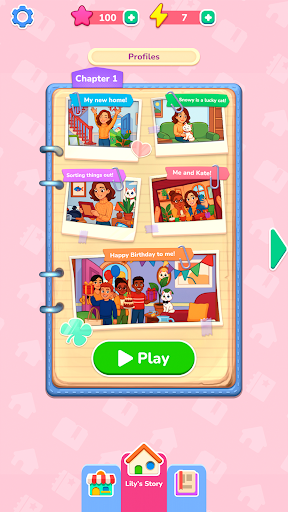
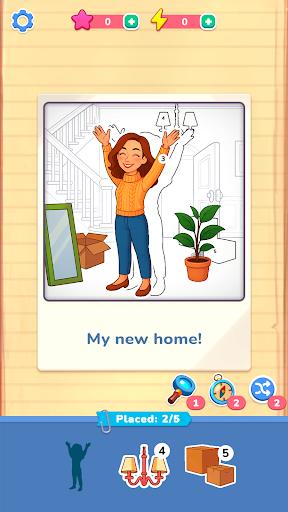
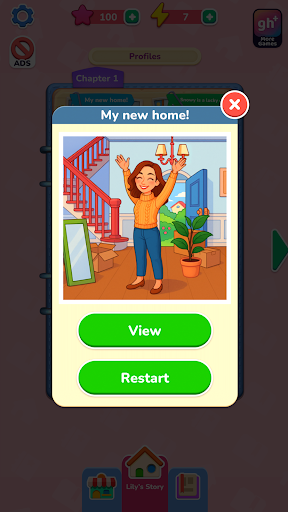
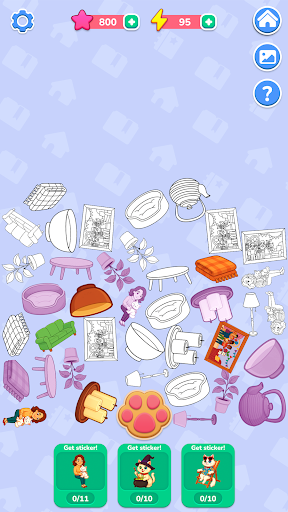
Грайте в цю гру БЕЗКОШТОВНО з рекламою – або отримайте ще більше ігор за допомогою застосунку gamehouse+! Розблокуйте понад 100 ігор з рекламою як безкоштовний учасник GH+ або перейдіть на VIP-статус GH+, щоб насолоджуватися ними ВСІМА без реклами, грати офлайн, отримувати ексклюзивні ігрові нагороди та багато іншого!
Почніть все спочатку з Лілі, коли вона оселяється у своєму новому домі та починає вести щоденник своїх пригод. Кожен спогад оживає завдяки сценам у стилі фотографій, які ви відновлюєте, перетягуючи та розміщуючи пронумеровані наліпки — свіжий, креативний погляд на класичні головоломки з розфарбовуванням за номерами. Зіставляйте фігури, слідкуйте за цифрами та використовуйте бустери, коли вам потрібна невелика допомога. Кожне завершене фото розкриває ще один момент з повсякденного життя Лілі: від дружби та хобі до свят та маленьких радощів, які роблять кожен день змістовним.
Відновлюючи фотографії, ви зароблятимете енергію, щоб розкривати таємні історії про Сніжинку, бешкетну кішку Лілі. Натисніть кнопку відбитка лапи, щоб збирати предмети, об'єднувати їх у наліпки та розблоковувати спеціальні сцени в альбомі Сніжинки. Зберіть кожну наліпку, щоб розкрити прихований бік пригод Сніжинки.
З більш ніж 40 розслаблюючими рівнями, 10 таємними історіями та спокійним ігровим процесом з перетягуванням, Щоденник Лілі пропонує творчу втечу, де кожна наліпка повертає спогад до життя.
ОСОБЛИВОСТІ:
Відновлення фотографій
Перетягуйте та розміщуйте пронумеровані наліпки, щоб відновити спогади Лілі.
Легке зіставлення
Слідкуйте за цифрами та фігурами для плавного та приємного розміщення.
Корисні підсилювачі
Використовуйте підказки, щоб швидко знайти потрібне місце, коли ви застрягли.
Таємні історії Сніжинки
Збирайте та об'єднуйте предмети в наліпки, щоб розблокувати бонусні рівні.
Енергія та винагороди
Заробляйте енергію, відновлюючи фотографії, та використовуйте її, щоб розкрити пригоди Сніжинки.
Затишний прогрес
Насолоджуйтесь понад 40 розслаблюючими сценами та 10 прихованими історіями, які можна пройти у власному темпі.
НОВИНКА! Знайдіть свій ідеальний спосіб гри з додатком Gamehouse+! Насолоджуйтесь понад 100 іграми безкоштовно з рекламою як безкоштовний учасник GH+ або перейдіть на VIP-підписку GH+ для гри без реклами, доступу офлайн, ексклюзивних ігрових бонусів та багато іншого. Gamehouse+ — це не просто ще один ігровий додаток, це ваше місце для гри на будь-який настрій та для кожного моменту. Підпишіться сьогодні!
Show more

1. Download MEmu installer and finish the setup

2. Start MEmu then open Google Play on the desktop

3. Search Lily's Diary in Google Play
Install
4. Download and Install Lily's Diary
5. On install completion click the icon to start

6. Enjoy playing Lily's Diary on PC with MEmu
MEmu App Player є кращим безкоштовним емулятором Android, і 50 мільйонів людей вже користуються його чудовим ігровим досвідом Android. Технологія віртуалізації MEmu дає вам змогу відтворювати тисячі ігор Android на вашому комп'ютері, навіть найбільш насичених графікою.
Bigger screen with better graphics; Long duration, without limitation of battery or mobile data.
Full Keymapping support for precise control of keyboard and mouse or gamepad.
Multiple game accounts or tasks on single PC at one time with Multi-Instance manager.
Play Lily's Diary on PC by following steps: