Lily's Diary
Đã cập nhật
Phiên bản hiện tại
1.0.14
Cung cấp bởi

Với tất cả niềm đam mê chơi Lily's Diary, đôi tay của bạn sẽ không còn bị giới hạn trên một màn hình nhỏ của điện thoại. Trải nghiệm chơi như một người chuyên nghiệp và kiểm soát hoàn toàn trò chơi của bạn bằng bàn phím và chuột. MEmu cung cấp cho bạn tất cả những điều mà bạn đang mong đợi. Tải xuống và chơi Lily's Diary trên PC. Miễn là bạn muốn chơi, bởi nó không còn giới hạn về pin, dữ liệu di động và các cuộc gọi làm phiền. MEmu 9 hoàn toàn là sự lựa chọn tốt nhất để chơi Lily's Diary trên PC. Với sự chuẩn bị về chuyên môn của chúng tôi, hệ thống sơ đồ bàn phím tinh tế làm cho Lily's Diary trở thành một trò chơi thực sự trên PC. Trình Quản lý đa năng, đã được chăm chút bởi sự tiếp thu của chúng tôi, có thể phát 2 hoặc nhiều tài khoản trên cùng một thiết bị. Và điều quan trọng nhất, công cụ mô phỏng độc quyền của chúng tôi có thể phát huy toàn bộ tiềm năng PC của bạn, giúp mọi thứ hoạt động trơn tru nhất có thể. Chúng tôi biết rằng quá trình tận hưởng hạnh phúc ở mỗi trò chơi cũng là mong muốn của mỗi game thủ, vì vậy các bạn chỉ cần chơi thôi hãy để chúng tôi quan tâm đến tất cả trải nghiệm đó.
Nhiều hơn
Tải Lily's Diary trên PC với Trình giả lập Android MEmu. Tận hưởng trải nghiệm chơi game trên màn hình lớn Chơi trò chơi này MIỄN PHÍ với quảng cáo – hoặc nhận thêm nhiều trò chơi hơn nữa với ứng dụng Gamehouse+!

Chơi trò chơi này MIỄN PHÍ với quảng cáo – hoặc nhận thêm nhiều trò chơi hơn nữa với ứng dụng Gamehouse+! Mở khóa hơn 100 trò chơi có quảng cáo với tư cách là thành viên GH+ Free, hoặc nâng cấp lên GH+ VIP để tận hưởng TẤT CẢ các trò chơi không có quảng cáo, chơi ngoại tuyến, nhận phần thưởng độc quyền trong trò chơi và hơn thế nữa!
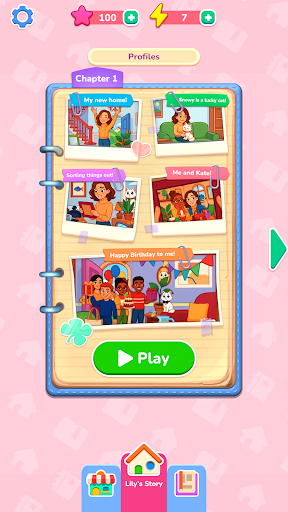
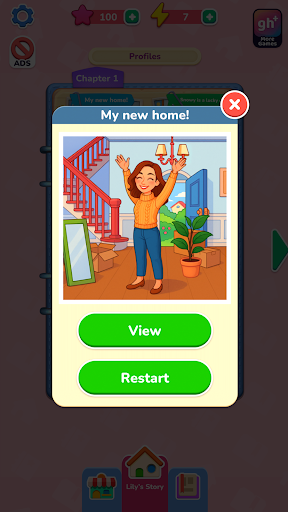
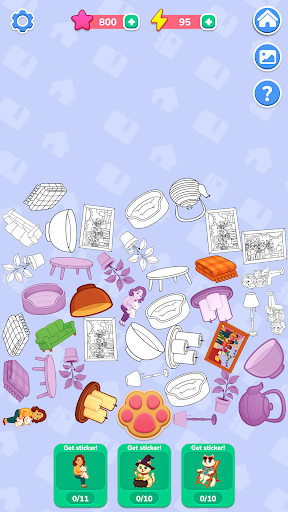
Bắt đầu cuộc phiêu lưu mới cùng Lily khi cô bé ổn định cuộc sống ở ngôi nhà mới và bắt đầu viết nhật ký về những chuyến phiêu lưu của mình. Mỗi kỷ niệm sẽ trở nên sống động qua những cảnh chụp theo phong cách ảnh mà bạn khôi phục bằng cách kéo và dán các nhãn dán được đánh số — một sự biến tấu mới mẻ và sáng tạo trên các trò chơi tô màu theo số cổ điển. Ghép các hình dạng, làm theo các con số và sử dụng các vật phẩm hỗ trợ bất cứ khi nào bạn cần. Mỗi bức ảnh hoàn chỉnh sẽ tiết lộ một khoảnh khắc khác trong cuộc sống thường nhật của Lily, từ tình bạn và sở thích đến những ngày lễ và những niềm vui nhỏ bé làm cho mỗi ngày trở nên ý nghĩa.
Khi bạn khôi phục ảnh, bạn sẽ kiếm được năng lượng để khám phá những câu chuyện bí mật về Snowy, chú mèo tinh nghịch của Lily. Chạm vào nút hình dấu chân để thu thập vật phẩm, ghép chúng thành nhãn dán và mở khóa các cảnh đặc biệt trong album của Snowy. Thu thập tất cả các nhãn dán để khám phá khía cạnh ẩn giấu trong những cuộc phiêu lưu của Snowy.
Với hơn 40 cấp độ thư giãn, 10 câu chuyện bí mật và lối chơi kéo thả nhẹ nhàng, Nhật ký của Lily mang đến một cuộc phiêu lưu sáng tạo, nơi mỗi nhãn dán giúp hồi sinh một kỷ niệm.
TÍNH NĂNG:
Khôi phục ảnh
Kéo và đặt các nhãn dán được đánh số để tái hiện lại những kỷ niệm của Lily.
Ghép nối dễ dàng
Theo dõi các con số và hình dạng để đặt chúng một cách mượt mà và dễ dàng.
Hỗ trợ hữu ích
Sử dụng gợi ý để nhanh chóng tìm đúng vị trí khi bạn gặp khó khăn.
Những câu chuyện bí mật của Snowy
Thu thập và ghép các vật phẩm thành nhãn dán để mở khóa các cấp độ thưởng.
Năng lượng & Phần thưởng
Kiếm năng lượng bằng cách khôi phục ảnh và sử dụng nó để khám phá những cuộc phiêu lưu của Snowy.
Tiến trình thoải mái
Thưởng thức hơn 40 khung cảnh thư giãn và 10 câu chuyện ẩn để hoàn thành theo tốc độ của riêng bạn.
MỚI! Khám phá cách chơi hoàn hảo của bạn với ứng dụng gamehouse+! Thưởng thức hơn 100 trò chơi miễn phí có quảng cáo với tư cách thành viên GH+ Free hoặc nâng cấp lên GH+ VIP để chơi không có quảng cáo, truy cập ngoại tuyến, các đặc quyền độc quyền trong game và hơn thế nữa. gamehouse+ không chỉ là một ứng dụng chơi game thông thường—đó là điểm đến giải trí của bạn cho mọi tâm trạng và mọi khoảnh khắc 'thời gian dành cho bản thân'. Đăng ký ngay hôm nay!
Nhiều hơn

1. Tải trình cài đặt MEmu và hoàn tất cài đặt

2. Khởi động MEmu, sau đó mở Google Play trên trang chủ

3. Tìm kiếm Lily's Diary trong Google Play
Install
4. Tải và Cài Đặt Lily's Diary
5. Khi cài đặt hoàn tất, nhấp vào biểu tượng để bắt đầu

6. Tận hưởng chơi Lily's Diary trên PC với MEmu
MEmu App Player là trình mô phỏng Android miễn phí tốt nhất và 50 triệu người đã tận hưởng trải nghiệm chơi trò chơi tuyệt vời trên Android của mình. Công nghệ ảo hóa MEmu trao quyền cho bạn để chơi hàng ngàn trò chơi Android mượt mà trên PC của bạn, ngay cả những trò chơi chuyên sâu nhất.
Màn hình lớn hơn cùng với đồ hoạ tốt hơn; thời lượng dài, không giới hạn về pin hoặc dữ liệu di động
Hỗ trợ đầy đủ Keymapping cho việc kiểm soát chính xác bàn phím và chuột hoặc gamepad
Nhiều tài khoản trò chơi hoặc tác vụ cùng lúc trên một PC với Quản lý Đa năng
Play Lily's Diary on PC by following steps: