Find the Difference 1000+
Updated
Current Version
3.47
Offered By

With your passion for Find the Difference 1000+, you shouldn’t have to limit yourself to the small screen of a phone. Play like a pro and take full control of the game using a keyboard and mouse. MEmu gives you everything you’re looking for. Download and play Find the Difference 1000+ on PC. Play as long as you want — no more worries about battery life, mobile data, or unexpected calls. The all-new MEmu 9 is the best way to play Find the Difference 1000+ on PC. With our expertly designed keymapping system, Find the Difference 1000+ feels just like a real PC game. The MEmu multi-instance manager lets you run two or more accounts on the same device at the same time. Most importantly, our exclusive emulation engine unlocks your PC’s full potential, delivering smooth and seamless performance.
Show more
Download Find the Difference 1000+ on PC with MEmu Android Emulator. Enjoy playing on big screen. The ultimate find the differences free game with over 1000 beautiful and challenging levels!
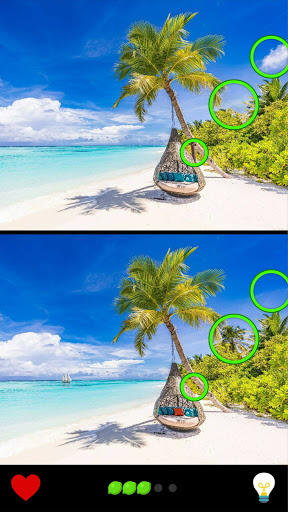
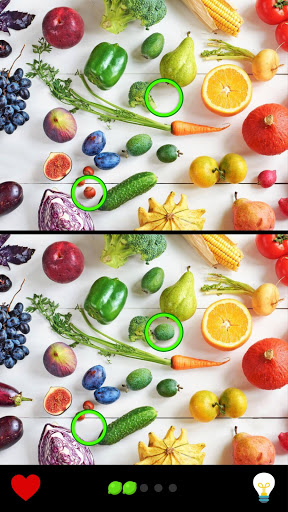
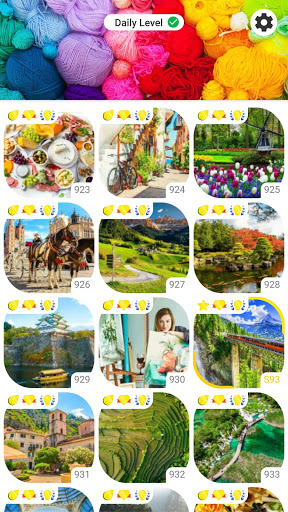

The ultimate find the differences free game with over 1000 beautiful and challenging levels! Test your detective skills. Can you find even the hard differences and hidden objects?
Compare pictures and try to spot the difference between them. Search and find hidden objects. Just like in hidden object games.
This is a 5 differences game, but some levels have even more hidden differences to spot!
Features that make our find the difference online free game the best:
• No timer! This is a relaxing picture puzzle.
• Unlimited hints! Useful to find the last hidden objects.
• Find the difference on High Quality photos and objects.
• Zoom! Become a detective and find those very challenging hidden differences.
• Progression on both easy and hard levels - some are harder than you think.
• Pretty medals! Find and collect them all.
• Designed for both phone and tablet, any screen orientation.
Search to spot the differences requires you to focus like a true detective. Find it out for yourself!
New find differences pictures every week.
Welcome to the Ultimate Find the Difference Game with 1000+ Levels!
Embark on an extraordinary journey through a myriad of captivating visual puzzles in our expansive find the difference game. With over 1000 levels, each meticulously crafted, this game is an ideal haven for enthusiasts who excel in spotting subtle differences in diverse images.
A Rich Tapestry of Challenges:
Our game offers an unparalleled variety of levels, each designed to test your observational prowess in engaging and unique ways.
New Find the Difference Games: We consistently refresh our game with new levels, ensuring a constantly evolving challenge.
Brain Games Find the Difference: Enhance your cognitive abilities, including memory, focus, and problem-solving, with our intricately designed puzzles.
Find Difference Between Two Pictures Games: Immerse yourself in the classic find the difference challenge, enriched with high-quality imagery spanning a multitude of themes.
Find the Difference Puzzles: A vast collection of puzzles awaits, catering to players of all skill levels, from beginners to experts.
Innovative Gameplay Elements:
New Spot the Difference Games: Our game is continually evolving, featuring new themes and puzzles that keep the gameplay fresh and exciting.
Find the Difference Detective Game: Delve into detective-themed levels where mystery and puzzle-solving combine to create a thrilling experience.
Best Find the Difference Games: Renowned for its engaging content, challenging puzzles, and stunning graphics, our game is a leader in its category.
Engaging and Inclusive Gameplay:
Hundreds of Handcrafted Levels: Each level is a work of art, offering a visually stunning and intellectually stimulating experience.
Diverse Themes and Scenarios: Explore a range of settings from tranquil natural landscapes to vibrant urban scenes, ensuring endless variety and interest.
Progressive Difficulty Levels: The game is designed to provide a satisfying progression, suitable for all players, enhancing the challenge as your skills grow.
A World of Puzzle Adventure Awaits:
This game is not just about finding differences; it's about embarking on a journey of discovery and detail. It’s an ideal mix of relaxation and mental exercise, tailored to provide an enjoyable experience for all players.
Regular Updates and New Challenges: Stay engaged with regular updates that introduce new levels and themes, keeping the game fresh and exciting.
Variety in Gameplay: With a vast array of levels and themes, each play session offers a new experience and a unique challenge.
Are you ready to put your observation skills to the test and enjoy hours of puzzle fun? Dive into a world where each level is a new discovery and every difference is a step closer to mastering the art of observation. Start your adventure today and revel in the joy of uncovering every hidden detail!
Show more

1. Download MEmu installer and finish the setup

2. Start MEmu then open Google Play on the desktop

3. Search Find the Difference 1000+ in Google Play
Install
4. Download and Install Find the Difference 1000+
5. On install completion click the icon to start

6. Enjoy playing Find the Difference 1000+ on PC with MEmu
MEmu Play is the best Android emulator and 100 million people already enjoy its superb Android gaming experience. The MEmu virtualization technology empowers you to play thousands of Android games smoothly on your PC, even the most graphic-intensive ones.
Bigger screen with better graphics; Long duration, without limitation of battery or mobile data.
Full Keymapping support for precise control of keyboard and mouse or gamepad.
Multiple game accounts or tasks on single PC at one time with Multi-Instance manager.
Play Find the Difference 1000+ on PC by following steps: