
신한 SOL증권 - 대표MTS
Updated
Current Version
D
Offered By

Stop worrying about high battery drain when using 신한 SOL증권 - 대표MTS on your phone. Free yourself from the tiny screen and enjoy the app on a much larger display. From now on, get a full-screen experience of your app with the convenience of a keyboard and mouse. MEmu offers you all the surprising features you’d expect: quick installation and easy setup, intuitive controls, and no more worries about battery life, mobile data, or unexpected calls. The all-new MEmu 9 is the choice for using 신한 SOL증권 - 대표MTS on your computer. With the MEmu multi-instance manager, you can run two or more accounts at the same time. Most importantly, our exclusive emulation engine unlocks your PC’s full potential, delivering smooth and enjoyable performance.
Show more
Enjoy superb experience of using 신한 SOL증권 - 대표MTS on PC with MEMU App Player. It's a powerful free Android emulator which provides you with thousands of android apps for their desktop version. Enjoy connecting with friends and polishing your work with higher efficiency! tradable products.


tradable products
Domestic/international stocks, bonds, funds, ELS/DLS, ETF/ETN, individual pension (IRP), retirement pension, CMA, ISA, domestic/international futures options, ELW, new stock warrants, gold spot, notes issued, RP, etc.
core features
1. Investment tailored to my tastes
①‘MY’, which collects my information
You can view your coupons, stories you have written, recently viewed content, and events you have participated in.
We recommend customized products based on your investment propensity and experience.
You can collect IR data and performance of your stocks.
②The ‘home’ I create
You can change the home order directly or set it automatically based on data.
Show customized information by market time and receive stock recommendations.
③ ‘Decimal investment’, ‘Regular investment’
You can collect quality stocks at the amount you want, for as long as you want.
2. Investment information that is easy to find and view
① When in doubt, use ‘Integrated Search’
Don't get lost and search for menus, stocks, and investment information.
Also try using recommended search themes such as ‘Many foreigners live there’ or ‘Many people in their 30s live here’.
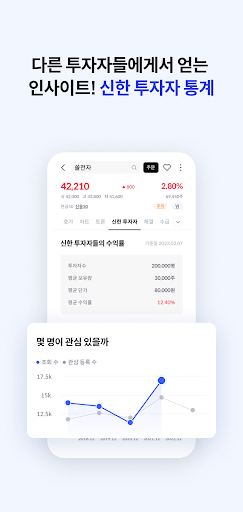
②Get investment hints through ‘Community’ and ‘Shinhan Investor’
Share your investment details and talk.
You can see other investors' stocks of interest, purchase prices, and stocks purchased together.
③Smart ‘current price’ and ‘calculator’
You can view everything from financial information on domestic/international stocks to theme information at current prices.
Estimate the profits and taxes from your investment using the 'Bond Yield Calculator' and 'Waterfall Calculator'.
3. An investment mate that takes care of everything
① ‘Notification settings’ to receive only what you want to receive
Select and receive only the notifications you need, such as sudden fluctuations in your stocks (±5%) or non-trading of stocks.
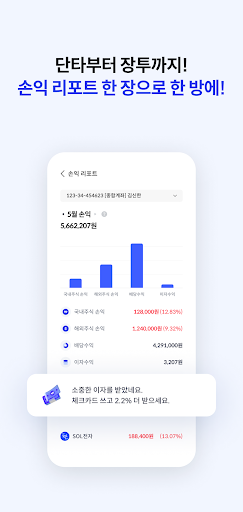
②Regular investment inspection with ‘Profit and Loss Report’
We will diagnose the profit and loss by month and asset in one page report.
③My scattered stocks at a glance, ‘stocks owned by other companies’
You can see stocks held by other securities companies and their real-time fluctuations in items of interest.
④Easy to manage tax savings account
You can easily manage tax-saving accounts such as ISA, retirement pension/IRP, and pension savings.
We will show you the annual payment limit and the additional payment amount you can pay this year.
※ Frequently Asked Questions
Q. I can't install the app properly.
Delete the data in the path below and try installing again.
Smartphone settings > Applications > Google Play Store > Storage > Delete data
Q. Please tell me how to set ‘app access permissions’.
Please set it in the path below.
Settings > Applications > Shinhan Investment & Securities > Permissions (Android 6.0 or higher)
Q. Do I have to allow ‘app access permission’?
Be sure to grant the required permissions.
You do not necessarily need to allow selection permission. However, you can use it except for functions that require optional permission.
[Functions requiring required permissions]
- Files and media: Reading/saving files when running the app, detecting/diagnosing malicious apps
- Phone: Check device information and status, connect to customer service center
[Features requiring optional permission]
- Microphone: Video calls and voice search
- Physical activity: Shinhan Super SOL pedometer
- Contact: Gift stocks
- Location: Search for a nearby branch
-Camera: ID card photo/video call to verify real name
- Display on top of other apps: visible ARS, floating quotes
Q. Optional access permissions cannot be set.
Please upgrade Android to 6.0 or higher and reinstall the Shinhan SOL Securities app.
※ Precautions
- Shinhan Investment & Securities does not request your entire personal information or security card number.
- It cannot be used on terminals whose operating system has been modified, such as rooted.
- Additional charges may apply if data capacity is exceeded in the 3G/LTE/5G flat rate plan.
Show more

1. Download MEmu installer and finish the setup

2. Start MEmu then open Google Play on the desktop

3. Search 신한 SOL증권 - 대표MTS in Google Play
Install
4. Download and Install 신한 SOL증권 - 대표MTS
5. On install completion click the icon to start

6. Enjoy using 신한 SOL증권 - 대표MTS on PC with MEmu
MEmu Play is the best Android emulator, and 100 million users already enjoy its superb Android app experience. Powered by advanced virtualization technology, it lets you enjoy thousands of Android apps smoothly on your PC—including the most graphics-intensive ones.
Bigger screen with better graphics; Long duration, without limitation of battery or mobile data.
Full Keymapping support for precise control of keyboard and mouse or gamepad.
Multiple game accounts or tasks on single PC at one time with Multi-Instance manager.
Use 신한 SOL증권 - 대표MTS on PC by following steps:
































