
Archer Castle : AFK Idle RPG
Zaktualizowano
Aktualna wersja
1.13.66
Sprzedawca

Przy całej swojej pasji do grania w Archer Castle : AFK Idle RPG, twoje ręce nie powinny być ograniczone na małym ekranie telefonu. Graj jak zawodowiec i uzyskaj pełną kontrolę nad grą za pomocą klawiatury i myszy. MEmu oferuje ci wszystko, czego oczekujesz. Pobierz i graj Archer Castle : AFK Idle RPG na PC. Graj tak długo, jak chcesz, bez ograniczeń baterii, danych komórkowych i niepokojących połączeń. Zupełnie nowy MEmu 9 to najlepszy wybór do grania w Archer Castle : AFK Idle RPG na PC. Przygotowany dzięki naszej wiedzy, znakomity, wstępnie ustawiony system mapowania klawiszy sprawia, że Archer Castle : AFK Idle RPG jest prawdziwą grą na PC. Zakodowany naszą absorpcją, menedżer wielu instancji umożliwia granie na 2 lub więcej kontach na tym samym urządzeniu. A co najważniejsze, nasz emulator może uwolnić pełny potencjał twojego komputera, sprawić, że wszystko będzie płynne. Dbamy nie tylko o to, jak grasz, ale także o cały proces czerpania radości z grania.
Pokaż więcej
Ciesz się wspaniałym doświadczeniem podczas grania w Archer Castle : AFK Idle RPG na komputerze z aplikacją MEMU App Player. Jest to potężny darmowy emulator Androida pozwalający grać w tysiące gier na Androida. Oficjalna społeczność już otwarta!


Oficjalna społeczność już otwarta!
https://discord.gg/vKqA4vcJyu
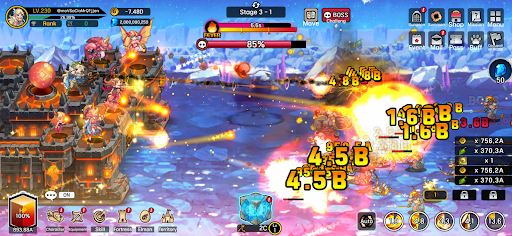
● Gra RPG łącząca bitwy obronne z budowaniem i zarządzaniem!
Czasem defensywne, czasem agresywne.
Zarządzaj swoją mobilną fortecą i ciesz się bogatą przygodą!
● Szybkie i spektakularne bitwy!
Emocje związane z potężnym atakiem typu hack-and-slash, teraz na urządzeniach mobilnych!
Zniszcz hordy wrogów jedną potężną umiejętnością!
Złoto i przedmioty wysypują się jak z rękawa!
● Ciesz się zróżnicowanymi strategiami i szczegółowym budowaniem talii!
Strategiczny, skoncentrowany ogień z ręcznym celowaniem!
Wysokiej jakości bitwy z wykorzystaniem obezwładniania i częściowego niszczenia!
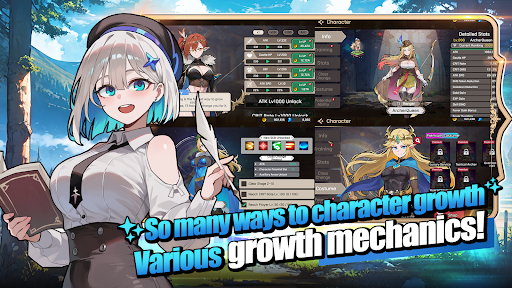
Twórz nieskończone kombinacje, korzystając łącznie ze 115 umiejętności, w tym umiejętności aktywnych, pasywnych, dowodzenia i broni!
● Radość z rozwoju w grze idle!
Twoja postać rośnie w siłę nawet wtedy, gdy śpisz!
Twoje terytorium rozwija się nawet wtedy, gdy pracujesz! Po prostu zostaw to w spokoju i obserwuj, jak wszystko rośnie!
● Stylowe postacie i potwory
Koniec z niezgrabnie animowanymi grami!
Poznaj stylowe postacie z płynnymi i naturalnymi animacjami!
● Zawartość, która naprawdę zmienia wygląd
To nie są tylko ikony!
Wyposaż się w 168 rodzajów ekwipunku, który naprawdę zmienia Twój wygląd!
Zbierz 180 rodzajów zwierzaków, Elmonsterów, które rosną, ewoluują i zmieniają swój wygląd!
─────────────────────
■ Zalecana specyfikacja urządzenia ■
- Zalecany system Android 9.0 lub nowszy
- Pamięć RAM: Zalecane 3 GB lub więcej
- Pamięć masowa: Zalecane co najmniej 300 MB wolnego miejsca
[Informacje o uprawnieniach aplikacji]
Archer Castle nie używa wrażliwych uprawnień aplikacji, które wymagają osobnego powiadomienia.
[ Jak zarządzać uprawnieniami aplikacji ]
* Android 6.0 lub nowszy
- Cofnij uprawnienia na podstawie uprawnień: Ustawienia urządzenia > Bezpieczeństwo i prywatność lub Prywatność > Menedżer uprawnień > Wybierz kategorię uprawnień > Wybierz aplikację > Zezwól lub odmów uprawnień
- Cofnij uprawnienia na podstawie aplikacji: Ustawienia urządzenia > Aplikacje > Wybierz Archer Castle > Uprawnienia > Zezwól lub odmów uprawnień
- Ustawienia powiadomień: Ustawienia urządzenia > Powiadomienia > Powiadomienia aplikacji > Wybierz Archer Castle > Zezwól lub wyłącz powiadomienia
※ Nazwy menu mogą się różnić w zależności od producenta urządzenia i wersji systemu operacyjnego.
* Android poniżej 6.0
Ze względu na specyfikę systemu operacyjnego, uprawnień poszczególnych aplikacji nie można cofnąć osobno. Uprawnienia można cofnąć, usuwając aplikację.
Aby zapewnić stabilne działanie usługi, zalecamy aktualizację do systemu Android 6.0 lub nowszego.
Pokaż więcej

1. Pobierz instalator MEmu i zakończ instalację

2. Uruchom MEmu, a następnie otwórz Google Play na pulpicie

3. Wyszukaj Archer Castle : AFK Idle RPG w Google Play
Install
4. Pobierz i zainstaluj Archer Castle : AFK Idle RPG
5. Po zakończeniu instalacji kliknij ikonę, aby rozpocząć

6. Ciesz się grą Archer Castle : AFK Idle RPG na PC z MEmu
MEmu Play to najlepszy emulator Androida, a 100 milionów ludzi już korzysta z jego i dosta doskonałe wrażenia z gier na Androida. Technologia wirtualizacji MEmu umożliwia płynne granie w tysiące gier Androida na komputerze, nawet tych najbardziej wymagających grafiki.
Większy ekran z lepszą grafiką; Długi czas, bez ograniczeń baterii lub danych mobilnych.
Pełna obsługa mapowania klawiszy dla precyzyjnego sterowania klawiaturą i myszą lub gamepadem.
Wiele kont gier lub zadań na jednym komputerze jednocześnie z menedżerem wielu instancji.
Play Archer Castle : AFK Idle RPG on PC by following steps: