Archer Castle : AFK Idle RPG
อัปเดตเมื่อ
เวอร์ชันปัจจุบัน
1.13.68
ให้บริการโดย

เวลาคุณเล่น Archer Castle : AFK Idle RPG, คุณอาจรู้สึกว่ามือคุณอาจบังจอแล้วทำให้ไม่ได้เล่นแบบเต็มที่. เล่นแบบไร้ขีดจำกัดด้วยเม้าส์และคีย์บอร์ด. MEmu มีตัวเลือกหลายอย่างให้คุณใช้งานเกมที่คุณเล่นแบบที่คุณต้องการ. ดาวน์โหลดและเล่น Archer Castle : AFK Idle RPG บน PC. เล่นนานแค่ไหนก็ได้, ไม่ต้องชาร์จแบตเตอรี่, หรือเจอคนโทรเข้ามาระหว่างเล่น. MEmu 9 เป็นตัวเลือกสำหรับการเล่น Archer Castle : AFK Idle RPG บน PC. ทางทีมงานเราได้ปรับแต่งเกม, ปรับให้เล่นเกมบางเกมได้เหมือนเล่น Archer Castle : AFK Idle RPG เป็นเกม PC เช่นเล็งด้วยเม้าส์หรือใช้คีย์บอร์ด. ระบบของเรายังทำให้คุณสามารถเปิดเล่นได้มากกว่า 2 เกมพร้อมๆกันในคอมของคุณ. และที่สำคัญที่สุด, ระบบโปรแกรมของเราสามารถทำให้คุณใช้ระบบของ PC ทำให้เกมลื่นเหมือนกับใช้โทรศัพท์รุ่นล่าสุด. เราไม่ได้ดูแลเรื่องการเล่นเกม, แต่เราดูแลถึงความสนุกสนานที่คุณได้จากการเล่นด้วย.
แสดงเพิ่มเติม
ดาวน์โหลด Archer Castle : AFK Idle RPG บน PC ด้วย MEmu Android Emulator สนุกกับการเล่นบนหน้าจอขนาดใหญ่ Official Community Now Open!


Official Community Now Open!
https://discord.gg/vKqA4vcJyu
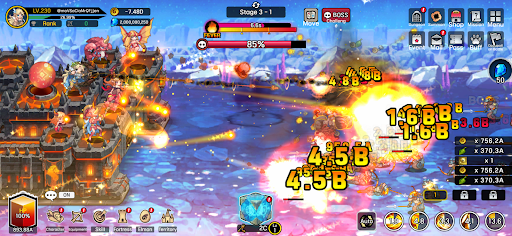
● An RPG that combines defense battles with construction and management!
Sometimes defensive, sometimes aggressive.
Manage your mobile fortress and enjoy a rich adventure!
● Fast-paced and spectacular battles!
The thrill of a powerful hack-and-slash strike, now on mobile!
Wipe out hordes of enemies with one powerful skill!
Gold and items pouring out are a bonus!
● Enjoy diverse strategies and detailed deck building!
Strategic focus fire with manual targeting!
High-quality battles using incapacitation and part destruction!
Create endless combinations with a total of 115 skills, including active, passive, command, and weapon skills!
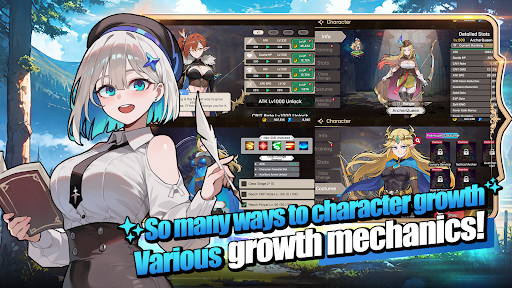
● The fun of growth in an idle game!
Your character grows stronger even while you sleep!
Your territory develops even while you work!
Just leave it alone and watch everything grow!
● Stylish characters and monsters
No more awkwardly animated games!
Meet stylish characters with smooth and natural animations!
● Content that actually changes appearance
These are not just icons!
Equip 168 types of gear that actually change your appearance!
Collect 180 types of pets, Elmonsters, that grow, evolve, and change their appearance!
─────────────────────
■ Recommended Device Specifications ■
- Android 9.0 or higher recommended
- RAM: 3GB or more recommended
- Storage: At least 300MB of free space recommended
[ App Permission Information ]
Archer Castle does not use sensitive app permissions that require separate notification.
[ How to Manage App Permissions ]
* Android 6.0 or higher
- Revoke by permission: Device Settings > Security & Privacy or Privacy > Permission Manager > Select permission category > Select the app > Allow or deny permission
- Revoke by app: Device Settings > Apps > Select Archer Castle > Permissions > Allow or deny permission
- Notification settings: Device Settings > Notifications > App notifications > Select Archer Castle > Allow or disable notifications
※ Menu names may vary depending on the device manufacturer and OS version.
* Below Android 6.0
Due to the nature of the operating system, individual app permissions cannot be revoked separately. Permissions can be revoked by deleting the app.
For stable service use, we recommend upgrading to Android 6.0 or higher.
แสดงเพิ่มเติม

1. ดาวน์โหลดตัวติดตั้ง MEmu และสิ้นสุดการติดตั้ง

2. เริ่ม MEmu จากนั้นเปิด Google Play บนหน้าแรก

3. ค้นหา Archer Castle : AFK Idle RPG ใน Google Play
Install
4. ดาวน์โหลดและติดตั้ง Archer Castle : AFK Idle RPG
5. เมื่อติดตั้งเสร็จให้คลิกที่ไอคอนเพื่อเริ่มใช้งาน

6. สนุกกับการเล่น Archer Castle : AFK Idle RPG บนพีซีด้วย MEmu
MEmu App Player เป็นอีมูเลเตอร์ Android ที่ดีที่สุดและผู้คนกว่า 50 ล้านคนเพลิดเพลินไปกับประสบการณ์การเล่นเกม Android ที่ยอดเยี่ยม เทคโนโลยีการจำลองเสมือนของ MEmu ช่วยให้คุณเล่นเกม Android หลายพันเกมได้อย่างราบรื่นบนพีซีของคุณแม้แต่เกมที่ต้องใช้กราฟิกมากที่สุด
จอใหญ่และกราฟฟิกสวยกว่า; เล่นได้นาน, ไม่ต้องใช้แบตเตอรี่โทรศัพท์หรือเน็ตโทรศัพท์.
ระบบปรับแต่งปุ่มคีย์บอร์ดและเม้าส์ตามที่คุณเลือก
เล่นมากกว่าหนึ่งเกมบน PC ในเวลาเดียวกันด้วยระบบหลายจอหรือ Multi-Instance manager.
Play Archer Castle : AFK Idle RPG on PC by following steps: