Archer Castle : AFK Idle RPG
Оновлено
Поточна версія
1.13.66
Постачальник

Перестаньте турбуватися про надмірні витрати, використовуючи ххх на своєму мобільному телефоні, звільніться від крихітного екрану і насолоджуйтеся використанням програми на набагато більшому дисплеї. Відтепер отримуйте повний екран свого додатка за допомогою клавіатури та миші. MEmu пропонує вам усі дивовижні функції, які ви очікували: швидка установка та просте налаштування, інтуїтивно зрозумілі елементи керування, більше обмежень від акумулятора, мобільних даних та тривожних дзвінків. Новий MEmu 9 - найкращий вибір використання Archer Castle : AFK Idle RPG на вашому комп’ютері. За допомогою нашого поглинання менеджер із кількома примірниками одночасно дозволяє відкрити 2 або більше рахунків. І найголовніше, наш ексклюзивний емуляційний двигун може вивільнити весь потенціал вашого ПК, зробити все гладким і приємним.
Show more
Насолоджуйтесь чудовим досвідом Archer Castle : AFK Idle RPG гри на ПК за допомогою програми MEMU App Player. Це потужний безкоштовний емулятор Android, який дозволяє вам грати в тисячі ігор Android. Офіційна спільнота вже відкрита!
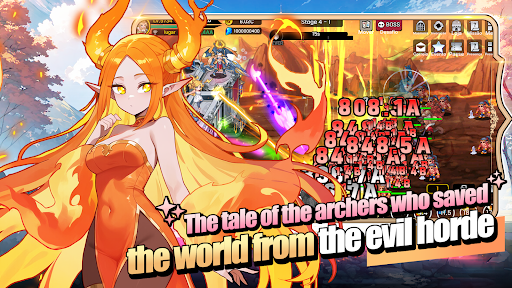
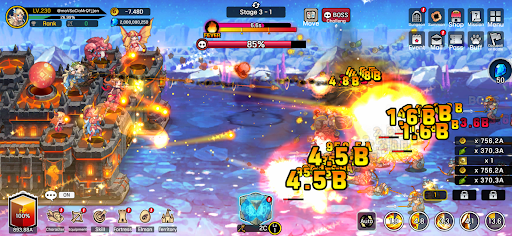
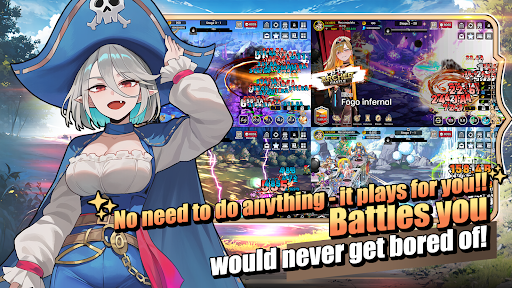
Офіційна спільнота вже відкрита!
https://discord.gg/vKqA4vcJyu
● RPG, що поєднує оборонні битви з будівництвом та управлінням!
Іноді оборонні, іноді агресивні.
Керуйте своєю мобільною фортецею та насолоджуйтесь насиченою пригодою!
● Швидкі та видовищні битви!
Азарт потужного рубального удару тепер на мобільних пристроях!
Знищте орди ворогів однією потужною навичкою!
Посипання золота та предметів – це бонус!
● Насолоджуйтесь різноманітними стратегіями та детальним складанням колоди!
Стратегічний вогонь з ручним прицілюванням!
Високоякісні битви з використанням виведення з ладу та часткового знищення!
Створюйте нескінченні комбінації загалом із 115 навичок, включаючи активні, пасивні, командні та збройові навички!
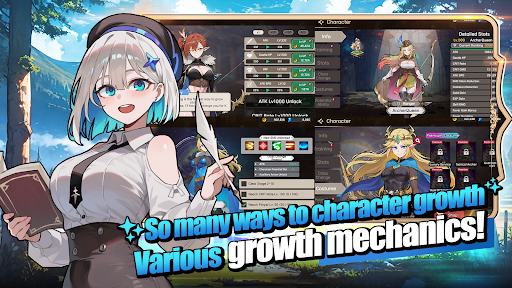
● Задоволення від зростання в грі в режимі очікування!
Ваш персонаж стає сильнішим навіть під час сну!
Ваша територія розвивається навіть під час роботи!
Просто залиште її в спокої та спостерігайте, як все росте!
● Стильні персонажі та монстри
Більше жодних незграбно анімованих ігор!
Зустрічайте стильних персонажів із плавною та природною анімацією!
● Контент, який дійсно змінює зовнішній вигляд
Це не просто значки!
Одягніть 168 видів спорядження, яке дійсно змінює ваш зовнішній вигляд!
Зберіть 180 видів домашніх тварин, монстрів-ельфів, які ростуть, розвиваються та змінюють свій зовнішній вигляд!
──────────────────────
■ Рекомендовані характеристики пристрою ■
- Рекомендовано Android 9.0 або вище
- Оперативна пам'ять: рекомендовано 3 ГБ або більше
- Пам'ять: рекомендовано щонайменше 300 МБ вільного місця
[Інформація про дозволи програм]
Archer Castle не використовує конфіденційні дозволи програм, які потребують окремого сповіщення.
[ Як керувати дозволами програм ]
* Android 6.0 або вище
- Скасувати за дозволом: Налаштування пристрою > Безпека та конфіденційність або Конфіденційність > Менеджер дозволів > Виберіть категорію дозволів > Виберіть програму > Дозволити або заборонити дозвіл
- Скасувати за програмою: Налаштування пристрою > Програми > Виберіть Archer Castle > Дозволи > Дозволити або заборонити дозвіл
- Налаштування сповіщень: Налаштування пристрою > Сповіщення > Сповіщення програм > Виберіть Archer Castle > Дозволити або вимкнути сповіщення
※ Назви меню можуть відрізнятися залежно від виробника пристрою та версії ОС.
* Android нижче 6.0
Через особливості операційної системи дозволи окремих програм не можна скасувати окремо. Дозволи можна скасувати, видаливши програму.
Для стабільного використання сервісу рекомендуємо оновити його до Android 6.0 або вище.
Show more

1. Download MEmu installer and finish the setup

2. Start MEmu then open Google Play on the desktop

3. Search Archer Castle : AFK Idle RPG in Google Play
Install
4. Download and Install Archer Castle : AFK Idle RPG
5. On install completion click the icon to start

6. Enjoy playing Archer Castle : AFK Idle RPG on PC with MEmu
MEmu App Player є кращим безкоштовним емулятором Android, і 50 мільйонів людей вже користуються його чудовим ігровим досвідом Android. Технологія віртуалізації MEmu дає вам змогу відтворювати тисячі ігор Android на вашому комп'ютері, навіть найбільш насичених графікою.
Bigger screen with better graphics; Long duration, without limitation of battery or mobile data.
Full Keymapping support for precise control of keyboard and mouse or gamepad.
Multiple game accounts or tasks on single PC at one time with Multi-Instance manager.
Play Archer Castle : AFK Idle RPG on PC by following steps: