
Archer Castle : AFK Idle RPG
अपडेट किया गया
वर्तमान वर्शन
1.13.68
संसाधन

अपने सेलफोन पर Archer Castle : AFK Idle RPG का उपयोग करते समय ओवरचार्ज के बारे में चिंता करना बंद करें, अपने आप को छोटी स्क्रीन से मुक्त करें और बहुत बड़े डिस्प्ले पर ऐप का उपयोग करने का आनंद लें। अब से, कीबोर्ड और माउस के साथ अपने ऐप का पूर्ण-स्क्रीन अनुभव प्राप्त करें। एमईएमयू आपको उन सभी आश्चर्यजनक सुविधाओं की पेशकश करता है जिनकी आपको उम्मीद थी: त्वरित इंस्टॉल और आसान सेटअप, सहज नियंत्रण, बैटरी की कोई सीमा नहीं, मोबाइल डेटा और परेशान कॉल। आपके कंप्यूटर पर Archer Castle : AFK Idle RPG का उपयोग करने का सबसे अच्छा विकल्प नया MEmu 9 है। हमारे अवशोषण के साथ कोडित, बहु-उदाहरण प्रबंधक एक ही समय में 2 या अधिक खाते खोलना संभव बनाता है। और सबसे महत्वपूर्ण, हमारा अनन्य उत्सर्जन इंजन आपके पीसी की पूरी क्षमता को जारी कर सकता है, सब कुछ सुचारू और सुखद बना सकता है।
और दिखाएं
डाउनलोड करें Archer Castle : AFK Idle RPG पीसी पर MEmu एंड्रॉयड एमुलेटर के साथ बड़े पर्दे पर खेलने का आनंद लें। Official Community Now Open!


Official Community Now Open!
https://discord.gg/vKqA4vcJyu
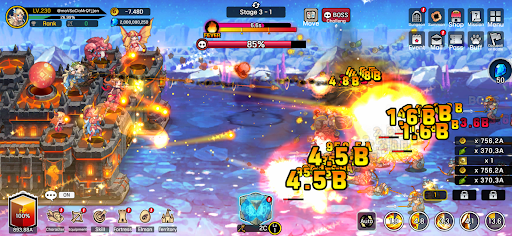
● An RPG that combines defense battles with construction and management!
Sometimes defensive, sometimes aggressive.
Manage your mobile fortress and enjoy a rich adventure!
● Fast-paced and spectacular battles!
The thrill of a powerful hack-and-slash strike, now on mobile!
Wipe out hordes of enemies with one powerful skill!
Gold and items pouring out are a bonus!
● Enjoy diverse strategies and detailed deck building!
Strategic focus fire with manual targeting!
High-quality battles using incapacitation and part destruction!
Create endless combinations with a total of 115 skills, including active, passive, command, and weapon skills!
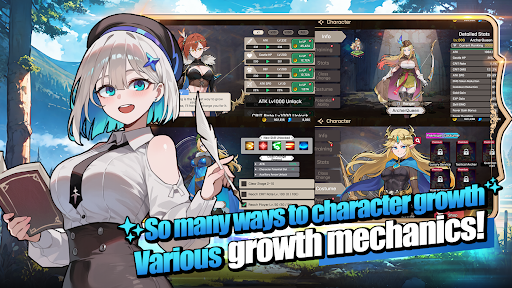
● The fun of growth in an idle game!
Your character grows stronger even while you sleep!
Your territory develops even while you work!
Just leave it alone and watch everything grow!
● Stylish characters and monsters
No more awkwardly animated games!
Meet stylish characters with smooth and natural animations!
● Content that actually changes appearance
These are not just icons!
Equip 168 types of gear that actually change your appearance!
Collect 180 types of pets, Elmonsters, that grow, evolve, and change their appearance!
─────────────────────
■ Recommended Device Specifications ■
- Android 9.0 or higher recommended
- RAM: 3GB or more recommended
- Storage: At least 300MB of free space recommended
[ App Permission Information ]
Archer Castle does not use sensitive app permissions that require separate notification.
[ How to Manage App Permissions ]
* Android 6.0 or higher
- Revoke by permission: Device Settings > Security & Privacy or Privacy > Permission Manager > Select permission category > Select the app > Allow or deny permission
- Revoke by app: Device Settings > Apps > Select Archer Castle > Permissions > Allow or deny permission
- Notification settings: Device Settings > Notifications > App notifications > Select Archer Castle > Allow or disable notifications
※ Menu names may vary depending on the device manufacturer and OS version.
* Below Android 6.0
Due to the nature of the operating system, individual app permissions cannot be revoked separately. Permissions can be revoked by deleting the app.
For stable service use, we recommend upgrading to Android 6.0 or higher.
और दिखाएं

1. MEmu इंस्टॉलर को डाउनलोड करें और इंस्टॉलेशन को पूरा करें

2. MEmu शुरू करें फिर होमपेज पर Google Play खोलें

3. Google Play में Archer Castle : AFK Idle RPG खोजें
Install
4. Archer Castle : AFK Idle RPG डाउनलोड कर इंस्टॉल करें
5. इंस्टॉल पूरा होने पर आइकन दबाएं

6. MEmu से पीसी पर Archer Castle : AFK Idle RPG खेलने का आनंद लें
MEmu Play सबसे बेहतरीन मुफ़्त Android एमुलेटर है और 5 करोड़ लोग पहले ही इसके शानदार Android गेमिंग अनुभव का आनंद ले चुके हैं। MEmu 9 वर्चुअलाइज़ेशन तकनीक आपको अपने PC पर हज़ारों Android गेम, यहाँ तक कि सबसे ज़्यादा ग्राफ़िक्स वाले गेम भी, आसानी से खेलने की सुविधा देती है।
असीमित बैटरी या मोबाइल डेटा के साथ बेहतर ग्राफिक्स के साथ बड़ी स्क्रीन; लंबी अवधि।
कीबोर्ड और माउस या गेमपैड के उत्तम नियंत्रण के लिए संपूर्ण कीमैपिंग का समर्थन करता हैं।
एक ही पीसी पर मल्टी-इंस्टेंस मैनेजर के साथ एक समय में कई गेम खाते या कार्य कर सकते हैं।
Play Archer Castle : AFK Idle RPG on PC by following steps: