Beholder: Conductor
อัปเดตเมื่อ
เวอร์ชันปัจจุบัน
1.0.62
ให้บริการโดย

เวลาคุณเล่น Beholder: Conductor, คุณอาจรู้สึกว่ามือคุณอาจบังจอแล้วทำให้ไม่ได้เล่นแบบเต็มที่. เล่นแบบไร้ขีดจำกัดด้วยเม้าส์และคีย์บอร์ด. MEmu มีตัวเลือกหลายอย่างให้คุณใช้งานเกมที่คุณเล่นแบบที่คุณต้องการ. ดาวน์โหลดและเล่น Beholder: Conductor บน PC. เล่นนานแค่ไหนก็ได้, ไม่ต้องชาร์จแบตเตอรี่, หรือเจอคนโทรเข้ามาระหว่างเล่น. MEmu 9 เป็นตัวเลือกสำหรับการเล่น Beholder: Conductor บน PC. ทางทีมงานเราได้ปรับแต่งเกม, ปรับให้เล่นเกมบางเกมได้เหมือนเล่น Beholder: Conductor เป็นเกม PC เช่นเล็งด้วยเม้าส์หรือใช้คีย์บอร์ด. ระบบของเรายังทำให้คุณสามารถเปิดเล่นได้มากกว่า 2 เกมพร้อมๆกันในคอมของคุณ. และที่สำคัญที่สุด, ระบบโปรแกรมของเราสามารถทำให้คุณใช้ระบบของ PC ทำให้เกมลื่นเหมือนกับใช้โทรศัพท์รุ่นล่าสุด. เราไม่ได้ดูแลเรื่องการเล่นเกม, แต่เราดูแลถึงความสนุกสนานที่คุณได้จากการเล่นด้วย.
แสดงเพิ่มเติม
ดาวน์โหลด Beholder: Conductor บน PC ด้วย MEmu Android Emulator สนุกกับการเล่นบนหน้าจอขนาดใหญ่ ยินดีต้อนรับสู่รถไฟแห่งความมุ่งมั่น!
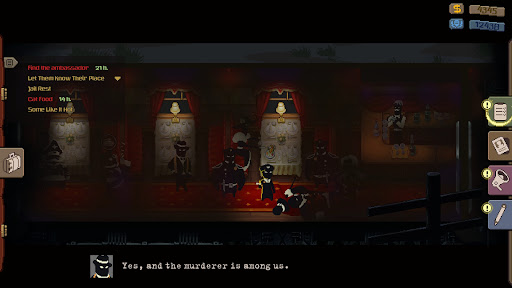
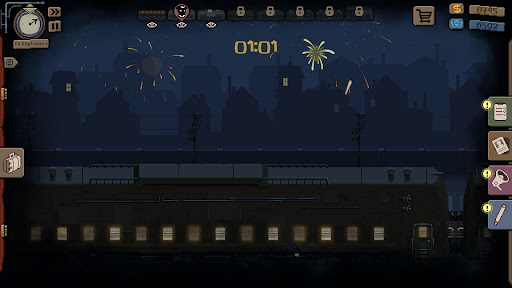
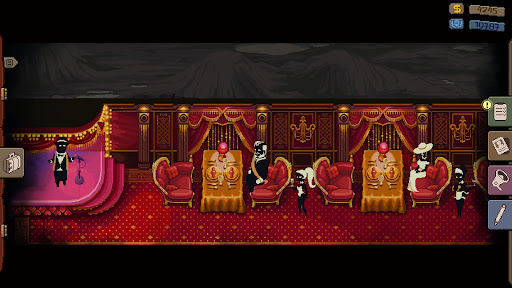
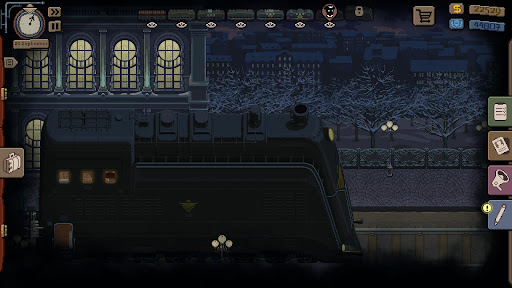
ยินดีต้อนรับสู่รถไฟแห่งความมุ่งมั่น!
คุณได้รับการแต่งตั้งให้เป็นหัวหน้าพนักงานควบคุมรถไฟในตำนาน ซึ่งประชาชนทั่วประเทศอันกว้างใหญ่ของเราต่างยินดีที่ได้เห็นในเมืองต่างๆ หน้าที่ของคุณคือการรักษาความสงบเรียบร้อยในตู้โดยสารที่ได้รับมอบหมาย และให้ความช่วยเหลือแก่ผู้โดยสารตลอดเส้นทาง เครื่องมือของคุณคือ การรายงาน การข่มขู่ การตรวจค้น และการไล่ออก จำไว้ว่า: พนักงานควบคุมรถไฟถูกต้องเสมอ
ตรวจสอบผู้โดยสาร
ตรวจสอบทุกคนที่เข้ามาในตู้โดยสารอย่างระมัดระวัง และตัดสินใจว่าจะทำอย่างไรกับผู้ที่ไม่จ่ายค่าโดยสาร สังเกตและรายงานกิจกรรมที่น่าสงสัย ไม่ได้รับอนุญาต และกิจกรรมของผู้โดยสารอื่นๆ ตรวจค้นสัมภาระและแจ้งตำรวจหากพบสิ่งของต้องห้าม
เลื่อนขั้น
เข้าถึงตู้เสบียงหรือห้องโดยสารวีไอพี และตู้โดยสารที่เจ้าหน้าที่ระดับสูงและนักอุตสาหกรรมรายใหญ่ใช้บริการ จับตาดูเพื่อนร่วมงานของคุณและรายงานการรับสินบนหรือการขนส่งสินค้าต้องห้าม กระทรวงจะไม่ปล่อยให้ความทุ่มเทของคุณถูกมองข้าม
ทำภารกิจลับให้สำเร็จ
สร้างความไว้วางใจกับผู้บังคับบัญชาเพื่อรับมอบหมายงานพิเศษ ระดับความลับของภารกิจจะขึ้นอยู่กับความภักดีของคุณ และการทำภารกิจสำเร็จจะได้รับรางวัลเป็นโบนัสหรือแม้แต่การเลื่อนตำแหน่ง คุณยังจะได้พบกับผู้ลักลอบขนสินค้า การขนส่งพัสดุของพวกเขาไปตามเส้นทางนั้นมีความเสี่ยง แต่ก็คุ้มค่า
เยี่ยมชมสถานีต่างๆ และมุมห่างไกลของประเทศ ตัดสินใจที่ยากลำบากซึ่งจะกำหนดชะตากรรมของผู้โดยสารและเพื่อนร่วมงานของคุณ คุณจะเป็นคนแบบไหนเมื่อสิ้นสุดการเดินทาง? ทางเลือกเป็นของคุณ!
แสดงเพิ่มเติม

1. ดาวน์โหลดตัวติดตั้ง MEmu และสิ้นสุดการติดตั้ง

2. เริ่ม MEmu จากนั้นเปิด Google Play บนหน้าแรก

3. ค้นหา Beholder: Conductor ใน Google Play
Install
4. ดาวน์โหลดและติดตั้ง Beholder: Conductor
5. เมื่อติดตั้งเสร็จให้คลิกที่ไอคอนเพื่อเริ่มใช้งาน

6. สนุกกับการเล่น Beholder: Conductor บนพีซีด้วย MEmu
MEmu App Player เป็นอีมูเลเตอร์ Android ที่ดีที่สุดและผู้คนกว่า 50 ล้านคนเพลิดเพลินไปกับประสบการณ์การเล่นเกม Android ที่ยอดเยี่ยม เทคโนโลยีการจำลองเสมือนของ MEmu ช่วยให้คุณเล่นเกม Android หลายพันเกมได้อย่างราบรื่นบนพีซีของคุณแม้แต่เกมที่ต้องใช้กราฟิกมากที่สุด
จอใหญ่และกราฟฟิกสวยกว่า; เล่นได้นาน, ไม่ต้องใช้แบตเตอรี่โทรศัพท์หรือเน็ตโทรศัพท์.
ระบบปรับแต่งปุ่มคีย์บอร์ดและเม้าส์ตามที่คุณเลือก
เล่นมากกว่าหนึ่งเกมบน PC ในเวลาเดียวกันด้วยระบบหลายจอหรือ Multi-Instance manager.
Play Beholder: Conductor on PC by following steps: