Dark Pals: The 1st Floor
อัปเดตเมื่อ
เวอร์ชันปัจจุบัน
ให้บริการโดย

เวลาคุณเล่น Dark Pals: The 1st Floor, คุณอาจรู้สึกว่ามือคุณอาจบังจอแล้วทำให้ไม่ได้เล่นแบบเต็มที่. เล่นแบบไร้ขีดจำกัดด้วยเม้าส์และคีย์บอร์ด. MEmu มีตัวเลือกหลายอย่างให้คุณใช้งานเกมที่คุณเล่นแบบที่คุณต้องการ. ดาวน์โหลดและเล่น Dark Pals: The 1st Floor บน PC. เล่นนานแค่ไหนก็ได้, ไม่ต้องชาร์จแบตเตอรี่, หรือเจอคนโทรเข้ามาระหว่างเล่น. MEmu 9 เป็นตัวเลือกสำหรับการเล่น Dark Pals: The 1st Floor บน PC. ทางทีมงานเราได้ปรับแต่งเกม, ปรับให้เล่นเกมบางเกมได้เหมือนเล่น Dark Pals: The 1st Floor เป็นเกม PC เช่นเล็งด้วยเม้าส์หรือใช้คีย์บอร์ด. ระบบของเรายังทำให้คุณสามารถเปิดเล่นได้มากกว่า 2 เกมพร้อมๆกันในคอมของคุณ. และที่สำคัญที่สุด, ระบบโปรแกรมของเราสามารถทำให้คุณใช้ระบบของ PC ทำให้เกมลื่นเหมือนกับใช้โทรศัพท์รุ่นล่าสุด. เราไม่ได้ดูแลเรื่องการเล่นเกม, แต่เราดูแลถึงความสนุกสนานที่คุณได้จากการเล่นด้วย.
แสดงเพิ่มเติม
ดาวน์โหลด Dark Pals: The 1st Floor บน PC ด้วย MEmu Android Emulator สนุกกับการเล่นบนหน้าจอขนาดใหญ่ Step into Dark Pals’ abandoned children’s mental health facility.
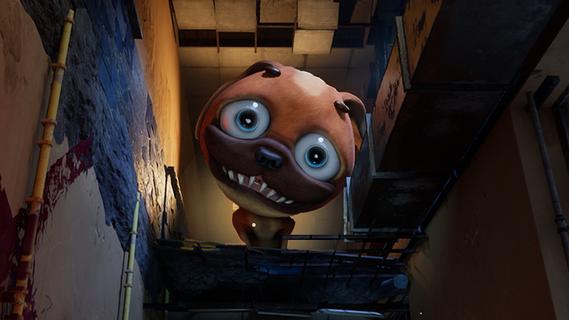
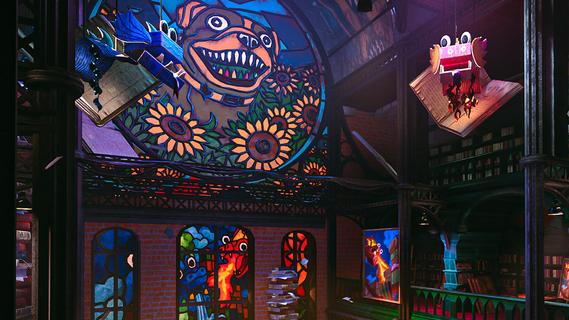
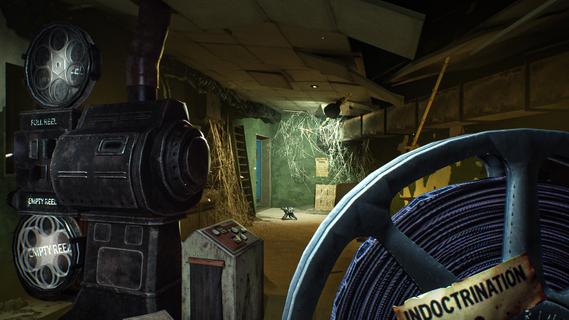
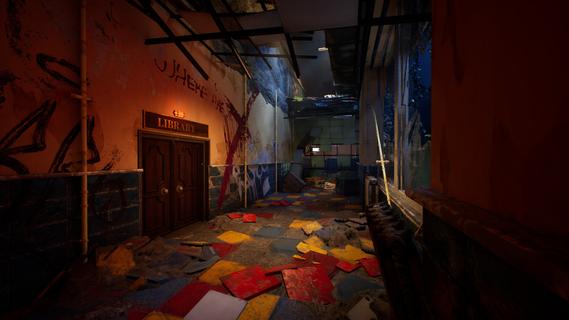
Step into Dark Pals’ abandoned children’s mental health facility. Once bright, cheerful, and welcoming, it now stands warped by time, neglect, and forgotten memories. Armed with your Ink Blaster, you’ll explore unsettling spaces, solve environmental and logic-based puzzles, and evade the facility’s disturbing mascots.But the more you explore, the clearer it becomes: this place knows you.Do you remember? The facility is home to a cast of colourful yet horrifying mascots, each hiding a darker purpose. From Chompy Chasey, a dog with a comically large head and deadly teeth, to other forgotten figures, such as Binky Drinky, lurking in the shadows of these forgotten halls. Progression isn’t just about escaping, it’s about perception. Using your toy paint gun, you’ll be solving puzzles that play with your expectations and sense of reality. Rooms may change their layout, you may have to put your morals and sense of self-preservation aside, and you need to keep your wits about you if you want to survive. What begins as a cheerful lobby slowly reveals something far more sinister. Catchy, irritating tunes echo through empty halls. Bright colours mask unsettling truths. Every puzzle and encounter draws you closer to the truth about who you really are, and why this place still haunts you.
แสดงเพิ่มเติม

1. ดาวน์โหลดตัวติดตั้ง MEmu และสิ้นสุดการติดตั้ง

2. เริ่ม MEmu จากนั้นเปิด Google Play บนหน้าแรก

3. ค้นหา Dark Pals: The 1st Floor ใน Google Play
Install
4. ดาวน์โหลดและติดตั้ง Dark Pals: The 1st Floor
5. เมื่อติดตั้งเสร็จให้คลิกที่ไอคอนเพื่อเริ่มใช้งาน

6. สนุกกับการเล่น Dark Pals: The 1st Floor บนพีซีด้วย MEmu
MEmu App Player เป็นอีมูเลเตอร์ Android ที่ดีที่สุดและผู้คนกว่า 50 ล้านคนเพลิดเพลินไปกับประสบการณ์การเล่นเกม Android ที่ยอดเยี่ยม เทคโนโลยีการจำลองเสมือนของ MEmu ช่วยให้คุณเล่นเกม Android หลายพันเกมได้อย่างราบรื่นบนพีซีของคุณแม้แต่เกมที่ต้องใช้กราฟิกมากที่สุด
จอใหญ่และกราฟฟิกสวยกว่า; เล่นได้นาน, ไม่ต้องใช้แบตเตอรี่โทรศัพท์หรือเน็ตโทรศัพท์.
ระบบปรับแต่งปุ่มคีย์บอร์ดและเม้าส์ตามที่คุณเลือก
เล่นมากกว่าหนึ่งเกมบน PC ในเวลาเดียวกันด้วยระบบหลายจอหรือ Multi-Instance manager.
Play Dark Pals: The 1st Floor on PC by following steps: