PRAGMATA
อัปเดตเมื่อ
เวอร์ชันปัจจุบัน
ให้บริการโดย

เวลาคุณเล่น PRAGMATA, คุณอาจรู้สึกว่ามือคุณอาจบังจอแล้วทำให้ไม่ได้เล่นแบบเต็มที่. เล่นแบบไร้ขีดจำกัดด้วยเม้าส์และคีย์บอร์ด. MEmu มีตัวเลือกหลายอย่างให้คุณใช้งานเกมที่คุณเล่นแบบที่คุณต้องการ. ดาวน์โหลดและเล่น PRAGMATA บน PC. เล่นนานแค่ไหนก็ได้, ไม่ต้องชาร์จแบตเตอรี่, หรือเจอคนโทรเข้ามาระหว่างเล่น. MEmu 9 เป็นตัวเลือกสำหรับการเล่น PRAGMATA บน PC. ทางทีมงานเราได้ปรับแต่งเกม, ปรับให้เล่นเกมบางเกมได้เหมือนเล่น PRAGMATA เป็นเกม PC เช่นเล็งด้วยเม้าส์หรือใช้คีย์บอร์ด. ระบบของเรายังทำให้คุณสามารถเปิดเล่นได้มากกว่า 2 เกมพร้อมๆกันในคอมของคุณ. และที่สำคัญที่สุด, ระบบโปรแกรมของเราสามารถทำให้คุณใช้ระบบของ PC ทำให้เกมลื่นเหมือนกับใช้โทรศัพท์รุ่นล่าสุด. เราไม่ได้ดูแลเรื่องการเล่นเกม, แต่เราดูแลถึงความสนุกสนานที่คุณได้จากการเล่นด้วย.
แสดงเพิ่มเติม
ดาวน์โหลด PRAGMATA บน PC ด้วย MEmu Android Emulator สนุกกับการเล่นบนหน้าจอขนาดใหญ่ PRAGMATA is Capcom’s highly anticipated new intellectual property, offering a bold and immersive science fiction action adventure set in a haunting vision of the near future.
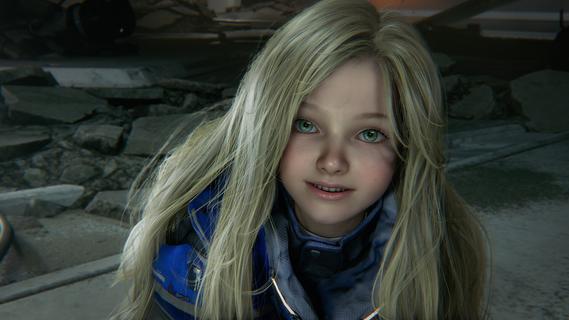
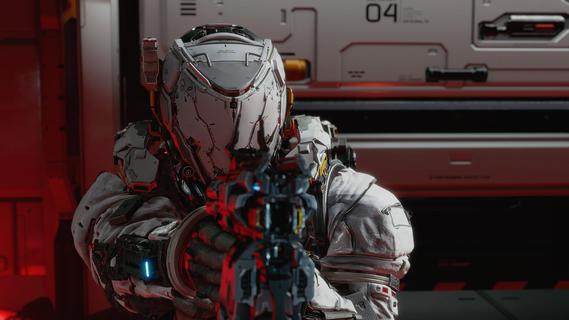
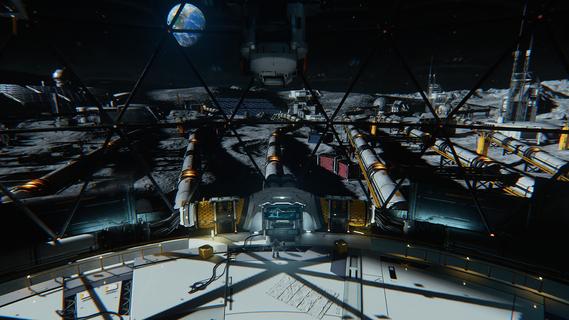
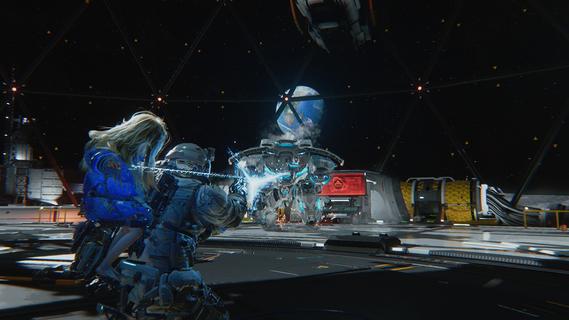
PRAGMATA is Capcom’s highly anticipated new intellectual property, offering a bold and immersive science fiction action adventure set in a haunting vision of the near future. Designed as a sweeping journey that blends narrative depth, innovative gameplay, and striking visuals, PRAGMATA challenges players to explore the unknown, unravel mysteries, and survive against overwhelming odds. Setting and StoryThe narrative unfolds in a cold, labyrinthine lunar research station, where humanity’s last hopes and buried secrets converge. Earth, battered by environmental catastrophe and disaster, has driven scientists, survivors, and outcasts to seek sanctuary beyond their home planet. Amidst the stark metallic halls and perpetual silence of the moon, echoes of the past mingle with the dangers of the present. Players step into the boots of Hugh, a skilled hacker with a tragic past and a burning drive for answers. By his side is Diana, an android companion endowed with advanced artificial intelligence and a childlike curiosity about the world. Their partnership, marked by unspoken trust and mutual dependence, serves as the emotional core of the game. Together, they must navigate the desolate lunar base, hacking into its ancient mainframes and piecing together the fate of its missing crew. Gameplay FeaturesPRAGMATA sets itself apart by merging classic action-adventure gameplay with innovative hacking mechanics: Dynamic Exploration: The lunar research station offers a vast, interconnected environment teeming with secrets and surprises. Players must solve environmental puzzles, unlock sealed sections, and uncover audiologs that hint at the facility’s dark history. Hacking Systems: Hugh’s unique abilities let players breach digital security, override robotic threats, manipulate surveillance, and even influence the lunar station’s gravity. The integration of hacking into combat and traversal provides endless creative strategies for overcoming challenges. Diana’s Support: As a companion, Diana does more than follow orders—she evolves alongside Hugh. Her AI grows from shy to assertive, learning to assist with hacking, defend against rogue robots, and offer insights that shape story outcomes. Tense Encounters: The moon station harbors unpredictable dangers: malfunctioning androids, rogue security systems, and mysterious anomalies that challenge both wits and reflexes. Every encounter tests the synergy between Hugh and Diana. Visuals and AtmospherePRAGMATA leverages Capcom’s RE Engine, showcasing breathtaking visuals: from vast domed landscapes gazing out upon space, to the cold, claustrophobic corridors where shadows play tricks on the eye. The game’s art direction blends high-tech realism with haunting surrealism, immersing players in a world that is both beautiful and unsettling. Narrative DepthThe story explores themes of identity, memory, and humanity’s search for hope in extraordinary circumstances. Through branching choices and dialogue, players influence the fate of Hugh, Diana, and the survivors they encounter. PRAGMATA’s narrative places equal emphasis on heart-stopping action and emotional resonance, inviting players to shape their own version of this lunar odyssey. Multiplayer and ReplayabilityWhile primarily a single-player experience, PRAGMATA offers time trials, challenge modes, and online leaderboards for players who master its hacking and combat systems. Hidden endings, multiple narrative paths, and evolving AI interactions with Diana further encourage replayability. ConclusionPRAGMATA stands as one of Capcom’s most ambitious forays into science fiction, promising a gripping blend of action, atmosphere, and narrative intrigue. With its innovative mechanics and unforgettable characters, it positions itself as a standout title for fans of immersive sci-fi adventures.
แสดงเพิ่มเติม

1. ดาวน์โหลดตัวติดตั้ง MEmu และสิ้นสุดการติดตั้ง

2. เริ่ม MEmu จากนั้นเปิด Google Play บนหน้าแรก

3. ค้นหา PRAGMATA ใน Google Play
Install
4. ดาวน์โหลดและติดตั้ง PRAGMATA
5. เมื่อติดตั้งเสร็จให้คลิกที่ไอคอนเพื่อเริ่มใช้งาน

6. สนุกกับการเล่น PRAGMATA บนพีซีด้วย MEmu
MEmu App Player เป็นอีมูเลเตอร์ Android ที่ดีที่สุดและผู้คนกว่า 50 ล้านคนเพลิดเพลินไปกับประสบการณ์การเล่นเกม Android ที่ยอดเยี่ยม เทคโนโลยีการจำลองเสมือนของ MEmu ช่วยให้คุณเล่นเกม Android หลายพันเกมได้อย่างราบรื่นบนพีซีของคุณแม้แต่เกมที่ต้องใช้กราฟิกมากที่สุด
จอใหญ่และกราฟฟิกสวยกว่า; เล่นได้นาน, ไม่ต้องใช้แบตเตอรี่โทรศัพท์หรือเน็ตโทรศัพท์.
ระบบปรับแต่งปุ่มคีย์บอร์ดและเม้าส์ตามที่คุณเลือก
เล่นมากกว่าหนึ่งเกมบน PC ในเวลาเดียวกันด้วยระบบหลายจอหรือ Multi-Instance manager.
Play PRAGMATA on PC by following steps: