MEmu Crashes During Startup
 |
|
MEmu Crashes During Startup – Fix Guide
If MEmu crashes when launching, try these quick fixes:
-
Enable VT (Virtualization)
-
Make sure Intel VT-x / AMD-V is enabled in BIOS.
-
-
Update Graphics Driver
-
Install the latest driver from NVIDIA / AMD / Intel official website.
-
-
Switch Graphics Rendering Mode
-
Open Multi-MEmu → Settings → Graphics → switch between OpenGL / DirectX.
-
-
Run as Administrator
-
Right-click MEmu → Run as administrator.
-
-
Disable Conflicting Software
-
Turn off Hyper-V, Windows Sandbox, or other emulators (e.g., BlueStacks, LDPlayer).
-
-
Check Antivirus
-
Add MEmu to whitelist or temporarily disable antivirus.
-
-
Reinstall MEmu
-
Fully uninstall, then reinstall using the latest version (prefer offline installer).
-
-
Check System Requirements
-
Ensure your PC meets minimum requirements (RAM, CPU, GPU).
-
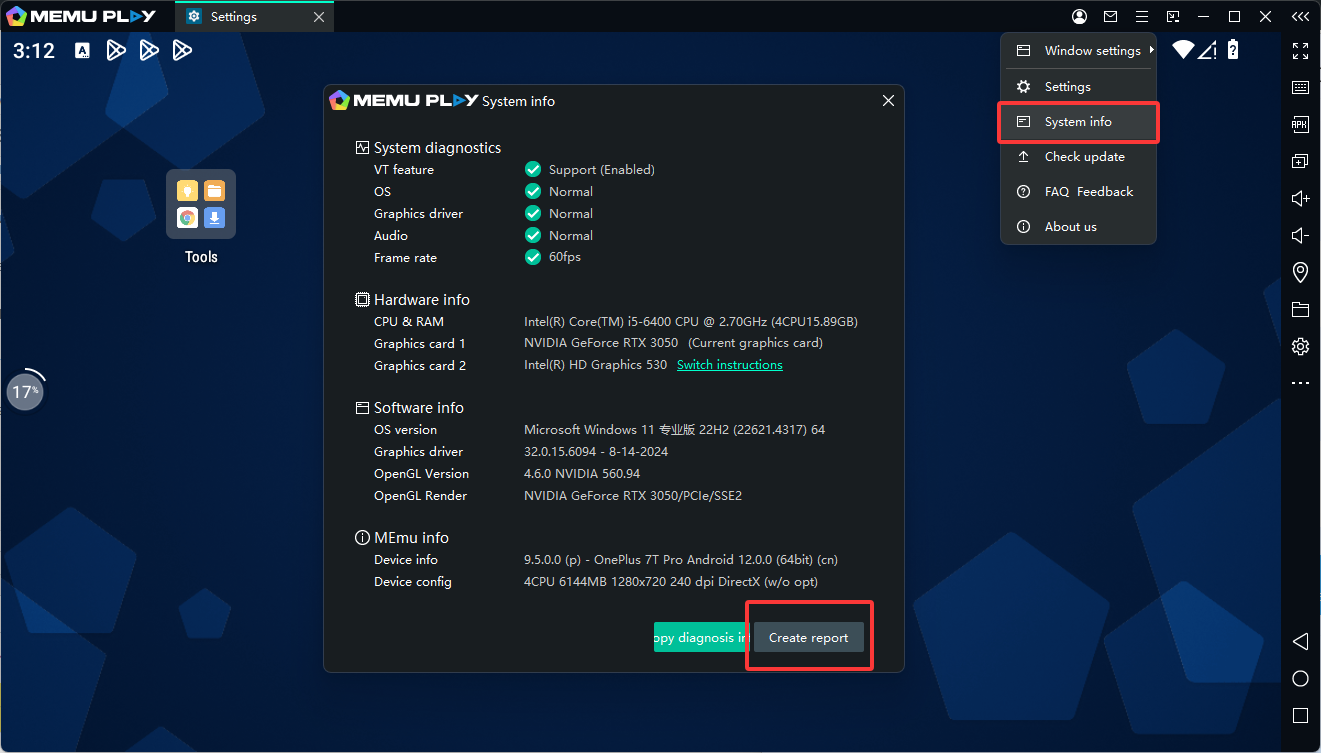
If the issue still persists, please send your MEmu log file (via “Create Report” on desktop) for further diagnosis.