Fix “Graphics Driver Not Compatible” Error
 |
|
Fix “Graphics Driver Not Compatible” Error (MEmu)
If you encounter this error, it usually means your GPU driver is outdated, incompatible, or incorrectly configured. Try the fixes below:
✅ 1. Update Your Graphics Driver
Download and install the latest driver from the official website:
-
NVIDIA / AMD / Intel
-
Avoid using Windows auto-installed drivers
Restart your PC after updating.
How to Update Graphic Driver: How to Update Graphic Driver
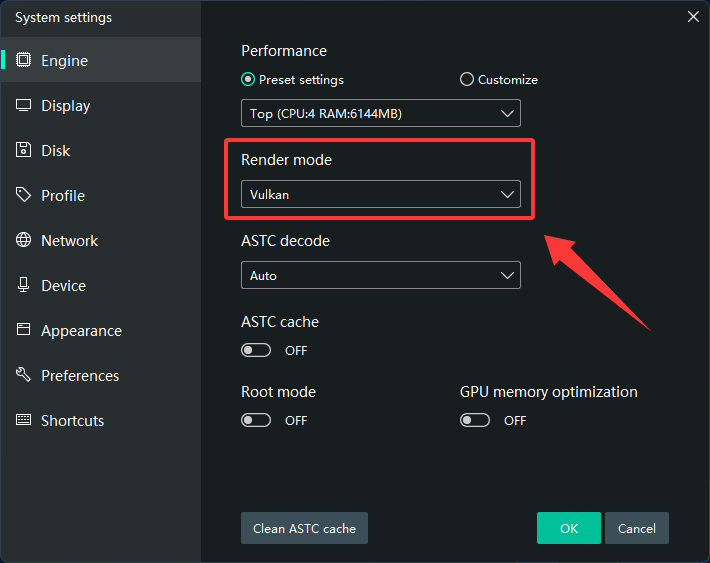
✅ 2. Switch Graphics Rendering Mode
-
Open Multi-MEmu
-
Go to Settings → Graphics
-
Switch between:
-
DirectX (recommended for compatibility)
-
OpenGL (better for some GPUs)
-
Apply changes and restart MEmu.
✅ 3. Force Dedicated GPU (For Laptops)
-
Open GPU control panel:
-
NVIDIA Control Panel / AMD Software
-
-
Set MEmu to use High Performance GPU
✅ 4. Reinstall Graphics Driver (Clean Install)
-
Uninstall current driver
-
Reinstall the latest version (clean install option recommended)
✅ 5. Check Windows Version
-
Update Windows to the latest version
-
Install latest DirectX and Visual C++ Redistributables
✅ 6. Disable Conflicts
-
Turn off Hyper-V
-
Close other emulators or virtual machines
⚠️ If the issue still persists:
-
Your GPU may be too old or unsupported
-
Try lowering graphics settings in MEmu
-
Send MEmu system info + log file for further analysis