STARCRAFT
อัปเดตเมื่อ
เวอร์ชันปัจจุบัน
ให้บริการโดย

เวลาคุณเล่น STARCRAFT, คุณอาจรู้สึกว่ามือคุณอาจบังจอแล้วทำให้ไม่ได้เล่นแบบเต็มที่. เล่นแบบไร้ขีดจำกัดด้วยเม้าส์และคีย์บอร์ด. MEmu มีตัวเลือกหลายอย่างให้คุณใช้งานเกมที่คุณเล่นแบบที่คุณต้องการ. ดาวน์โหลดและเล่น STARCRAFT บน PC. เล่นนานแค่ไหนก็ได้, ไม่ต้องชาร์จแบตเตอรี่, หรือเจอคนโทรเข้ามาระหว่างเล่น. MEmu 9 เป็นตัวเลือกสำหรับการเล่น STARCRAFT บน PC. ทางทีมงานเราได้ปรับแต่งเกม, ปรับให้เล่นเกมบางเกมได้เหมือนเล่น STARCRAFT เป็นเกม PC เช่นเล็งด้วยเม้าส์หรือใช้คีย์บอร์ด. ระบบของเรายังทำให้คุณสามารถเปิดเล่นได้มากกว่า 2 เกมพร้อมๆกันในคอมของคุณ. และที่สำคัญที่สุด, ระบบโปรแกรมของเราสามารถทำให้คุณใช้ระบบของ PC ทำให้เกมลื่นเหมือนกับใช้โทรศัพท์รุ่นล่าสุด. เราไม่ได้ดูแลเรื่องการเล่นเกม, แต่เราดูแลถึงความสนุกสนานที่คุณได้จากการเล่นด้วย.
แสดงเพิ่มเติม
ดาวน์โหลด STARCRAFT บน PC ด้วย MEmu Android Emulator สนุกกับการเล่นบนหน้าจอขนาดใหญ่ StarCraft is a legendary real-time strategy game set in a distant future where three powerful races fight for survival, dominance, and control of the galaxy.
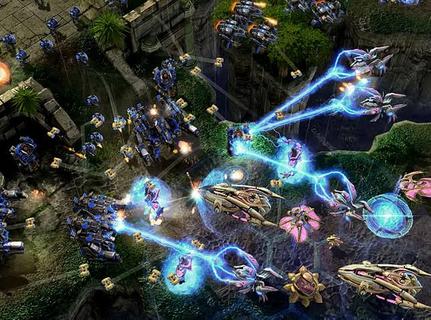
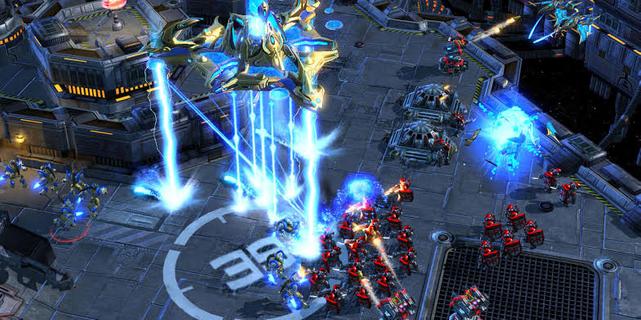
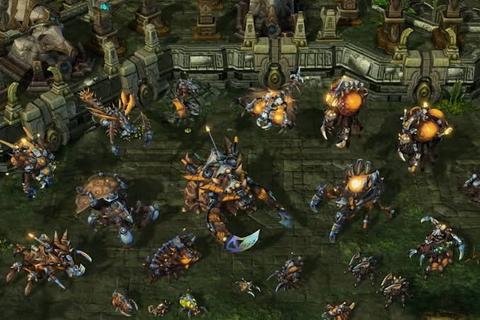
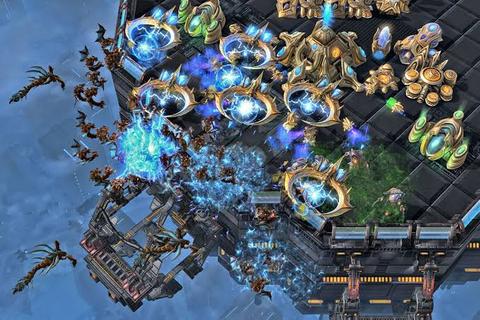
StarCraft is a legendary real-time strategy game set in a distant future where three powerful races fight for survival, dominance, and control of the galaxy. Developed by Blizzard Entertainment, the game combines fast-paced tactical combat, resource management, base construction, and an unforgettable science-fiction story. Players must gather minerals and vespene gas, expand their bases, research advanced technologies, and command armies in intense battles where every decision can determine victory or defeat.The Terrans are resourceful humans who rely on adaptable military units, heavy machinery, and defensive structures. Their forces include Marines, Siege Tanks, Battlecruisers, and powerful orbital support. The Zerg are a relentless alien swarm driven by instinct and evolution. They reproduce rapidly, overwhelm enemies with massive numbers, and mutate their organisms into deadly specialized units. The Protoss are an ancient and highly advanced species whose elite warriors use psychic powers, energy weapons, and sophisticated technology to defend their civilization.StarCraftâs campaign tells a dramatic story of war, betrayal, political conflict, and alien invasion. Each race has its own perspective, heroes, motivations, and missions, allowing players to experience the conflict from different sides. Iconic characters such as Jim Raynor, Sarah Kerrigan, and Artanis have helped make the series one of the most memorable franchises in gaming history.The gameplay is famous for its depth and competitive balance. New players can enjoy building armies and completing campaign missions, while experienced players can master advanced techniques such as scouting, unit positioning, economy control, and precise timing attacks. Because every faction has unique strengths and weaknesses, matches require constant adaptation. A well-planned strategy can defeat a larger army, but even a strong plan may fail if the opponent reacts quickly.Multiplayer is one of StarCraftâs greatest features. Players can compete online in ranked matches, casual battles, team games, and custom scenarios. The gameâs fast pace and high skill ceiling have made it a cornerstone of esports, with professional players competing in tournaments around the world. Watching expert matches is exciting because strategies can change in seconds, turning a losing position into an incredible comeback.With its distinct races, strategic freedom, atmospheric world, and intense battles, StarCraft remains a classic for fans of science fiction and real-time strategy. Whether you prefer commanding human armies, evolving alien swarms, or leading advanced warriors, the galaxy offers endless opportunities for conquest.
แสดงเพิ่มเติม

1. ดาวน์โหลดตัวติดตั้ง MEmu และสิ้นสุดการติดตั้ง

2. เริ่ม MEmu จากนั้นเปิด Google Play บนหน้าแรก

3. ค้นหา STARCRAFT ใน Google Play
Install
4. ดาวน์โหลดและติดตั้ง STARCRAFT
5. เมื่อติดตั้งเสร็จให้คลิกที่ไอคอนเพื่อเริ่มใช้งาน

6. สนุกกับการเล่น STARCRAFT บนพีซีด้วย MEmu
MEmu App Player เป็นอีมูเลเตอร์ Android ที่ดีที่สุดและผู้คนกว่า 50 ล้านคนเพลิดเพลินไปกับประสบการณ์การเล่นเกม Android ที่ยอดเยี่ยม เทคโนโลยีการจำลองเสมือนของ MEmu ช่วยให้คุณเล่นเกม Android หลายพันเกมได้อย่างราบรื่นบนพีซีของคุณแม้แต่เกมที่ต้องใช้กราฟิกมากที่สุด
จอใหญ่และกราฟฟิกสวยกว่า; เล่นได้นาน, ไม่ต้องใช้แบตเตอรี่โทรศัพท์หรือเน็ตโทรศัพท์.
ระบบปรับแต่งปุ่มคีย์บอร์ดและเม้าส์ตามที่คุณเลือก
เล่นมากกว่าหนึ่งเกมบน PC ในเวลาเดียวกันด้วยระบบหลายจอหรือ Multi-Instance manager.
Play STARCRAFT on PC by following steps:























![[ไกด์เกม] CookieRun Classic แนะนำ 5 คุกกี้น่าปั้น น่าลงทุน ที่มือใหม่ห้ามพลาด! (เล่นบน PC ผ่าน MEmu ให้ลื่นสุด ๆ) PC](https://www.memuplay.com/blog/wp-content/uploads/2026/08/579c01ab-a953-45b3-8115-9b6279b7d6f9.png)