Match Squad
Updated
Current Version
1.82.1785
Offered By

With your passion for Match Squad, you shouldn’t have to limit yourself to the small screen of a phone. Play like a pro and take full control of the game using a keyboard and mouse. MEmu gives you everything you’re looking for. Download and play Match Squad on PC. Play as long as you want — no more worries about battery life, mobile data, or unexpected calls. The all-new MEmu 9 is the best way to play Match Squad on PC. With our expertly designed keymapping system, Match Squad feels just like a real PC game. The MEmu multi-instance manager lets you run two or more accounts on the same device at the same time. Most importantly, our exclusive emulation engine unlocks your PC’s full potential, delivering smooth and seamless performance.
Show more
Download Match Squad on PC with MEmu Android Emulator. Enjoy playing on big screen. Puzzles?
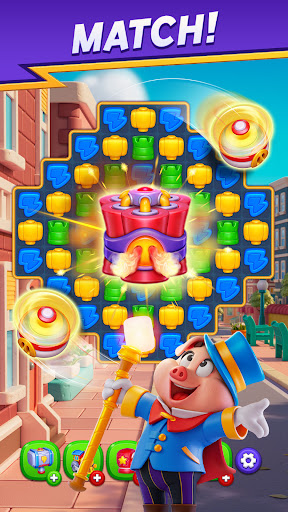
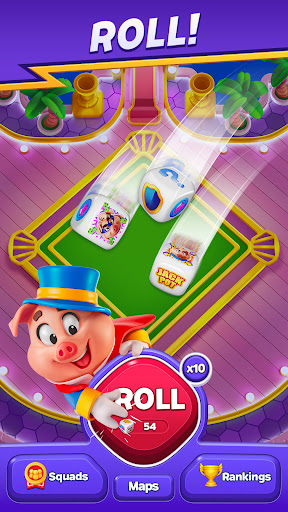
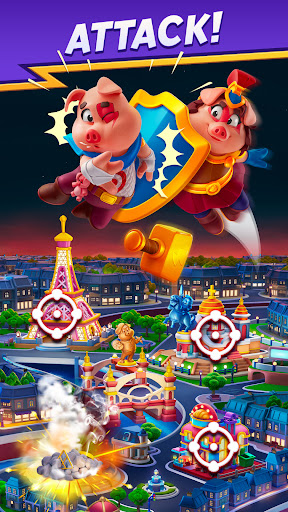
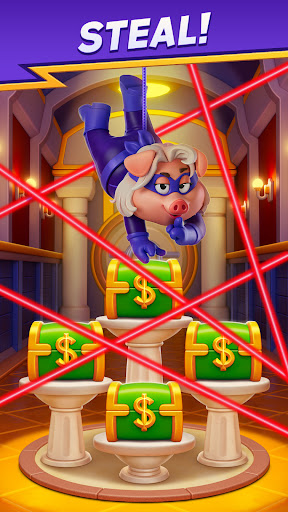
Puzzles? Piggies? Adventures? Fun? For free? YES! Match Squad is all this and so much more!
Get ready for a fun and engaging match-3 puzzle adventure filled with exciting challenges, treasure-like rewards, and endless fun! Train your brain with challenging puzzles, tackle eye candy obstacles, and blast through levels with powerful booster combos! That’s not all! Earn dice as you complete levels and roll to attack, steal treasures, attack your friends and protect your cities with the help of your Piggy Squad!
Match, Roll & Win!
Join the vibrant community of players and take on exciting match-3 challenges! Solve puzzles, sort and blast obstacles, and unlock powerful boosters to rise to the top. With every level you complete, you’ll earn a dice roll to attack rival cities, steal treasures, gain shields, and earn precious rewards!
Features:
BUILD & UPGRADE your cities by earning treasures!
SWIPE & MATCH through hundreds of addictive levels with unique boosters!
ROLL THE DICE to attack friends, steal loot, and claim your rewards!
DEFEND YOUR TREASURES and protect your city from enemy raids!
JOIN A THRIVING COMMUNITY and team up with players worldwide!
STRATEGIZE YOUR MOVES to outsmart rivals and become the King of Match Squad!
NO ADS & NO WI-FI NEEDED – Play anytime, anywhere!
The Story of Match Squad
For centuries, piggies lived in peace until one day the Banker’s clumsiness led to the discovery of a secret chamber in the Dice Wars Memorial Museum. Inside were the Dice War legends, carved from stone, with the Dice Guardian holding the mighty dice at the top of his magic wand.
The stealer, who happened to be there, saw an opportunity and stole a legendary gem from the mighty dice. Suddenly, the balance in the piggy universe was disrupted. A big burst of light was seen from all corners of the universe, and there they were - Dice Guardian and his companions, back and alive!
Ready to match, roll, and rule? Join Match Squad today!
Match Squad is a free game, perfect for those who enjoy either easy games or hard games.This new game is a classic puzzle game that also includes a dice board game as a mini-game. Play the dice game and discover new boards! Download this free puzzle game, enhance your zen and become the master of relaxing puzzles! You can play solo or with your friends and family to get social! Use strategy and logic to clash with others as a team! Download now and start enjoying this free game with no ads!
Match Squad will be updated regularly with more levels, new boosters, and exciting events! Already enjoying the game? Leave us a review and stay tuned for updates!
Facebook: https://www.facebook.com/matchsquadofficial/
Instagram: https://www.instagram.com/matchsquadofficial/
Match Squad is free to play but optional in-game items require payment.
You can for free play anytime online and offline, but in-app purchases do require an active internet connection.
Show more

1. Download MEmu installer and finish the setup

2. Start MEmu then open Google Play on the desktop

3. Search Match Squad in Google Play
Install
4. Download and Install Match Squad
5. On install completion click the icon to start

6. Enjoy playing Match Squad on PC with MEmu
MEmu Play is the best Android emulator and 100 million people already enjoy its superb Android gaming experience. The MEmu virtualization technology empowers you to play thousands of Android games smoothly on your PC, even the most graphic-intensive ones.
Bigger screen with better graphics; Long duration, without limitation of battery or mobile data.
Full Keymapping support for precise control of keyboard and mouse or gamepad.
Multiple game accounts or tasks on single PC at one time with Multi-Instance manager.
Play Match Squad on PC by following steps:


























































![PUBG mobile update [Mar.2020] PC](https://www.memuplay.com/blog/wp-content/uploads/2019/11/121-1.jpg)






























![[Game Reviews] Mobile Legends: Bang bang PC](http://www.memuplay.com/blog/wp-content/uploads/2016/11/bangbang-3-small.png)