
Haunted Paws
Updated
Current Version
Offered By

With your passion for Haunted Paws, you shouldn’t have to limit yourself to the small screen of a phone. Play like a pro and take full control of the game using a keyboard and mouse. MEmu gives you everything you’re looking for. Download and play Haunted Paws on PC. Play as long as you want — no more worries about battery life, mobile data, or unexpected calls. The all-new MEmu 9 is the best way to play Haunted Paws on PC. With our expertly designed keymapping system, Haunted Paws feels just like a real PC game. The MEmu multi-instance manager lets you run two or more accounts on the same device at the same time. Most importantly, our exclusive emulation engine unlocks your PC’s full potential, delivering smooth and seamless performance.
Show more
Download Haunted Paws on PC with MEmu Android Emulator. Enjoy playing on big screen. Haunted Paws is a unique blend of cozy and horror elements, offering players an engaging cooperative experience as two adorable puppies on a daring mission.
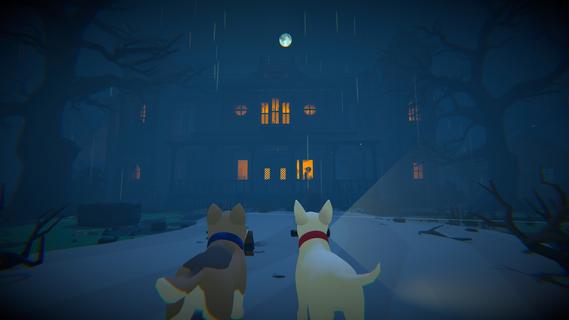
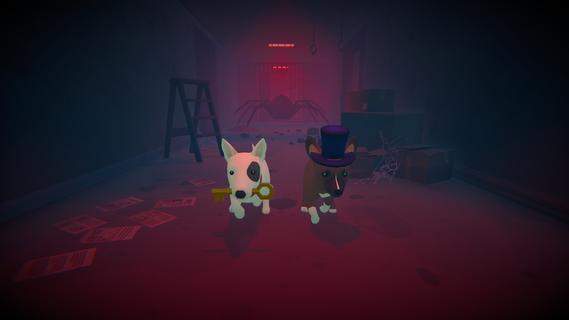

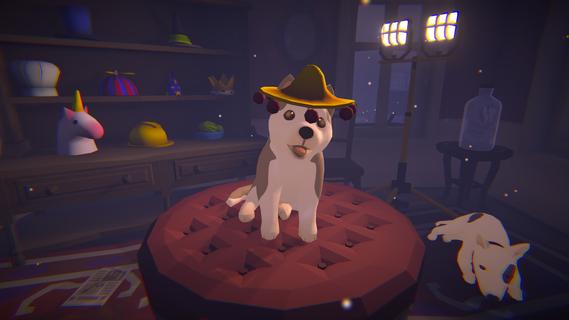
Haunted Paws is a unique blend of cozy and horror elements, offering players an engaging cooperative experience as two adorable puppies on a daring mission. Set in a haunted mansion filled with eerie atmospheres and sinister creatures, the game invites players to explore spooky environments, solve puzzles, and battle evil forces to rescue their human friend. At its core, Haunted Paws combines action-packed gameplay with charming aesthetics. Players begin by creating their own puppy character, customizing appearance and abilities to suit their playstyle. This personalization adds a warm, inviting touch to the otherwise chilling setting, balancing the horror with cuteness and humor. The mansion itself is a sprawling, mysterious location filled with dark corridors, hidden rooms, and supernatural traps. Exploration is a key aspect, as players uncover secrets and gather clues that help them progress. The environment is designed to evoke a spooky yet playful vibe, with atmospheric lighting, haunting sound effects, and detailed visuals that immerse players in the eerie world. Combat in Haunted Paws is fast-paced and strategic. Players must work together to defeat various evil creatures that lurk within the mansion’s shadows. Each puppy has unique skills and abilities, encouraging teamwork and coordination. Whether it’s distracting enemies, setting traps, or using special attacks, players need to combine their strengths to survive the mansion’s dangers. The cooperative nature of the game is one of its standout features. Designed for two players, either locally or online, Haunted Paws emphasizes collaboration. Communication and strategy are essential, as players navigate challenging puzzles and combat scenarios that require synchronized actions. This cooperative gameplay fosters a sense of camaraderie and shared adventure. Beyond the immediate goal of rescuing their human friend, the game offers a rich narrative filled with mystery and charm. As players delve deeper into the mansion, they uncover the story behind the haunting, meeting quirky characters and unraveling the mansion’s dark past. This storytelling element adds depth and emotional engagement to the gameplay. Haunted Paws also incorporates elements of progression and customization. As players advance, they unlock new abilities, upgrade their puppies, and gain access to better equipment. This RPG-like progression system adds replayability and encourages players to experiment with different strategies and playstyles. The game’s art style is a delightful mix of cozy and creepy. The puppies are rendered with adorable, expressive animations that contrast with the mansion’s gothic and eerie design. This juxtaposition creates a unique atmosphere that appeals to fans of both horror and cute, lighthearted games. In summary, Haunted Paws offers a refreshing take on the horror genre by blending cooperative gameplay, charming characters, and spooky exploration. It challenges players to work together, think strategically, and immerse themselves in a mysterious world where friendship and bravery are key. Whether you’re a fan of horror games looking for a lighter experience or someone who enjoys cooperative adventures with a twist, Haunted Paws promises an unforgettable journey filled with thrills and heartwarming moments.
Show more

1. Download MEmu installer and finish the setup

2. Start MEmu then open Google Play on the desktop

3. Search Haunted Paws in Google Play
Install
4. Download and Install Haunted Paws
5. On install completion click the icon to start

6. Enjoy playing Haunted Paws on PC with MEmu
MEmu Play is the best Android emulator and 100 million people already enjoy its superb Android gaming experience. The MEmu virtualization technology empowers you to play thousands of Android games smoothly on your PC, even the most graphic-intensive ones.
Bigger screen with better graphics; Long duration, without limitation of battery or mobile data.
Full Keymapping support for precise control of keyboard and mouse or gamepad.
Multiple game accounts or tasks on single PC at one time with Multi-Instance manager.
Play Haunted Paws on PC by following steps:

















































