
Killer Bean
Updated
Current Version
Offered By

With your passion for Killer Bean, you shouldn’t have to limit yourself to the small screen of a phone. Play like a pro and take full control of the game using a keyboard and mouse. MEmu gives you everything you’re looking for. Download and play Killer Bean on PC. Play as long as you want — no more worries about battery life, mobile data, or unexpected calls. The all-new MEmu 9 is the best way to play Killer Bean on PC. With our expertly designed keymapping system, Killer Bean feels just like a real PC game. The MEmu multi-instance manager lets you run two or more accounts on the same device at the same time. Most importantly, our exclusive emulation engine unlocks your PC’s full potential, delivering smooth and seamless performance.
Show more
Download Killer Bean on PC with MEmu Android Emulator. Enjoy playing on big screen. Killer Bean is an action-packed roguelike shooter that puts you in the role of a rogue assassin coffee bean with a mission to clean up the world, one bullet at a time.
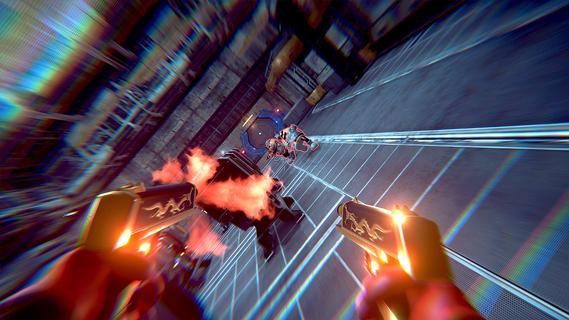
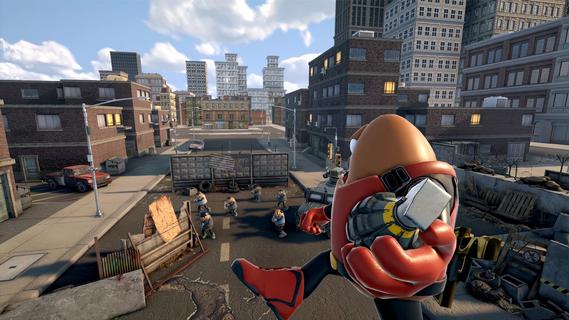

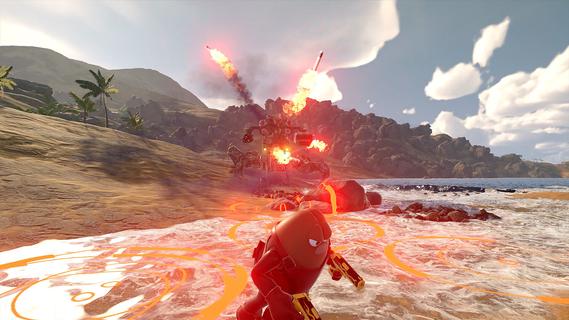
Killer Bean is an action-packed roguelike shooter that puts you in the role of a rogue assassin coffee bean with a mission to clean up the world, one bullet at a time. Combining fast-paced gunplay with strategic decision-making, the game offers a unique blend of first-person and third-person perspectives, allowing players to experience intense combat from different angles. Each campaign you start unfolds a new story, ensuring that no two playthroughs are the same and keeping the gameplay fresh and unpredictable. As Killer Bean, you navigate through procedurally generated levels filled with enemies, traps, and challenges that test your reflexes and tactical skills. The roguelike elements mean that death is permanent, but each run allows you to unlock new weapons, abilities, and upgrades that enhance your chances of survival in subsequent attempts. This progression system encourages experimentation with different playstyles, whether you prefer stealthy takedowns, aggressive firefights, or a balanced approach. The game’s combat mechanics are fluid and satisfying, with a variety of firearms and gadgets at your disposal. Precision aiming, quick dodges, and smart use of cover are essential to overcoming waves of hostile targets. The dynamic switching between first-person and third-person views adds depth to the gameplay, letting you adapt your strategy based on the situation—first-person for precise shooting and immersion, third-person for better spatial awareness and maneuvering. Beyond combat, Killer Bean’s narrative adds an intriguing layer to the experience. The story evolves with each campaign, revealing more about the mysterious world you inhabit and the motivations behind your assassination missions. This evolving narrative keeps players engaged, as they uncover secrets, face moral dilemmas, and encounter a cast of colorful characters along the way. Visually, Killer Bean features stylized graphics that blend cartoonish charm with gritty action aesthetics. The environments range from shadowy urban alleys to high-tech facilities, each designed to challenge your navigation and combat skills. The sound design complements the intense action, with impactful gunfire, atmospheric music, and voice acting that bring the world to life. Killer Bean also emphasizes replayability and player choice. The procedural generation ensures that each run presents new layouts and enemy placements, while the variety of unlockable gear and abilities allows for personalized strategies. Whether you aim for high scores, speed runs, or simply want to experience the evolving story, the game offers plenty of content to keep you coming back. In summary, Killer Bean is a thrilling roguelike shooter that combines fast-paced action, strategic gameplay, and an evolving narrative. Its unique protagonist—a rogue assassin coffee bean—adds a quirky twist to the genre, while the procedural storytelling and dynamic combat keep the experience engaging and fresh. For players who enjoy challenging shooters with a mix of strategy and story, Killer Bean delivers an exciting and memorable adventure.
Show more

1. Download MEmu installer and finish the setup

2. Start MEmu then open Google Play on the desktop

3. Search Killer Bean in Google Play
Install
4. Download and Install Killer Bean
5. On install completion click the icon to start

6. Enjoy playing Killer Bean on PC with MEmu
MEmu Play is the best Android emulator and 100 million people already enjoy its superb Android gaming experience. The MEmu virtualization technology empowers you to play thousands of Android games smoothly on your PC, even the most graphic-intensive ones.
Bigger screen with better graphics; Long duration, without limitation of battery or mobile data.
Full Keymapping support for precise control of keyboard and mouse or gamepad.
Multiple game accounts or tasks on single PC at one time with Multi-Instance manager.
Play Killer Bean on PC by following steps:

















































